68kMLA Classic Interface
This is a version of the 68kMLA forums for viewing on your favorite old mac. Visitors on modern platforms may prefer the main site.
| Click here to select a new forum. | |
| Mac SE/30 - horizontal wavy lines? | |
| Posted by: macsonny on 2025-08-28 16:25:31 Hi All, I have recently picked up a Mac SE/30 that boots fine but has a horrible wavy horizontal picture distortion as per attached pic. The unit has been recapped and I tested the board in a known good machine with the same result which makes me thing it's a motherboard issue. I did give it a good clean in IPA but same result. I've also attached a p[hoto of the U8 area which apparently is notorious for causing failures as I can't see any issues. Any help/advice appreciated. Thanks Sonny | |
| Posted by: Chuckdubuque on 2025-08-28 16:55:35 Recapped logic board and analog board both? | |
| Posted by: Fred1212 on 2025-08-28 18:30:37 I can see green grunge and dirt. Ultrasonic clean an see what happens. If no go you will need to lift a few chips and see what it's like under them | |
Posted by: macsonny on 2025-08-29 04:26:48I can see green grunge and dirt. Ultrasonic clean an see what happens. If no go you will need to lift a few chips and see what it's like under themWhich ones specifically? | |
Posted by: macsonny on 2025-08-29 04:28:15Recapped logic board and analog board both?Just the motherboard. But I did put the faulty SE/30 motherboard in a known good SE/30 chassis/power board and got the same results so I figure the issue is the motherboard. | |
Posted by: croissantking on 2025-08-30 01:57:26I've also attached a p[hoto of the U8 area which apparently is notorious for causing failures as I can't see any issues. The solder joints on these chips look damaged, certainly due to electrolyte from the old cap at C7: 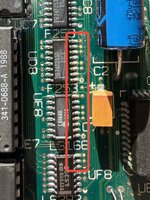 The picture you’re seeing looks like part of the VRAM is not getting written to (default state showing through), likely an addressing error. So start with repairing the joints on the F253 chip at UD8. | |
Posted by: Juror22 on 2025-08-30 07:27:55I can see green grunge and dirt.Me too - the following chips and nearby traces have more corrosion than they should after recapping. A thorough cleaning is in order and far less invasive than removing the chips - I would clean it first (you can always lift the chips following the cleaning, if you have ongoing issues). 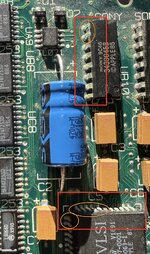 Ultrasonic is best (if you have it) but chemical cleansing, done properly, is also effective. | |
| Posted by: cheesestraws on 2025-08-30 09:49:54 Agree with the above. Once you have cleaned, have a look at (if I'm counting properly), A8. This is an educated guess based on: you have what looks like four lines of good data followed by four lines of default VRAM content, repeat. The framebuffer is 512 pixels wide, at 1bpp, which is 64 bytes per line. That's 256 bytes per "good" bit and per "bad" bit, which would suggest bit 8 is misbehaving. Might be wrong, though. | |
Posted by: croissantking on 2025-08-30 10:34:35Agree with the above. A8 is pin 3 of UD8, so I think you're right on the money there. 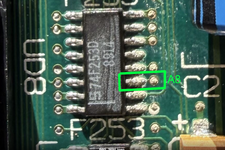 | |
| Posted by: obsolete on 2025-08-30 11:45:21 I was too afraid to try it for a long time, but vinegar works really well for this kind of corrosion. Just the regular grocery store 5%, scrub with a toothbrush, rinse thoroughly with distilled water, then isopropanol to drive the water out of all the little crevices. I've gotten great results with this method on a couple boards. Did not damage anything. | |
| Posted by: macsonny on 2025-08-30 19:35:24 Hello All, Thank you so very much for each of your input. To explain what I've done: 1. Cleaned and reflowed UF8, UE8 and UD8. 2. Cleaned and reflowed both the SONY chips. 3. Cleaned and reflowed UD12 and UE12 where the pins look corroded. Cleaned and reflowed pins that looked corroded around UJ11. Lots of pictures of work performed attached. Outcome - same screen and scratchy sound. What's my next option? Thanks Sonny | |
| Posted by: Fred1212 on 2025-08-30 21:53:21 Did you actually remove the chips you have reflowed? It will be dirty and possibly have track corrosion under them | |
| Posted by: macsonny on 2025-08-30 23:37:17 No, didn't remove the chips. Hoping I could reflow without the hassle of removing. This is going to be a big job :-( | |
Posted by: croissantking on 2025-08-31 01:25:17No, didn't remove the chips. Hoping I could reflow without the hassle of removing. This is going to be a big job :-( With regards the screen issue specifically, I would tone out the connections to UD8 using the schematics - are there any broken traces? If not UD8 might be faulty - new parts are available. Could the scratchy audio be dirt/corrosion inside the headphone jack? It has a contact closure that reroutes sound to the internal speaker when no miniplug is inserted. Try spraying contact cleaner into the jack, and/or plugging and unplugging a miniplug several times. | |
| Posted by: Callan on 2025-08-31 11:24:46 As croissantking said, your sound issue might be something as simple as a dirty audio jack. I would cover all the simple stuff first and trace your way back. Looking at your pics, another issue I see is that some of your caps aren't soldered to the pads. Are you using enough flux? Make sure your tip is heating both the pad and the cap at the same time. If you add some solder to the tip before applying heat to your capacitors, you will 'tack' the cap in place. That way, you can place the cap, which makes it easier to solder the other side. After that, i'd check the op amp and amp (q1, q2, and ua9). As others suggested, i'd desolder and clean your sony chips. If you socket them you it will be easier to troubleshoot later. If you still have an issue, i'd pull the asc chip (ue10) and clean the pads / chip legs. It's right next to the leaking caps, so sometimes, it needs that. Hopefully, it won't need to get to that, but that's the normal troubleshooting path i'd follow. You also need to be checking traces as you go through the process. You can have small micro cracks where the traces meet the pads that can give intermittents or broken traces. Your video issue is a totally different problem altogether. I'd check your video rom and socket first. It's the easiest to check, so I'd start there. After that (as others have suggested), i'd check the video mux. It takes direct damage from the caps, so it is probably the issue. Pull your 253's and check your traces, vias, and either test the 253's or replace them (74f253's are cheap/easy to get). I usually replace any /all chips that were exposed to electrolyte just to be on the safe side (and erase possible issues from the troubleshooting process). | |
| Posted by: macsonny on 2025-09-01 18:35:28 Yeah, looking closer at the caps I think you are right. I inherited this SE/30 and the re-cap was done by the previous owner. I'm going to have another go at them over the weekend. Well done for spotting the solder job or lack there of! I'm also going to do a bit of buzzing for continuity on UD8. Seems like the culprit in many cases. I'll also probably remove for a trace inspection. Thanks for all the fantastic advice and I'll report back once I've done the work. | |
Posted by: croissantking on 2025-09-01 23:24:40I'm also going to do a bit of buzzing for continuity on UD8. Seems like the culprit in many cases. I'll also probably remove for a trace inspection. If you do remove it for cleaning, and don’t find trace issues, use a new part when you come to replace. You can get F253 chips here, pick up four: Also would be sensible to pick up a couple of LS166: And a couple of LS393: | |
| Posted by: macsonny on 2025-09-19 19:38:21 Well, I finally got some time to re-look at the Mac SE/30. I reflowed all the caps and found one cap that wasn't soldered at the end. They are all now done and still getting the horrible screen issue. Next I'm going to start work on the UD8........ Will report back. | |
| Posted by: macsonny on 2025-09-29 02:58:15 Hi All, Just a quick update. I have removed IC's UD8, UE9 and UF8. Cleaned up the pads and it all actually looks fairly good per photos. Unless anyone can see an issue I'm going to replace all these ICs with a bunch I bought from MOUSER. Anything else before I start soldering? | |
| Posted by: bibilit on 2025-09-29 05:57:10 Nothing obvious, but i will check continuity between the pad itself and the trace, sometimes it is hard to catch a broken one. | |
| 1 > |