68kMLA Classic Interface
This is a version of the 68kMLA forums for viewing on your favorite old mac. Visitors on modern platforms may prefer the main site.
| Click here to select a new forum. | |
| 13" Hi-res monitor softness | |
| Posted by: timoog on 2024-03-29 06:38:24 Hi all, I've had the 13" trinitron in to get looked at, there's a slight improvement but still some kind of offset, low contrast and softness. The TV guy said it needs a new line output transformer, but can't source one. Any other opinions on this? considered a re-cap perhaps? n.b. the pink diagonal is in camera 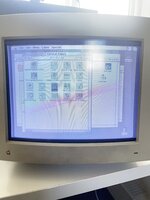 | |
Posted by: imactheknife on 2024-03-29 08:07:07Hi all, I've had the 13" trinitron in to get looked at, there's a slight improvement but still some kind of offset, low contrast and softness. The TV guy said it needs a new line output transformer, but can't source one. Any other opinions on this? considered a re-cap perhaps?That looks like brightness is too high for sure. Have you played with adjustments on back and side? | |
| Posted by: timoog on 2024-03-29 08:33:07 Yes this is as good as the brightness/contrast can get, the back adjustments don't affect the washed out look | |
Posted by: imactheknife on 2024-03-29 11:25:39Yes this is as good as the brightness/contrast can get, the back adjustments don't affect the washed out lookAfter i recapped one of color classics it looked like that. There has to be a brightness adjustment on these in back in a small hole. Need a flat preferably plastic blade to turn it. | |
| Posted by: timoog on 2024-03-29 11:35:22 thanks for considering it @imactheknife, the adjustments at the back are all position and width/height. One on the side controls is brightness the other is contrast, turning brightness does nothing, wonder if it's the pot? but they don't break, do they? Actually turning the brightness dial makes a 'row' of pixels extend or retract along the top of the monitor | |
| Posted by: croissantking on 2024-03-29 11:59:44 The cutoff dial is sometimes hidden on these, you have to take the cover off and it’s above the other dials at the rear. Have you definitely adjusted that? | |
Posted by: imactheknife on 2024-03-29 12:40:14The cutoff dial is sometimes hidden on these, you have to take the cover off and it’s above the other dials at the rear. Have you definitely adjusted that?This is what i meant, I thought you could still get to these with cover on | |
Posted by: croissantking on 2024-03-29 12:59:49This is what i meant, I thought you could still get to these with cover onI think some have an access hole, but mine definitely doesn’t. | |
| Posted by: timoog on 2024-03-30 04:52:19 Is it this one at the top? seems to adjust focus but got it as good as it can. I've not taken it apart yet 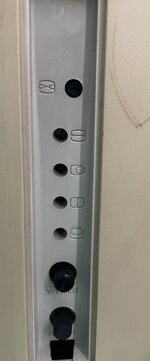 | |
| Posted by: LaPorta on 2024-03-30 05:19:41 The others are hidden inside. | |
Posted by: croissantking on 2024-03-30 05:20:18Is it this one at the top? seems to adjust focus but got it as good as it can. I've not taken it apart yetView attachment 71770No, the cutoff is above that dial. But you need to take the cover off to access it. | |
| Posted by: croissantking on 2024-03-30 05:28:50 Have the machine booted up when you adjust the cutoff dial. (First, turn contrast up to full and set brightness to the middle ‘detent’ setting.) You’ll want to turn down the cutoff in a dimly lit room until the black levels of the picture are *just* visible, then turn it down a tiny bit more so that they disappear. | |
| Posted by: timoog on 2024-03-31 04:38:46 Ah brilliant thank you, there was a little bit of anti-clockwise movement. Made it much more useable 🙌 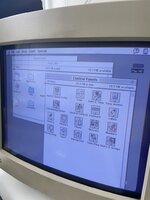 | |
Posted by: croissantking on 2024-03-31 11:12:28Ah brilliant thank you, there was a little bit of anti-clockwise movement. Made it much more useable 🙌I would potentially go even lower if you can. The black area I’ve highlighted in red below shouldn’t be visible. 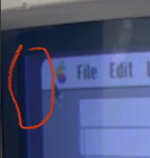 | |
| Posted by: timoog on 2024-03-31 13:14:19 Afraid not, only a small Amount of adjustment available, perhaps could change for a different value ? | |
| Posted by: croissantking on 2024-03-31 13:15:47 This would suggest something else wrong with the monitor as you should be able to drop the cutoff much further. | |
| Posted by: timoog on 2024-03-31 14:51:49 Oh yes for sure it has other problems, but this is much better. Need to track down a line output transformer. | |
| Posted by: olePigeon on 2024-04-01 11:12:20 If you haven't already, wouldn't hurt to spray some Deoxit into those pots. | |
| Posted by: croissantking on 2024-04-01 12:36:04 I would also recap the monitor. | |
| Posted by: croissantking on 2024-04-01 12:40:17 Also, check the service manual: It goes into quite a lot of depth regarding cutoff adjustment, if you want to get really into it. | |
| 1 > |