68kMLA Classic Interface
This is a version of the 68kMLA forums for viewing on your favorite old mac. Visitors on modern platforms may prefer the main site.
| Click here to select a new forum. | |
| DOS comparability card not working. | |
| Posted by: crazyben on 2024-03-19 19:26:00 When I try to open the PC set up control panel I get messages saying card is not installed. I swapped the known working raiser card to rule that out. It’s seems the DOS card is the issue. Is there anything particular I can check to see what might be going on? | |
Posted by: Phipli on 2024-03-19 21:29:36When I try to open the PC set up control panel I get messages saying card is not installed. I swapped the known working raiser card to rule that out. It’s seems the DOS card is the issue. Is there anything particular I can check to see what might be going on?Sometimes reseating the processor and repasting the heatsink helps, but often the issue is software. What OS are you using? Newer (8 and later) versions seem to be less compatible. Does the Control Panel change to a blue screen when it loads during startup? | |
| Posted by: Byrd on 2024-03-20 00:53:43 Have same card, 486 was really hot card wouldn't start up. Pulling the CPU cleaning the pins and socket sorted mine. | |
Posted by: crazyben on 2024-03-20 03:52:37Sometimes reseating the processor and repasting the heatsink helps, but often the issue is software. What OS are you using? Newer (8 and later) versions seem to be less compatible.I will have to check that when I can power again later. But what I do know is I have same exact another card and it has no issue running dos. I am scared to pull the CPU out cuz of the pins. Any suggestions on how to do it safely? | |
Posted by: crazyben on 2024-03-20 03:53:36Have same card, 486 was really hot card wouldn't start up. Pulling the CPU cleaning the pins and socket sorted mine.That is good to know. Did you use anything tools to pull the cpu out? I am scared that I will break the pins. | |
Posted by: Phipli on 2024-03-20 05:51:38I am scared to pull the CPU out cuz of the pins. Any suggestions on how to do it safely?Carefully. I have a special CPU removal tool, but there don't seem to be as many on eBay these days. If you're not using the right tool, try to avoid using anything metal, and don't push in towards the pins ever, put the edge of a thin plastic prying tool and rotate away from the PCB so you push down on the socket at the middle end of the tool. 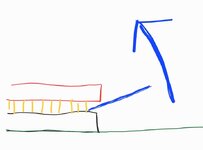 Keep moving to different sides to try and lift the CPU evenly. Don't apply force in a way that will cause you to slip and hit the pins. Just apply the tool to the gap, work it a little to open it, adjust so the tool is in a better position, eventually you can just rotate the tool using the length of the handle to do so with good positional control. Something like this might work? A broad end is best because it it doesn't apply too much force in one location. Sigh. This whole post feels like innuendo and I've really tried to phrase things carefully. 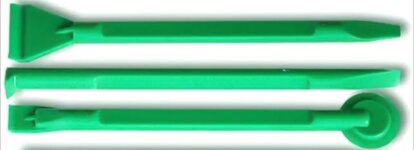 | |
Posted by: crazyben on 2024-03-20 15:12:30Carefully. I have a special CPU removal tool, but there don't seem to be as many on eBay these days. If you're not using the right tool, try to avoid using anything metal, and don't push in towards the pins ever, put the edge of a thin plastic prying tool and rotate away from the PCB so you push down on the socket at the middle end of the tool.Thank you. I was able to remove the CPU and put it back. I did remove the old thermal paste and applied the new one. Still no change. The Mac OS I am using is 7.5.3. | |
Posted by: Phipli on 2024-03-20 15:34:57Thank you. I was able to remove the CPU and put it back. I did remove the old thermal paste and applied the new one. Still no change. The Mac OS I am using is 7.5.3.Is the control panel changing between black and blue during startup? | |
Posted by: crazyben on 2024-03-20 15:37:09Is the control panel changing between black and blue during startup?Like when I startup PC does it go black? | |
Posted by: Phipli on 2024-03-20 15:38:20Like when I startup PC does it go black?I can't remember if it switches from black to blue, or blue to black, but it changes colour if it finds the card. | |
| Posted by: crazyben on 2024-03-20 15:45:29 I didn’t see any color change on the working card. Not sure if I am looking at right place. | |
Posted by: Phipli on 2024-03-20 15:52:37I didn’t see any color change on the working card. Not sure if I am looking at right place. Houdini II DOS compatibility card 486-66 with SB16 - software, hardware considerations on 68KThe card is in a Quadra 950 (it has 486SX on board), PC Setup 1.6.4 is installed on both Mac OS 7.6.1 and 8.0. When I start the PC in PC Setup, it only says “PC is booting”… and hangs in the booting stage. Switching to PC mode fades the screen to black and it remains black until I switch back...
 68kmla.org
Is this blue when it loads during startup? | |
Posted by: Juror22 on 2024-03-20 19:00:21Something like this might work? A broad end is best because it it doesn't apply too much force in one location.I have no need for this right now, but using the spudger is a brilliant idea for when you can't get your hands on the precise tool. Sorry - didn't mean to interrupt the flow, carry on! 😎 | |
Posted by: crazyben on 2024-03-20 19:39:52Yes it does. On the PC setup control panel it is stuck as PC is booting. | |
Posted by: Phipli on 2024-03-21 01:32:48Yes it does. On the PC setup control panel it is stuck as PC is booting.Ok, that's good. The computer sees the card. Have you tried a different disk image? | |
| Posted by: crazyben on 2024-03-21 12:06:05 I tired it on fresh 7.6 install with pc compatibility 1.64 Same thing. | |
Posted by: Phipli on 2024-03-21 12:28:25I tired it on fresh 7.6 install with pc compatibility 1.64 Same thing.Have you tried a different PC disk image? Have you tried the other monitor setting? How is your monitor connected? Have you tried a different monitor? Have you tried with and without RAM? They're a bit of a fiddle to get working, but it sounds like the hardware one yours is working, so it is just the software and monitor arrangement that needs fixing, probably. | |
Posted by: crazyben on 2024-03-21 12:37:34Have you tried a different PC disk image? Have you tried the other monitor setting? How is your monitor connected? Have you tried a different monitor? Have you tried with and without RAM?Yes I have tried different pc disk image. I have not tired different monitor setting not sure what to try. I have 14” Apple crt monitor so no adapter there. I tired with both with and without RAM. | |
Posted by: Phipli on 2024-03-21 13:02:50Yes I have tried different pc disk image. I have not tired different monitor setting not sure what to try. I have 14” Apple crt monitor so no adapter there. I tired with both with and without RAM.and the other DOS card works just fine in this computer? | |
Posted by: crazyben on 2024-03-21 13:04:19and the other DOS card works just fine in this computer?That is correct. Just replacing the card with same exact setup. | |
| 1 > |