68kMLA Classic Interface
This is a version of the 68kMLA forums for viewing on your favorite old mac. Visitors on modern platforms may prefer the main site.
| Click here to select a new forum. | |
| PowerMac G4! | |
| Posted by: quinterro on 2024-01-17 13:03:19 Today I stopped at a thrift store on the way home. Initially I saw a nice WiFi router, but turned around and saw this: 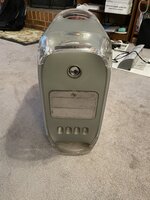 Looked at the price tag: 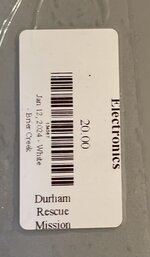 And thought to myself : I would have to be an idiot to not buy this. Now that it is home with me, I can see if it actually works. It’s a 1.25ghz G4, 768 MB RAM, 80GB hard disk and a DVD combo drive. Still has the protective plastic over the shiny bits. 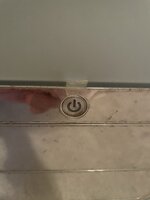 | |
| Posted by: quinterro on 2024-01-17 13:09:12 I did remove the battery. It hasn’t leaked, but was 20 years old. | |
| Posted by: quinterro on 2024-01-17 13:31:01 It boots! The Mac appears to be the last G4 PowerMac model produced. It has MacOS X 10.3.9 installed, and was not cleaned before sale. It was last used in 2006 and has personally identifiable information (scans of driver’s license, SSN, passport, etc.). It will be wiped. After using this computer, I have come to realize two things:
I’ll have to look into replacement fans for it too. | |
| Posted by: s_pupp on 2024-01-17 14:58:47 That’s a great find! Mine did not do well with a quieter CPU/hard drive cooler - it needs the loud 120cm x 38mm fan it has. Mounting a quiet ATX PSU externally and connecting it with a re-pinned ATX extension connector (see atxg4.comm/mdd.html) worked wonders - in addition to losing the loud PSU fans, the case is cooler and the internal 120mm x 38mm fan doesn’t spin as fast - in fact, I don’t even feel a need to change it out for something quieter. | |
| Posted by: LaPorta on 2024-01-17 15:03:04 I'd mark that as one of the great finds of the year so far! | |
| Posted by: quinterro on 2024-01-17 15:45:25 I wouldn't mind upgrading the memory on it, but I took all of the older memory DIMMS I had to electronics recycling a few months ago. I think that I only have DDR3 and DDR4 memory in my stash. I didn't expect that I would find a computer that would actually use memory that old. Once I reload MacOS X on it, I'll see how well it works with the memory that came with it. | |
| Posted by: quinterro on 2024-01-17 16:13:41 Apparently "working" is something of a misnomer. I tried booting from the original drive one last time before removing it. The fans started at full blast, it got to a desktop after several tries, and then powered off. I'm hoping a reinstall will fix it. | |
| Posted by: quinterro on 2024-01-17 18:02:54 Reapplied heat sink paste since it appeared to be original. Same issue when powering on the system. It doesn't power off completely, but goes into sleep or suspend mode. Pressing a key on the keyboard turns on the power LED on the keyboard for a second and then turns off. The speaker has also deteriorated, but given its age I'm not surprised. | |
| Posted by: LaPorta on 2024-01-17 18:07:48 For $20…it’s a project that is great to take on. | |
| Posted by: quinterro on 2024-01-19 14:35:45 I hope to get it working again. I found out who the original owner was, only to find out they died in 2022. It made me feel different about the computer. I ordered a battery for it that will arrive in a few days. I'm also looking at one of the cables to allow it to use an ATX power supply. I'm sure I could make one, but they are available on eBay for about $50 after shipping. | |
| Posted by: joshc on 2024-01-19 14:38:47 MDDs are tricky. Noisy and probably the least reliable of the G4s. That said, that price was good and it’s worth keeping if you have the space to keep it. I think some people manage to get them running quieter by swapping the fans. | |
| Posted by: quinterro on 2024-01-20 17:44:26 The PRAM battery arrived a day early, so I went ahead and installed it. This time it booted to MacOS 9.2. The fans sounded like they were going to behave initially, but sporadically started to spin up to full speed a few times before the system went into suspend mode. Definitely sounds like the power supply could be flaky. I put the hard drive in a Newer Technologies USB 2.0/FireWire case I had lying around - the only FireWire device I own. Along with that, I have a single FireWire cable. I attempted to boot the drive in my Lombard, but once I inserted the Adaptec FireWire/USB 2.0 PC Card, the system immediately locked up. I also tried booting the drive from USB 2 on a separate USB 2.0 PC Card, which also didn't work. Connecting it to the internal USB 1.1 showed it as a system drive option in Mac OS X 10.3's Startup Disk control panel, but it still wouldn't boot from it. I can read the drive, but wanted to see if I could boot it from any other Mac I own. The only other option for that vintage is my iBook G4 1.33ghz, which can't boot 10.3.9 to my knowledge. I can at least give it a shot. While I do plan to at least wipe personal data from the drive and possibly the entire drive, it does have quite a few applications on it. | |
| Posted by: waynestewart on 2024-02-05 13:51:36 I’ve always liked the MDD. I bought one new in 2002. Right now I’m using a 1.42ghz MDD. I still have the hard drives in it but they’re disconnected and I’m booting off a CF card, it’s faster than the original hard drives. I have it connected to the second HDMI connector on a 32” LG 4k monitor. It only does 1080 but it looks good on that monitor. I have a DA and QS with dual 1.8ghz CPUs but the MDD is noticeably faster. | |
| Posted by: quinterro on 2024-02-05 16:06:48 Right now the power supply is on top of the case. I won’t be able to use it until I build or buy an ATX adapter cable, fix the power supply or buy another power supply. | |
| Posted by: quinterro on 2024-02-11 18:38:38 Finally ordered an ATX adapter cable for the MDD so I can actually do something with it. I should have a couple of power supplies I can use with it. | |
| Posted by: quinterro on 2024-03-01 16:23:37 After a few weeks, I have the MDD working.
Running Disk Utility from my iBook G4 reported no errors, but they booted afterwards. | |
| Posted by: quinterro on 2024-03-01 16:28:03 A dual 867mhz G4 processor card arrived today. Woohoo! I want to replace the original hard disk with an SSD and install MacOS 9 and X to it before doing the processor swap. | |
| Posted by: s_pupp on 2024-03-01 19:16:35 An internal SSD made a very satisfying improvement for my MDD G4. | |
| Posted by: LaPorta on 2024-03-01 19:20:08 Glad to hear this is back underway! | |
| Posted by: LCARS on 2024-03-02 20:02:09 If you remove the outer plastic side panels, you might find a disgusting amount of hair and dust wedged between the panel and inner metal case, blocking airflow in from the bottom. As others have said, the MDDs are noisy. Mine was marginally less sporadic with the fan RPMs once I thoroughly cleaned the case. It might also be worth a peek into the PSU to see how much junk is insulating the parts that want to radiate their heat away. I have not checked recently but there has been a seller on eBay with SATA IDE cards with the right Silicon Image chip to work on these. I am shocked at how fast a good Samsung SATA SSD is on on these machines. One version with 2 SATA ports will support OS 9 and the one with 4 is 10.x only. An AirPort Extreme card will connect to contemporary Wifi. USB 2.0 PCI cards also work well and improve the experience. Enjoy the MDD! | |
| 1 > |