68kMLA Classic Interface
This is a version of the 68kMLA forums for viewing on your favorite old mac. Visitors on modern platforms may prefer the main site.
| Click here to select a new forum. | |
| PowerBook 165/180 RAM chips, how can I test them? | |
| Posted by: croissantking on 2023-11-16 08:20:43 I have a large pile of PSRAM chips taken from PowerBook 165/180 RAM cards and CPU daughtercards. I am trying (and struggling) to assemble some 10MB cards using the empty pads on my 4MB RAM cards. I think some of these chips are faulty. Is there any way to test these chips other than soldering them onto RAM cards etc? | |
| Posted by: luRaichu on 2023-11-16 15:10:13 As soon as I saw the first 27 characters of this thread's title I got excited... I've been trying to find reasonably priced stock of these RAM chips myself. But this kind of testing sounds like something their datasheets would tell you about. Unfortunately they seem to been lost to time | |
Posted by: croissantking on 2023-11-16 15:16:21As soon as I saw the first 27 characters of this thread's title I got excited... I've been trying to find reasonably priced stock of these RAM chips myself. 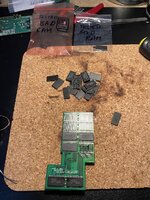 Ha.. I’m testing one by one, soldering and desoldering them to a working card. | |
| Posted by: 3lectr1cPPC on 2023-11-16 15:20:09 I hope that doesn't damage the card in the end. Are you worried about that at all? | |
Posted by: croissantking on 2023-11-16 15:54:52I hope that doesn't damage the card in the end. Are you worried about that at all?Not too much, I have three of them! | |
| Posted by: croissantking on 2023-11-17 07:04:36 So after many hours of concentrated work I finally managed to assemble the holy grail of upgrades, a working 10MB card:  I hooked up the PowerBook to an external monitor for testing, here it is with its total of 14MB. It passed the quick RAM test in MacTest Pro. 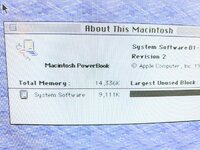 Out of a big stack of RAM chips, only 3 tested bad. I have enough parts left over to build another 10MB card. 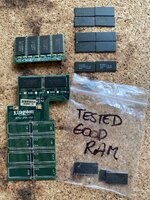 14MB RAM seems such an arbitrary amount to me - I wonder how they settled on that amount & I am curious if the machine could theoretically address more. | |
| Posted by: luRaichu on 2023-11-17 07:08:18 That's awesome! would you sell me a 10MB card (or atleast the chips)? I'm drooling over it | |
Posted by: croissantking on 2023-11-17 07:14:59That's awesome! would you sell me a 10MB card (or atleast the chips)? I'm drooling over itPossibly! Once I get another working I’ll PM you. | |
| Posted by: 3lectr1cPPC on 2023-11-17 07:22:40 I really need to go and do this myself. I have a 500 series memory card that I could totally upgrade from 20MB to 32MB but I just need to get an old desktop memory stick with the chips. | |
Posted by: croissantking on 2023-11-17 07:32:52I really need to go and do this myself. I have a 500 series memory card that I could totally upgrade from 20MB to 32MB but I just need to get an old desktop memory stick with the chips.Did I mention I did this? One thing to be aware of is clearance of the desktop chips which are generally the larger SOJ rather than the low profile TSOP. I solved this on the top side by dremelling down each chip’s pins down flush with the package and then soldering in place. On the bottom side of the card clearance doesn’t matter unless you have a modem card installed. | |
Posted by: 3lectr1cPPC on 2023-11-17 07:38:57I solved this on the top side by dremelling down each chip’s pins down flush with the package and then soldering in place.What exactly did this look like - I'm curious. What did the chips look like beforehand? | |
| Posted by: croissantking on 2023-11-17 08:03:20 @3lectr1cPPC I just dug up these photos. In the first pic you can see the original donor RAM sticks and my homemade 500 series RAM card. I later used the chips on the other stick to get my PowerBook 1400c to 64MB. In the second pic you can see the difference in clearance on the upper side of my RAM card where I cut down the legs vs. the lower side with the unmodified donor chips. The dremelling is a bit of a hassle but happily it makes soldering them to the pads easier. Hope that answers your question? 🙂 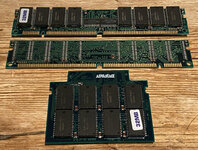 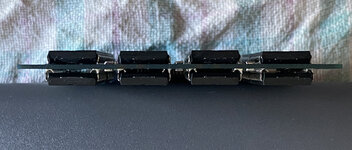 | |
| Posted by: 3lectr1cPPC on 2023-11-17 08:12:10 That does! Thanks. I think I could probably file them down as well, I don't own a dremel. | |
Posted by: croissantking on 2023-11-17 08:13:37That does! Thanks. I think I could probably file them down as well, I don't own a dremel. Maybe some side cutters to clip the J legs then tidy up with a file? | |
| Posted by: croissantking on 2023-11-17 08:15:46 The PowerBook 160, 165 and 180 are much harder to perform the RAM upgrade trick on in this way – it's why I've only just got around to it. The PSRAM chips are difficult to obtain – you won't find them on any old donor stick from the era. You're pretty much limited to harvesting them from second hand PowerBooks. The chips also seem far more failure-prone than the FPM parts used in later PowerBooks, and it's a lot of work to identify the bad chips. | |
| Posted by: croissantking on 2023-11-21 05:58:54 It took all of Sunday, but I got the second 10MB card working. Both cards check out good after running the long test in MacTestPro. I now have one fantastically working PowerBook 165 with FPU, so it’s really a 180, but I use a passive matrix screen so can’t give it the honour of calling it a 180. I then have two more 180s worth of mostly broken parts. These machines are so unreliable that it took four of them to get to where I am now. I have four dead batteries so the next step is to build a working one. I need to figure out which cells to buy. 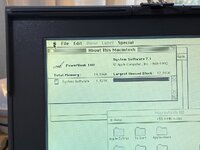 | |
| Posted by: luRaichu on 2023-11-21 07:30:12 There's people who've used tabbed NiMh "A" cells or the equivalent, others use rechargable AA's which you can utilise with a battery holder and avoid soldering cells that way. If you do use tabbed cells I'd drop in a thermal fuse or two. There are a couple 1xx battery rebuild threads that are worth checking out if you haven't already. | |
Posted by: croissantking on 2023-11-21 08:52:11There's people who've used tabbed NiMh "A" cells or the equivalent, others use rechargable AA's which you can utilise with a battery holder and avoid soldering cells that way. If you do use tabbed cells I'd drop in a thermal fuse or two.I'd prefer to use tabbed A cells, if I can find a good source for these. However, it seems much easier to get hold of rechargeable AA and there's the additional reassurance of being able to choose a known vendor/brand in this case. May be worth picking up a spot welder? | |
Posted by: luRaichu on 2023-11-21 16:34:52May be worth picking up a spot welder?I think you could hypothetically do it the ghetto way and solder tabs with a regular iron. You'd have to use higher heat (solder melts faster, less time for the battery to heat up), sand the battery contacts, and use plenty of flux. | |
Posted by: mmjs on 2024-02-05 21:07:39So after many hours of concentrated work I finally managed to assemble the holy grail of upgrades, a working 10MB card: Hi! Thanks so much for this thread -- it's super useful. I'm currently doing exactly the same thing with my PowerBook, including using the external screen to test. For this Kingston board, did you add any missing filter caps or the R2 resistor (and if so, what size?). I successfully brought my card to 6MB, but once I added 2 more MB I'm still getting only 6MB. I'm *pretty* sure my modules are good, since the machine still boots. Thx! | |
| 1 > |