68kMLA Classic Interface
This is a version of the 68kMLA forums for viewing on your favorite old mac. Visitors on modern platforms may prefer the main site.
| Click here to select a new forum. | |
| Classic II - what 3.5 and 5.25 Apple Original floppy drives can I plug at the back? | |
| Posted by: foxtrot81 on 2023-09-30 13:21:06 Classic II: There are various external floppy units around - I read about advising against connecting any 5.25 to the DB-19 back port and the like... Could anyone provide a list of 3.25 and 5,25 units made by apple that could work on a Classic II | |
Posted by: Phipli on 2023-09-30 13:33:46Classic II:5.25" disks weren't really a thing on macs, very specific exceptions aside. If you really want an external floppy drive, the only one that really makes sense is the SuperDrive / FDHD, product code G7287, or a small number of rare third party equivalents... Except, have you considered alternatives? A SCSI CD Drive or Zip drive is more useful. CDs are particularly good for moving files from a modern computer. Another option might be to use an "AirTalk" - an adapter than plugs into a serial port and allows you to network to other retro macs over WiFi, or even with a specific, special build of the Mini vMac emulator. Floppy disks are a little unreliable, plus while a "SuperDrive" floppy can read PC disks, they're not fully compatible with Mac files and there are complications that need to be considered. Macintosh formatted disks are hard to make on modern computers, and a necessity for booting from. What specifically are you planning to use an external drive for? They're not actually that common to use if your machine has an internal hard disk like the Classic II does. | |
Posted by: cheesestraws on 2023-09-30 14:08:025,25 units as far as I know there is only one Apple mac-compatible 5.25" drive, and it does not plug into the floppy port, nor is it compatible at all with the C II, so you are out of luck with this. | |
Posted by: Phipli on 2023-09-30 14:19:39as far as I know there is only one Apple mac-compatible 5.25" drive, and it does not plug into the floppy port, nor is it compatible at all with the C II, so you are out of luck with this.(I was thinking the SE PC card, and the IIe card, neither are any use) | |
| Posted by: Mk.558 on 2023-09-30 14:31:11 AFAIK they won't work because the wiring is different.  If you look at this old post of mine, then look at the 5.25" pinout shown there, it's similar, but not the same. Pin 9, 10 and 16 are different, but what's also important is how the signals are processed too. That's an in-depth thing I can't elaborate on as I'm not familiar with the various Disk II models and how the floppy controller talks to them. The reality was that by 1988/1989 most people were on-board with 3.5" disks, and only a limited number of accessory cards came out that could drive a 5.25" floppy. The SE is known for having some aftermarket thing, and there might have been something for the Macintosh II, but yeah there's not much of a cross-over. You could say that Zip disks survived better into the 2000s because they had USB models available. | |
Posted by: Phipli on 2023-09-30 14:33:33AFAIK they won't work because the wiring is completely incompatible.That's what we were saying? | |
Posted by: volvo242gt on 2023-10-01 02:56:17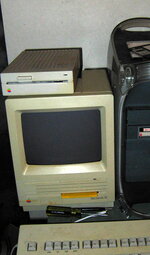 That thing. The PC drive. 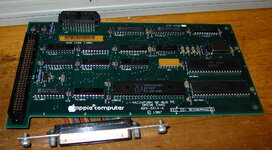 Here's the card for it that's used in the machine shown above. With respect to 3.5" drives, you can also use an A9M0106 or the M0130 800k drive. Both of those can be upgraded with a Sony MP-F75W 1.4MB FDHD mechanism, turning them into the rare G7287 external SuperDrive floppy drive. | |
Posted by: foxtrot81 on 2023-10-01 15:40:21View attachment 62825 I understand I couldn't install this card on a Classic II...? | |
Posted by: foxtrot81 on 2023-10-01 15:41:39Except, have you considered alternatives? A SCSI CD Drive or Zip drive is more useful. CDs are particularly good for moving files from a modern computer. Another option might be to use an "AirTalk" - an adapter than plugs into a serial port and allows you to network to other retro macs over WiFi, or even with a specific, special build of the Mini vMac emulator.Planning on having this classic on my bookshelf, so for displaying it as well. I would like to add an original floppy unit so can be shown next to it ;-) | |
Posted by: joshc on 2023-10-01 15:43:47I understand I couldn't install this card on a Classic II...?The pictured card is for the SE, which has its own expansion slot. The Classic II was not an expandable Mac outside of attaching external SCSI / ADB devices. | |
Posted by: Mk.558 on 2023-10-01 15:45:41That's what we were saying? Sorry if that came across wrong. I wasn't disagreeing with you, merely elaborating. | |
Posted by: Phipli on 2023-10-01 15:46:00Planning on having this classic on my bookshelf, so for displaying it as well. I would like to add an original floppy unit so can be shown next to it ;-)An external floppy drive wouldn't normally be the sort of thing you connected to a Classic II when they were in use, are you sure you wouldn't like to get something more useful? And cheaper. | |
| Posted by: Iesca on 2023-10-01 18:05:41 Below is the SCSI-based Iomega Floptical Disk Drive, circa 1992 (good luck finding one): 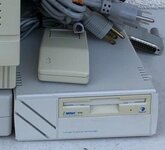 And here is what appears to be a SCSI-based SuperDisk drive from I-D Data (again, good luck!) 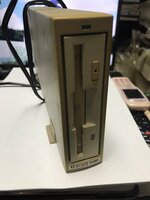 | |
| Posted by: joshc on 2023-10-02 00:06:36 A more accurate/representative thing to buy to sit next to your Classic II would be a StyleWriter I or StyleWriter II. | |
Posted by: foxtrot81 on 2023-10-02 06:09:29A more accurate/representative thing to buy to sit next to your Classic II would be a StyleWriter I or StyleWriter II.I will pair it with a StyleWriter 2500, sadly don't have the originals I or II :-( | |
| Posted by: cheesestraws on 2023-10-02 07:12:06 Agreed: if you want something historically accurate, an external floppy drive wouldn't be it. Give it a printer or perhaps an external SCSI hard disc, or both. | |
| Posted by: Phipli on 2023-10-02 07:13:04 Or a Tone Generator! 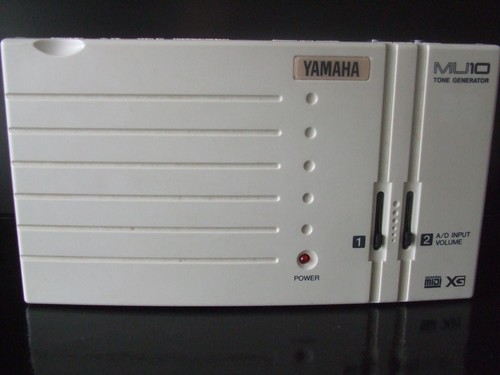
Yamaha MU10 MIDI Tone Generator circa 1997. Working, slider noisy, some marks | eBayFind many great new & used options and get the best deals for Yamaha MU10 MIDI Tone Generator circa 1997. Working, slider noisy, some marks at the best online prices at eBay! Free delivery for many products.
www.ebay.co.uk
| |
| Posted by: Salty_1966 on 2024-08-22 17:45:06 I know this outside of the original thread but I need a new internal floppy for my Macintosh classic 2. Any suggestions about the model for this? | |
| Posted by: Iesca on 2024-08-22 19:00:27 I believe you'll be looking for the Sony 2MB floppy drives, they should all be more or less interchangeable I believe. | |
| Posted by: Salty_1966 on 2024-08-22 23:36:15 Thanks! | |
| 1 > |