68kMLA Classic Interface
This is a version of the 68kMLA forums for viewing on your favorite old mac. Visitors on modern platforms may prefer the main site.
| Click here to select a new forum. | |
| AppleColor RGB Monitor Repair | |
| Posted by: Sideburn on 2023-07-10 13:22:57 Just got an AppleColor RGB monitor that needs repair. Anyone know by looking at the screen what might be the issue. I’m assuming caps but first look and they all visibly look ok. I’ve got diagonal RGB lines and a purplish screen. 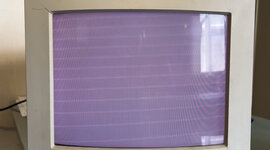 | |
| Posted by: thellmer on 2023-07-14 15:27:08 Is this connected to a Mac or just running with no connections? Sometimes this looks normal when they are simply turned on but not connected to anything. With no connection there are no sync signals and nothing to blank the display, etc..so you are simply seeing a working CRT television/monitor with nothing to tell it what to do and a random mix of phosphors being lit up resulting in some random color raster. If it is connected to a working computer then you have other issues. | |
| Posted by: Sideburn on 2023-07-14 15:42:38 It's not connected to anything. I have to fix my IICX board first in order to have something to connect to it! lol | |
| Posted by: thellmer on 2023-07-14 17:26:08 AH ok. So what you see could just be normal. An unconnected monitor can do various things depending on how its made. Some just sit blank with a black screen but others look like this one. If you see retrace lines (those diagonal lines) when connected to an input source (like a working computer) then usually it's just the brightness control is set too high but even with brightness all the way down if they are still visible there is an internal higher voltage "screen" control that technicians sometimes have to adjust by opening it up. But with nothing connected and the brightness in the normal visible range this is completely normal for lots of old CRT monitors. | |
Posted by: croissantking on 2023-07-14 18:38:01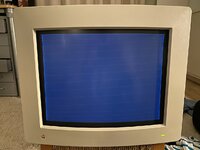 Mine looks like this with no input. So I’d say yours is normal. Hook it up to a Mac and see how it looks. Edit: on second thoughts, you may have a convergence issue. I see your retrace lines are split into three parts. | |
| Posted by: LaPorta on 2023-07-14 18:47:06 Note: Neither of those are normal. The internal brightness trim pots are turned up way too high. The proper way to have those set are so that when the monitor brightness knob externally is turned all the way up, the internal trim pot is turned down till just when that pattern disappears and the screen appears black. All Mac CRTs normally are completely black with no video signal. | |
| Posted by: LaPorta on 2023-07-14 18:50:22 Back on topic, the OP's monitor is ballooned out to scan way beyond the proper borders that should be there. Do you know if this monitor has been fooled with? | |
| Posted by: croissantking on 2023-07-14 18:55:23 Ah. I think my photo is before I adjusted the cut-off pot. I definitely have the black level to where it should be now. The overscan on OP’s monitor is probably correct. I had the same on mine and it looked wrong, so I adjusted it to what you see in my photo. But then when I hooked up my IIsi, the image was very small! I had to bring the H-Size and V-Size right back up to where they were. | |
| Posted by: LaPorta on 2023-07-14 19:03:02 You make a good point: these should not be adjusted without a video signal. | |
Posted by: Sideburn on 2023-07-14 21:31:22View attachment 59340Interesting, yeah i have separated RGB lines but this is promising... mines also magenta vs your blue... I hope to have a IICX board running tomorrow. Just pulled the caps off today, cleaned it and fixed a couple broken traces. | |
Posted by: Sideburn on 2023-07-14 21:32:13Back on topic, the OP's monitor is ballooned out to scan way beyond the proper borders that should be there. Do you know if this monitor has been fooled with?No I bought it off ebay AS-IS... | |
| Posted by: Sideburn on 2023-07-14 21:32:46 ** it arrived with the top left corner cracked so he gave a me a full refund. | |
Posted by: croissantking on 2023-07-15 01:57:00** it arrived with the top left corner cracked so he gave a me a full refund.This is why I’m glad I picked mine up by car. I have a hairline crack in one corner and I’m sure it would have opened up had it been shipped. Honestly, yours is not too bad though, I’ve seen far worse. Post back once you get an image on screen! | |
| Posted by: Sideburn on 2023-07-15 02:37:29 Yeah, I’m wondering how tough it is to get tat front bezel off and then what kind of glue or technique i can use to repair it. I’ve never had much luck with superglue on these old plastics. Clouds maybe dremil out some sends or grooves on the inside to get the glue to stick better and use some epoxy putty or something. Hopefully I can fix it. | |
| Posted by: croissantking on 2023-07-15 02:40:23 It might be wise to leave it, unless you’re sure it won’t end up looking worse. | |
| Posted by: Sideburn on 2023-07-15 02:59:50 That’s true. I’ve been down that road before :/ | |
| Posted by: Sideburn on 2023-07-15 09:46:59 I just powered it up again (without anything connected) and the brightness / contrast knobs don’t change anything. Is this “normal”? | |
Posted by: croissantking on 2023-07-15 10:36:55I just powered it up again (without anything connected) and the brightness / contrast knobs don’t change anything. Is this “normal”?Yes, I noticed the same thing. The knobs only do anything when there's a source of video. In normal use, there is a minimal range of adjustment with the brightness knob (as compared to say, an SE/30), so it's important to set the cut-off pot correctly. Curious to see what sort of image you get. | |
Posted by: jmacz on 2023-07-15 12:06:35Yeah, I’m wondering how tough it is to get tat front bezel off and then what kind of glue or technique i can use to repair it. I’ve never had much luck with superglue on these old plastics. Clouds maybe dremil out some sends or grooves on the inside to get the glue to stick better and use some epoxy putty or something. Hopefully I can fix it. For the front bezel, if it's just the cosmetics you want to fix, I used JB Plastic Weld to get rid of cracks on mine. I had a crack in one corner similar to your monitor (as well as some pits on the outer edges). I filled in the cracks using the JB Plastic Weld (it's like a putty that is moldable and hardens to be very strong). After that you can sand it smooth so that you can't see it, and then of course you will have to paint the monitor casing to hide the repair. I did not unfortunately take photos before the repair, but the after is in my Quadra 700 thread: https://68kmla.org/bb/index.php?threads/my-macintosh-quadra-700-clean-up-and-fixes.43433/ There's also a video in that thread about JB Plastic Weld, as well as which paint I used... it's not a direct match but worked for me since my Quadra 700 also had case repairs, so they match. If you're going to do this, you can mask off the front glass of the monitor (as well as the Apple logo) so that you don't have to disassemble the entire thing. So you can mask the glass so that you can do the repair and paint it. And you can remove the rear case to paint that. That's what I did for mine. | |
Posted by: Sideburn on 2023-07-15 12:16:58For the front bezel, if it's just the cosmetics you want to fix, I used JB Plastic Weld to get rid of cracks on mine. I had a crack in one corner similar to your monitor (as well as some pits on the outer edges). I filled in the cracks using the JB Plastic Weld (it's like a putty that is moldable and hardens to be very strong). After that you can sand it smooth so that you can't see it, and then of course you will have to paint the monitor casing to hide the repair.YEah Ive done that same thing with an Atari 520 ST cracked case. you cant find the crack anymore 🙂 | |
| 1 > |