68kMLA Classic Interface
This is a version of the 68kMLA forums for viewing on your favorite old mac. Visitors on modern platforms may prefer the main site.
| Click here to select a new forum. | |
| Fried SE/30 Ethernet Card? | |
| Posted by: Reasons. on 2016-06-30 21:24:58 So I received an older SE/30 with an Asante ethernet card in it recently. I got around to setting it up today, though, only to find that it doesn't work. All of the drivers are installed and all of the relevant software is configured correctly, but I can't get the thing to work. The card is detected by the machine, though (that's how the drivers got installed), and the light on the back works. However, it also fails every test I throw at it with Asante's troubleshooting tool. I know Occam's razor says that the thing is just broken, but I'd like to get a second opinion before I confine a potentially useful (and pricy) component to the bottom of a drawer somewhere. | |
| Posted by: Macdrone on 2016-06-30 22:11:43 Some cards the internal card cable to the ports is not slotted and can be incorrectly flipped. | |
| Posted by: 360alaska on 2016-06-30 22:20:55 Did you check the fuse on the daughter card? Second, is the switch on the back in the right position? | |
| Posted by: sstaylor on 2016-07-01 10:17:31 It's my understanding that some older ethernet cards have a hard time connecting with 100-BaseT or faster routers and switches. Do you have a 10-Base T hub or switch you could try it with? | |
| Posted by: Reasons. on 2016-07-01 14:09:18 What is the correct position for the switch on the back? I have checked both the switch and the cable, and no cigar. | |
| Posted by: Reasons. on 2016-07-01 14:27:10 It works! It seems like all I needed to do was switch the cable to the daughter card! This is very exciting. | |
| Posted by: Macdrone on 2016-07-01 15:31:25 yep that thing tripped me up once also. | |
| Posted by: olePigeon on 2016-07-01 15:42:58 Yeah. Some of them are keyed, some of them aren't, so they can be switched around. | |
| Posted by: techknight on 2016-07-01 16:40:58 Luckily the circuits arnt sensitive enough to fry themselves when the cable is forced in backwards. I have run into sticky situations where the magic smoke comes out on a flipped cable! | |
| Posted by: Reasons. on 2016-07-02 18:33:14 Okay, so I think I actually have a new and different problem: I think the cable for the card is broken. I got it working for a couple hours last night, but then this morning it just would not work. I opened the machine and reconnected the cable, even, and it still wouldn't work. How would I go about replacing this, then? Will any 16-pin ribbon cable work, or would it have to be the specific cable from the machine? I'm looking at this cable on amazon right now. Would this work okay? | |
| Posted by: Reasons. on 2023-11-15 08:36:38 Bringing this thread back from the dead: this card (an Asante MacCon) is profoundly cursed. In both of my SE/30 logic boards, the card runs into an issue where it works on initial install, keeps working for a bit, then fails and stays failed even on cold boot. The frustrating thing is that it works again when you pull it and reinstall it in another board, which, ??????. I've replaced the ribbon cable, so that's not the problem; I even bought a newly recapped, known-good SE/30 logic board at VCFMW this year on the theory that both of my boards had some damage that affected the PDS slot and it's still exhibiting the same behavior. I'd really, really like to get this working as the going rate for these is bonkers and I tend to prefer FTP for file transfer. My current theory is that some rail on the power supply is drooping and causing issues, but I don't know if that's a reasonable thought. Any help would be greatly appreciated--I can upload pictures if it would be helpful. | |
| Posted by: zigzagjoe on 2023-11-15 09:09:14 What is the behavior when "failed"? That's gonna drive a lot of troubleshooting. | |
| Posted by: Mk.558 on 2023-11-15 09:24:23 Replace the oscillator on the main board with a new one. 18pF 20MHz. The oscillator has 4 total connections: 2 to the main chip which connect via VIAs on the backside and 2 to adjacent capacitors. | |
Posted by: zigzagjoe on 2023-11-15 09:32:18Replace the oscillator on the main board with a new one. 18pF 20MHz. The oscillator has 4 total connections: 2 to the main chip which connect via VIAs on the backside and 2 to adjacent capacitors.Yes, decent chance of this being the issue if the card is detected but it fails self-tests. I ran the bad crystal problem on a NOS Maccon. He could have something else going on, though, if, for example it's not detected at all. However, if the symptoms haven't changed in the last 7 years since the original post, crystal swap is worth doing. I used one from my junk drawer of unknown spec, but this is what I ordered as a more appropriate replacement if I have issues again. https://www.digikey.com/en/products/detail/abracon-llc/ABL-20-000MHZ-B2/675241 | |
| Posted by: Reasons. on 2023-11-15 09:42:04 The card is detected and shows up in Asante's troubleshooting tool, but fails every test I throw at it (specifically, it sends but never receives packets). The oscillator is a good call--it at least feels right given the symptoms. I'll take a look tonight and make an order. | |
Posted by: zigzagjoe on 2023-11-15 10:16:02The card is detected and shows up in Asante's troubleshooting tool, but fails every test I throw at it (specifically, it sends but never receives packets). The oscillator is a good call--it at least feels right given the symptoms. I'll take a look tonight and make an order.You have a screenshot handy? I don't seem to have saved the pictures from asante's tools, but I think I could recognize it. | |
| Posted by: Mk.558 on 2023-11-15 11:05:48 That's the same issue I had with mine. Found this thread on a random popup and yeah both of my cards were spotty but now work just fine. Caution: Those traces on the back of the board are tiny. You'll need some good heat and solder wick to sip that solder out of there. Check the connections afterwards with a DMM continuity test function for continuity to the two caps adjacent to the crystal, on the immediate left of the oscillator (towards the FPU socket) and to two pins on the DP83901V chip: the two pins are on the side with the FPU socket, near the middle of the chip. | |
| Posted by: Reasons. on 2023-11-15 11:47:24 I don't have one handy but I can absolutely pull them tonight. I appreciate the tip about the traces on the back of the board--I have a Hakko desoldering gun that should hopefully make this straightforward, but considering the value of one of these boards I'm still planning to be pretty careful. I'll probably be back to ask for help with identifying where exactly needs to be desoldered/resoldered. Thanks for your both your help so far--I really appreciate it. | |
Posted by: zigzagjoe on 2023-11-15 12:08:10I don't have one handy but I can absolutely pull them tonight. I appreciate the tip about the traces on the back of the board--I have a Hakko desoldering gun that should hopefully make this straightforward, but considering the value of one of these boards I'm still planning to be pretty careful. I'll probably be back to ask for help with identifying where exactly needs to be desoldered/resoldered. Here's a quick diagram. No polarity. If you have a desoldering iron, you're already better equipped than most. Just let the iron do the work and you'll be fine. 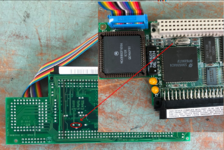 | |
| Posted by: Mk.558 on 2023-11-15 13:05:55 Image as well in case you're like me and just yolos through it, asking questions after it's already removed. Datasheet reference for the chipset on board. 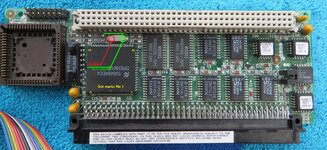 | |
| 1 > |