68kMLA Classic Interface
This is a version of the 68kMLA forums for viewing on your favorite old mac. Visitors on modern platforms may prefer the main site.
| Click here to select a new forum. | |
| Berenod's "Lot Vintage Macintosh" | |
| Posted by: Berenod on 2023-03-15 15:01:38 elderly person moving to a smaller house cleaning out the attic: 3 working machines:
Big bag of ADB keyboards, mice and assorted cables  | |
| Posted by: chiptripper on 2023-03-15 17:36:51 Nice score! Those are both great displays. Hopefully no battery surprises. | |
| Posted by: 3lectr1cPPC on 2023-03-15 17:57:52 Nice pickups! None too yellowed either. I can sense many new capacitors in your future… | |
| Posted by: Berenod on 2023-03-18 04:05:14 Bought some extra shelving 🙂 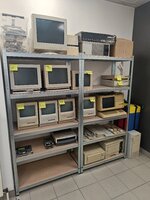 | |
| Posted by: Berenod on 2023-03-18 04:08:47 Most of those are recently bought, so still lot's of cleaning up to do. Usually t's buy them, remove batteries, clean logic boards, test them and start planning the recaps where needed. Everything visual, so cleaning up mice, keyboards, sticker glue residue, comes last! | |
Posted by: Berenod on 2023-03-18 04:09:59Nice pickups! None too yellowed either. I can sense many new capacitors in your future…Yup, just put in a substantial order at my local parts supplier 😎 | |
Posted by: Phipli on 2023-03-18 04:13:31Yup, just put in a substantial order at my local parts supplier 😎1000x 47uF... | |
| Posted by: Phipli on 2023-03-18 04:16:22 BTW, the LaserWriter Pro needs recapping and has 5x 47uF 16V and one 220uF 16V. 220uF causes the worst damage. | |
| Posted by: 3lectr1cPPC on 2023-03-18 07:24:48 Honestly, that damage in the 3rd picture doesn’t look like it was from that cap. I’d expect all the legs in that area to have the same corrosion, not just patches. That looks like something fell on that area and corroded it, cap leakage usually doesn’t cause that sort of corrosion that looks black like that. Edit: it is from 1992 though so those caps do gotta go. | |
Posted by: Phipli on 2023-03-18 07:32:37Honestly, that damage in the 3rd picture doesn’t look like it was from that cap. I’d expect all the legs in that area to have the same corrosion, not just patches. That looks like something fell on that area and corroded it, cap leakage usually doesn’t cause that sort of corrosion that looks black like that.That picture shows how corrosion can happen when you power something up, it's accelerated on pins where current flows. Those will be the power pins or pins which had higher current flows. Sadly it's why you shouldn't use a machine that probably needs recapping. This one had been in storage. | |
| Posted by: 3lectr1cPPC on 2023-03-18 08:10:38 Ah, makes sense. | |
Posted by: Phipli on 2023-03-18 08:20:33Edit: it is from 1992 though so those caps do gotta go.Already gone, that's the before photo. | |
| Posted by: 3lectr1cPPC on 2023-03-18 08:21:31 Nice! | |
| Posted by: Renegade on 2023-03-19 02:15:29 Nice pick, @Berenod ! Funny I have the same compact mac carrying case from Targus, I bought it from an Apple dealer in 1992. Be careful with those Practo metal shelves: I'm not sure they'll hold the weight for very long... | |
| Posted by: joshc on 2023-03-19 02:29:17 Lovely Harlequin Mac compact bag you have there. 🙂 | |
Posted by: Durosity on 2023-03-19 06:59:57LC II with a monochrome monitorI love that mono monitor with its built in coil for the display cable! Made for nice tidy cable management! | |
Posted by: Berenod on 2023-03-19 07:24:51Lovely Harlequin Mac compact bag you have there. 🙂 Haha, yup, love it as well! I always find it amazing how many of those companies from back then are still around, doing pretty much still the same! Targus (who made the Harlequin carry bag) is 40 years old, still making protective bags for computers. Lots of others as well, LaCie, still today making external cases and drives... Others just dissapeared, just ordered me 44MB cartridges from SyQuest for my external SCSI drive... SyQuest has been gone since 2003 I think.... 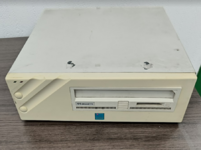 | |
| Posted by: Juror22 on 2023-03-19 08:14:17 I finally started including notes on mine as well...that is an excellent habit to get into. I always struggle with how much information to include, now that I have some with floppy gears replaced, and did I service the floppy, and when? Does it have an original HD or did I put in an SD solution and when was it last imaged - or do you just keep a few items on the post-it and the rest in a spreadsheet? (that I never seem to enter)  Anyway - I love your storage solution, your new additions, and I particularly like that you also have a TI PEB occupying space alongside the rest of your collection! I have not seen one in a dual floppy configuration before. I didn't know they supported that. | |
Posted by: Phipli on 2023-03-19 08:17:05I finally started including notes on mine as well...that is an excellent habit to get into. I always struggle with how much information to include, now that I have some with floppy gears replaced, and did I service the floppy, and when? Does it have an original HD or did I put in an SD solution and when was it last imaged - or do you just keep a few items on the post-it and the rest in a spreadsheet? (that I never seem to enter)I forget who, but someone here puts QR codes on each computer and then has a wiki on their network that the QR codes link to. Each QR code takes them to a page that describes the current state of the machine they just read. | |
Posted by: Berenod on 2023-03-19 10:07:25I forget who, but someone here puts QR codes on each computer and then has a wiki on their network that the QR codes link to. Each QR code takes them to a page that describes the current state of the machine they just read.That honestly is a neat solution! I'll have a think on how to implement something like that! | |
| 1 > |