68kMLA Classic Interface
This is a version of the 68kMLA forums for viewing on your favorite old mac. Visitors on modern platforms may prefer the main site.
| Click here to select a new forum. | |
| Portable is driving me crazy | |
| Posted by: bibilit on 2016-06-13 23:42:37 I have at home a macintosh Portable, board has been cleaned and new caps fitted. I have also fitted new caps to the original PSU and have a very stable 7.5 volts unit. The Portable doesn't want to boot the usual way, and will only boot with the 9 volt battery and PSU fitted (and main battery removed), and i know this is not the way it should be !! Once booted, i can slide the main battery and put back the cover on, the Portable will happily work and the Hard Drive is working as well, i can even restart the Portable. So if think something is wrong in the charging/power area. I have had a look at some topics here but will need some help. I am looking information concerning the main connector, i have two black and two red wires, black are negative and red positive. What kind of voltage should i have when the batteries are on or off. thanks | |
| Posted by: 360alaska on 2016-06-14 07:31:33 Well, is the battery any good? My portable will run on just the 9v also (Not the Hard drive though), I think it's there so you can put it into sleep and swap out main batteries. | |
| Posted by: techknight on 2016-06-14 14:44:34 In the System desktop, Run the battery widget (system 6) and see if it indicates that its "Charging" with the plug removed, and running on battery. Or if its saying not charging when it really is plugged in. I have a funny suspicion, it really sounds like a failed Hybrid IC. VERY common. The fix which works 80/20 percent of the time is this: Once you determine the hybrid is bad, you must clean the hybrid really good, and use SMD291/SMD294 reflow flux or something comperable, and apply to all exposed pins, then reflow with the heat gun. This will absorb residual cap goo, and refresh the contacts on everything. This by itself will usually get it going again, but if not, the next step is to apply a 1Meg ohm resistor between 2 pins. I cant recall which off hand but I will get back to that later if it turns up to be the issue. | |
| Posted by: bibilit on 2016-06-14 23:36:07 Hi Technight, thanks, the Portable runs System 7  I will have a look at the battery widget. | |
| Posted by: techknight on 2016-06-15 14:35:06 Well then look in the corner at the battery symbol. Same deal. | |
| Posted by: Macdrone on 2016-06-15 17:15:28 it can run without the battery Big battery?) ? If it can its getting too much power. SOunds like the wrong power supply for one, I am only assuming here as I do not see it in the pictures and I dont see it mentioned. | |
Posted by: bibilit on 2016-06-16 01:11:28it can run without the battery Big battery?) ? If it can its getting too much power. SOunds like the wrong power supply for one, I am only assuming here as I do not see it in the pictures and I dont see it mentioned.yes, will boot without main battery, but with the Original PSU plugged on (new caps on the Logic board and Psu) | |
| Posted by: techknight on 2016-06-18 05:18:55 You cant run these without the battery, or a battery substitute. (AC adapter 6.3V 5Amps on prongs.) | |
| Posted by: bibilit on 2016-06-18 06:22:58 Hi, further testing. Once you determine the hybrid is bad, you must clean the hybrid really good, and use SMD291/SMD294 reflow flux or something comperable, and apply to all exposed pins, then reflow with the heat gun. This will absorb residual cap goo, and refresh the contacts on everything. This by itself will usually get it going again, but if not, the next step is to apply a 1Meg ohm resistor between 2 pins. I cant recall which off hand but I will get back to that later if it turns up to be the issue.The Battery widget is showing a full battery, one of the batteries is 6,3 volts but the widget is showing more or less the same thing with a bad battery, so don't know what to think about it. Once booted, the Portable is working just fine, i can even restart it. I touched up all the exposed pins, but didn't change much (didn't use a heat gun, not being too familiar with the procedure, and most of all the Portable is not mine) | |
Posted by: techknight on 2016-06-18 10:42:04Hi, further testing.You didnt fully complete what I asked which will help me determine the cause. Maybe a language barrier? Whether the battery is "full or not" is irrelevent. What matters if it is indicating its charging when its not, or not charging when it should be. Also if you dont want to take the time to attempt a repair on the unit, then send it back to the original owner and give up, or send it to someone who can. This problem wont fix itself, and will need due diligence and troubleshooting. I know these machines inside and out. I double checked your image and I think its a Backlit model which doesnt use a hybrid which changes my assessment somewhat, they are NOT the same between the M5120/5126 in the power/reset circuitry. These are known for a couple of different things. One there are breaks around the quad op-amp that sits below the keyboard connector, and sometimes the NMI/RESET pull-up resistors will break connection and cause fun stuff like this. | |
| Posted by: bibilit on 2016-06-18 12:03:25 TechKnight, Thanks for you reply, i not used to the Portable, and you are right, i didn't complete fully what you asked for. I probably don't know where to look for to get the information of charging / not charging status, the Battery widget is the only one i have found so far, maybe there is another, or maybe i didn't look properly. You are correct, the Portable has a Backlit screen, but is not an M 5126 Model, is the M 5120 with a Backlit screen option fitted (a small card is fitted to the Rom slot) Again, you were correct, the Hybrid IC is present and as i said in my previous post, i touched up the exposed pins, but didn't used a heat gun. | |
| Posted by: techknight on 2016-06-18 14:58:06 Ah ok. You got the rarity upgrade. NICE! I am currently in the process of reverse engineering one I borrowed myself. Touching pins is wasting your time on the Hybrid, sorry to say, You would have to follow my instructions exactly in order to have a valid attack at the hybrid. Anyways.. The battery widget is all you need. It will indicate whether the battery is charging (lightning bolt symbol) or NOT. The battery should charge when the AC adapter is connected, and once you remove the AC adapter, 1 second later it will switch to not charging. If this isnt operating correctly, the Hybrid is at fault. Also the fact that your battery meter is stuck on full is a damn good sign right there. | |
| Posted by: BadGoldEagle on 2016-06-18 15:00:20 My M5126 (Backlit, no Hybrid model) does a similar thing. Can boot up when power cord plugged in without any main battery or door even! But mine can boot with the battery and door in place as well. It did say the battery was 100% charged when it was clearly not and can't run without the cord... Looks similar to me. But then mine doesn't have the Hybrid thing. Luis, the battery desk accessory is supposed to tell you whether or not the battery is charging. IIRC, mine didn't say anything either. I tried both 6.0.8 (US) and 6.0.7.1 (exists in France and in Japan I believe, since 6.0.8 was never released in France). System 7 introduced the Powerbook control panel. It works with the Portable. Didn't have time to try it out. | |
Posted by: bibilit on 2016-06-19 00:15:48Anyways.. The battery widget is all you need. It will indicate whether the battery is charging (lightning bolt symbol) or NOT. The battery should charge when the AC adapter is connected, and once you remove the AC adapter, 1 second later it will switch to not chargingOk Techknight, i can confirm then that there is no lightning bolt symbol when charging, never seen one. So again, i think you located the problem. thanks again for help. | |
| Posted by: techknight on 2016-06-19 05:59:23 Not a problem. Best thing to do is try to rework it if you feel up to it, or reference the owner to this thread. | |
Posted by: bibilit on 2016-06-19 07:30:17Best thing to do is try to rework it if you feel up to it, or reference the owner to this thread.I don't feel confident, and not have the equipment to do so, i have got my limits. The Portable is in better shape now with new caps all round, will probably give it back to the owner. | |
Posted by: bibilit on 2016-06-19 07:32:34  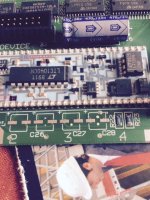 | |
| Posted by: techknight on 2016-06-19 08:15:55 oh yea, that hybrid has definitely absorbed some cap goo. Thats usually what happens to it. | |
Posted by: bibilit on 2016-08-13 02:14:49The fix which works 80/20 percent of the time is this: Once you determine the hybrid is bad, you must clean the hybrid really good, and use SMD291/SMD294 reflow flux or something comperable, and apply to all exposed pins, then reflow with the heat gun. This will absorb residual cap goo, and refresh the contacts on everything.thanks to you Techknight ! Was able to perform the repair. The battery cells were replaced with a Panasonic unit, giving a strong unit to start with, i removed again the Logic Board and performed the cleaning, reflow process. In the end, the portable was put back together again, hold my breath and :  Booted first time 🙂 the widget is now showing change of charging/not charging icon, no longer need to deal with the 9 volt battery and charger trick again.  one info box is showing the Portable as a Macintosh XL...  | |
| 1 > |