68kMLA Classic Interface
This is a version of the 68kMLA forums for viewing on your favorite old mac. Visitors on modern platforms may prefer the main site.
| Click here to select a new forum. | |
| Black screen on Macintosh plus | |
| Posted by: MattBranth on 2022-10-22 05:34:48 Hello everyone! 👋 I'm in the process of refurbishing a 1988 Mac plus. For the moment, when I turn it on, it's a black screen. I took it apart, the analog board seems to be a problem. Indeed, a part of the board is corroded. Below are some pictures from different angles: 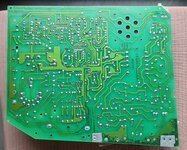 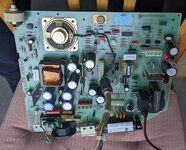 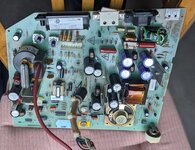 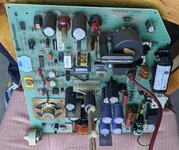 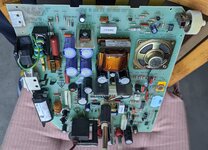 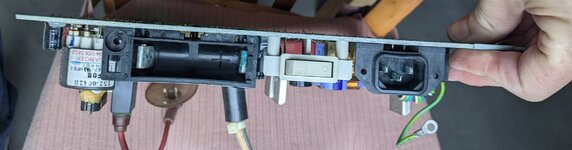 If you are familiar with these board, what can I do to improve things? Another problem, the floppy drive seems to be damaged as well. Below are some pictures: 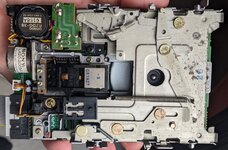 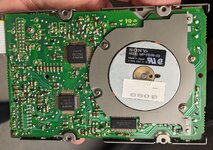 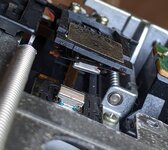 On this last picture, there is a floppy disk in the drive. 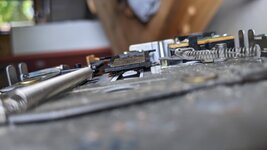 The read head seems to be partly detached, I don't know if this can be fixed easily. Thanks in advance for your help! 👍 Matthieu | |
| Posted by: joshc on 2022-10-22 11:08:01 Make sure the brightness is turned up. 😉 Reflow the solder joints for the yoke connector and logic board power connector. read voltages from the floppy port at the back of the machine with it switched on. What are the readings? 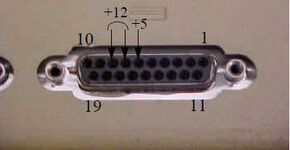 | |
| Posted by: bibilit on 2022-10-22 11:50:17 A lot of broken joints in your board, common issue. | |
Posted by: MattBranth on 2022-10-22 14:00:14Make sure the brightness is turned up. 😉Thank you for this answer, there is no tension in this floppy port when the machine is switched on. | |
Posted by: MattBranth on 2022-10-22 14:02:00A lot of broken joints in your board, common issue.I redid all the soldering that you framed but unfortunately this does not change the result | |
Posted by: joshc on 2022-10-22 17:59:04Thank you for this answer, there is no tension in this floppy port when the machine is switched on.What do you mean? Everything reading zero or? Does the Mac make a beep when it turns on? | |
Posted by: MattBranth on 2022-10-22 23:18:50What do you mean? Everything reading zero or?Yes, everything reading zero (to measure the voltage I used a voltmeter to measure the voltage between the different holes, is that what was expected?) And, no, the Mac don't make any beep when it turns on. | |
| Posted by: MattBranth on 2022-10-23 02:27:10 The fuse on the analog board is broken, this must be part of the problem... 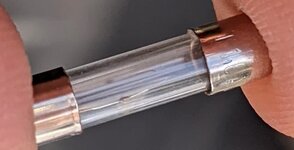 | |
| Posted by: MattBranth on 2022-10-23 02:40:20 I will try to replace the fuse, but in that case, maybe the big black rectangle component in the input is defective? 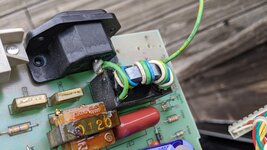  | |
| Posted by: joshc on 2022-10-23 04:04:46 Fuses blow for a reason. You can replace it but finding the fault on your board should be done before powering up again, there is likely a faulty component/short somewhere on your board. | |
| Posted by: bibilit on 2022-10-23 04:12:54 Not your issue here, yes fuse is blowing for a reason. Try looking for short components first. Bridge rectifier… | |
| Posted by: cheesestraws on 2022-10-23 04:20:02 The big black rectangle is just some coils of wire. Very little to go wrong in that. Check the diodes immediately across the mains. Be very careful working on power supplies if you're not used to it, you can damage yourself very easily. Pretty sure one of the heatsinks on that board is live, so be extra careful. | |
| Posted by: MattBranth on 2022-10-23 06:30:06 How can I check the diodes, and others components? How to look for short? | |
| Posted by: MattBranth on 2022-10-23 06:39:17 Which components are the heatsinks? How to reconize them? | |
| Posted by: MattBranth on 2022-10-23 06:40:28 I ckeck all the diodes with my multimeter and they are all OK | |
| Posted by: joshc on 2022-10-23 06:56:43 I think you’d need to check them out of circuit, as testing in circuit can give inaccurate results I believe. A component tester is a worthwhile purchase as it makes this easier. The heat sinks on these boards are small pieces of metal attached to components to dissipate heat from them. | |
Posted by: joshc on 2022-10-23 06:58:53Be very careful working on power supplies if you're not used to it, you can damage yourself very easily. Pretty sure one of the heatsinks on that board is live, so be extra careful.Second this. Best to avoid trying to do complex repair on an analog board/power supply if you are not confident - they can be dangerous. | |
| Posted by: MattBranth on 2022-10-23 09:37:01 I resoldered some parts and changed the fuse. Now the screen lights up! But I have this error that appears. Any idea? 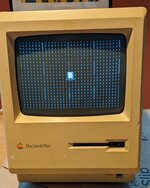 | |
| Posted by: joshc on 2022-10-23 09:39:56 Try reseating the RAM | |
| Posted by: MattBranth on 2022-10-23 10:21:50 I changed the RAM chips having another mac available for parts. New error now: 022000 | |
| 1 > |