68kMLA Classic Interface
This is a version of the 68kMLA forums for viewing on your favorite old mac. Visitors on modern platforms may prefer the main site.
| Click here to select a new forum. | |
| Twentieth Anniversary Macintosh G4 (!) | |
| Posted by: ried on 2022-07-14 21:20:00 What's a TAM doing in the G3/G4/G5 forum, you ask? Well, of course there is a Sonnet Crescendo G3 L2 upgrade for the TAM which, as an "upgrade-challenged Mac" fits neatly into the machine's cache slot. But what about a G4-powered TAM? Sonnet never made one of those... But @herd did. Check it out! Here's the TAM booting with a G4 upgrade in its cache slot. The Sonnet Crescendo extension correctly identifies the processor as a G4 and loads the "Crescendo G4" animation accordingly. 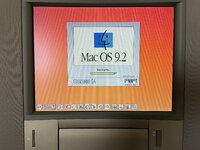 This one is conservatively clocked at 300MHz with 512K of L2 cache. Not really sure how far one can push a G4 in the TAM. Here's a shot of the Apple System Profiler, along with MacBench 5 processor results comparing the baseline Power Mac G3/300, the TAM with a Sonnet G3 500/1MB, and the TAM with a G4 300/512K. 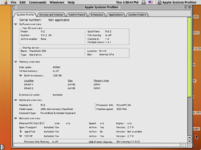 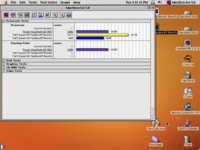 | |
| Posted by: Trash80toHP_Mini on 2022-07-14 21:25:45 WOW! 😲 Neat trick, but slower? | |
| Posted by: ried on 2022-07-14 21:32:23 Is the TAM with a G4/300/512K slower than the baseline PM G3/300/1MB? Yes, a little. Probably due to the TAM having a 50MHz system bus (vs 66MHz) and the 512K L2 cache (vs 1MB). Think a 500MHz G4 with 1MB L2 would also work? Or would that be too hot / power hungry for the TAM? 🤔 | |
| Posted by: Byrd on 2022-07-14 22:27:42 That's amazing - pretty much any G3 300Mhz+ and above in a TAM feels the same to me, how is the heat output? I have a slimline 80mm fan positioned on the fat back blowing on my G3-400Mhz (using Sonnet Clocker overclocked @ 500Mhz), it remains cool but the top of the case near the PCI cards gets warmer than I'd like. | |
| Posted by: ried on 2022-07-16 09:38:45 I've been looking for a CPU temperature monitor that's compatible with Mac OS 9, but they're few and far between. I don't know of any that'd work with the Sonnet G3 L2, so have to rely on "does it feel hot?" which isn't super helpful. Hmmm... I'd love to get this thing up to 400MHz or more, but it seems risky. Do we have any available tables that show the thermal design power of the original G3 (XPC750) and the G4 (7400 or 7410) at various clock speeds? | |
| Posted by: cheesestraws on 2022-07-16 10:36:35 That's a lot of fun and a real one-of-a-kind. Nice one, and nicely done @herd ! | |
| Posted by: herd on 2022-07-16 10:46:57 This is what the datasheets that I have say: 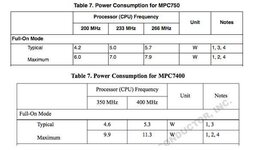 It doesn't cover all the speeds we want, but looks like an XPC750 at 2.6v and 300MHz would be similar to an MPC7400 at 1.8v and 300MHz. You can get pretty inexpensive thermocouple stuff that could tell you the operating temperature of different areas. I would put one on the heatsink (or back side of the CPU) and one on the power section of the PCB. | |
| Posted by: LaPorta on 2022-07-16 11:59:40 Why does the speed test show the G4 as slower than the G3? | |
Posted by: cheesestraws on 2022-07-16 12:20:26Why does the speed test show the G4 as slower than the G3? I assume because the G3 is clocked at 500MHz, while the G4 is clocked at 300MHz (if I'm understanding the original post correctly). | |
| Posted by: ried on 2022-07-16 14:45:51 There are 3 scores in the MacBench 5 chart:
The TAM with a G4/300/512K is slower than the reference Power Mac G3 with a G3/300/1MB because:
| |
Posted by: Byrd on 2022-07-16 15:36:18I've been looking for a CPU temperature monitor that's compatible with Mac OS 9, but they're few and far between. I don't know of any that'd work with the Sonnet G3 L2, so have to rely on "does it feel hot?" which isn't super helpful. Powerlogix' CPU director is the only one but yes I find the accuracy lacking, it serves as a guide. You can overclock Sonnet L2 G3 in software using Sonnet Clocker - a utility that adjusts the CPU multiplier set by the Crescendo extension, I can get my G3 400Mhz 1MB cache to 500Mhz no stability issues (450Mhz does not work as the multiplier is not supported). Worth a try? | |
Posted by: ried on 2022-07-16 16:03:31Powerlogix' CPU director is the only one but yes I find the accuracy lacking, it serves as a guide.Certainly is! Found it: | |
| Posted by: ried on 2022-07-16 17:06:08 I'll be a monkey's uncle. It works! That little utility allows the Sonnet to go up to both 350 and 400MHz, but no faster. Modifying the Sonnet extension for 450 or 500MHz just results in the machine running at 400MHz. From what I understand, only an 8x bus multiplier is possible in this hardware configuration. Thank you, @Byrd. MacBench 5 results for the TAM with a 350 and 400MHz G4 follow. 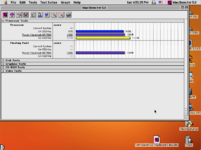 | |
| Posted by: Byrd on 2022-07-16 17:17:19 That’s great! Sorry I did look for the program but glad you found it. It’s a bit of a treasure as clearly software overclocking wasn’t really common place in Macs of this era. Check heat output the TAM has utterly wretched cooling with hardly anywhere for it to exhaust out the top, especially with a large PCI card and CS card in place. | |
| Posted by: ried on 2022-07-16 18:53:33 I'll keep an eye on it, thanks @Byrd. 👍 Thanks @herd for being a complete wizard and making it possible. 🍻 Continuously impressed at the level of skill and knowledge that can be found in this community. 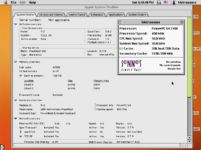 | |
| Posted by: EtherRad on 2022-07-19 07:13:53 Is the cpu a 7410 or 7400? A 7410 should run cooler at higher speeds. | |
| Posted by: KnobsNSwitches on 2022-07-19 07:27:13 This is terrific, I love these kind of upgrades. Thanks for showing it off. | |
Posted by: ried on 2022-07-19 08:24:27Is the cpu a 7410 or 7400? A 7410 should run cooler at higher speeds.It's a 7400. The 7410 requires L2 cache that runs at a different voltage. I asked herd the same question 🙂 | |
Posted by: Powerbase on 2022-07-19 16:37:48I'll be a monkey's uncle. It works! That little utility allows the Sonnet to go up to both 350 and 400MHz, but no faster. Modifying the Sonnet extension for 450 or 500MHz just results in the machine running at 400MHz. From what I understand, only an 8x bus multiplier is possible in this hardware configuration.Im pretty sure even first gen G4s/7400 support a 9x multiplier. I run the G4 in my Powerbase at 9x45MHz. Maybe its a limitation of Sonnets software controls. | |
| Posted by: ried on 2022-07-19 17:19:04 Yeah, the Sonnet G3 L2 cards seem to have come in two versions, with either an 8x or a 10x multiplier onboard. The one herd swapped the 7400 onto has an 8x multiplier. There's more info on the old Sonnet Clocker download page. I have another G3 L2 that runs at 500MHz in the TAM, so that one certainly has the 10x multiplier onboard. | |
| 1 > |