68kMLA Classic Interface
This is a version of the 68kMLA forums for viewing on your favorite old mac. Visitors on modern platforms may prefer the main site.
| Click here to select a new forum. | |
| Color classic headphone/speaker out not working correctly | |
| Posted by: Verault on 2022-05-16 05:29:45 So I had to replace a bad Dfac2 chip on my color classic board to get any audio. When I plug a speaker or headphone set into the audio out I am expecting to get stereo audio out and the internal speaker to cut out.. But the internal speaker keeps playing audio and the audio out only plays audio via the left channel (left earphone). This does not seem like normal behavior. My LC575 which is of a similar vintage gives me stereo out via the headphones (both headphones give sound) and the internal speaker cuts out when plugged in. So the fact theat the MAC color classic isnt doing any of that seems something is way off. I think the next step is to replace the audio jack. But before I go to that length. Can someone with a Macintosh Color classic please test a pair of head phones on the audio out jack in back and see if they get audio for one, and if the internal speaker still plays audio or cuts out? Thanks | |
Posted by: jajan547 on 2022-05-16 06:01:20So I had to replace a bad Dfac2 chip on my color classic board to get any audio. When I plug a speaker or headphone set into the audio out I am expecting to get stereo audio out and the internal speaker to cut out.. But the internal speaker keeps playing audio and the audio out only plays audio via the left channel (left earphone).Speaker should disable and switch output to earbuds or stereo speakers. Sometimes the little clip in the headphone jack gets stuck and may be causing the issues you describe. | |
Posted by: cheesestraws on 2022-05-16 06:39:36Sometimes the little clip in the headphone jack gets stuck and may be causing the issues you describe. Agreed; you could try using contact cleaner to try to clean the switch in the back of the headphone jack a bit. Or the plug itself might be physically dodgy. But that's what I'd look at first. | |
| Posted by: Verault on 2022-05-16 08:03:30 I tried cleaning the jack several times. I know cleaning the headphone jack on my IIgs fixed a low sound output. but Cleaning this one made no change at all. Should I replace it? | |
| Posted by: jajan547 on 2022-05-16 08:08:38 Have the capacitors near the sound chip been replaced? And if yes or no to that question have you cleaned that area throughly? | |
| Posted by: Verault on 2022-05-16 08:09:45 Yes and yes. This machine has zero sound until I replaced the DFAC2 chip. | |
Posted by: jajan547 on 2022-05-16 08:11:13Yes and yes.Have you made sure there are no bridged pins or loose connections to the chip? Otherwise I’d say next resort is a new headphone jack. | |
| Posted by: Verault on 2022-05-16 15:16:06 yes I have checked for bridges and connectivity. the only issue with sound I have is with the audio out jack. I will have to steal a jack from my broken LC550 board (where I got the DFAC2 chip from). But everything on that board is corrosed so the jack is not going to be all that nice to look at. I will deoxit the heck out of it once I have desoldered it. | |
Posted by: jajan547 on 2022-05-16 15:16:53yes I have checked for bridges and connectivity. the only issue with sound I have is with the audio out jack. I will have to steal a jack from my broken LC550 board (where I got the DFAC2 chip from). But everything on that board is corrosed so the jack is not going to be all that nice to look at. I will deoxit the heck out of it once I have desoldered it.Let us know how it goes when you install the new jack. | |
| Posted by: Verault on 2022-05-17 14:02:00 replaced the jack, no change whatsoever. I am at a loss. Its not the audio jack | |
Posted by: jajan547 on 2022-05-17 14:16:22replaced the jack, no change whatsoever. I am at a loss. Its not the audio jackdid you check for continuity under the chip? | |
| Posted by: Verault on 2022-05-17 17:10:57 yes every pin. | |
Posted by: jajan547 on 2022-05-17 18:01:25yes every pin.And it’s the same jack from the 550 | |
| Posted by: Verault on 2022-05-17 18:11:07 they are the same exact jack yes. | |
| Posted by: jajan547 on 2022-05-17 18:36:36 Have a photo you could provide? | |
| Posted by: Verault on 2022-05-17 18:49:53 of what? | |
Posted by: jajan547 on 2022-05-17 18:51:42of what?the area surrounding the audio jack and the DFAC chip. Not sure if you have the schematics or not but figured I'd upload them anyway. | |
| Posted by: Verault on 2022-05-18 08:10:21 Sure, here you go. 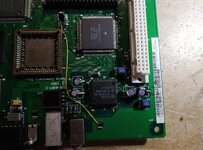 | |
| Posted by: jajan547 on 2022-05-18 08:20:33 Pretty sure C8 is supposed to connect to that via next to the negative capacitor pad and not where the bodge runs, also what’s the pin touching something here in this area? | |
| Posted by: Verault on 2022-05-18 08:40:34 Ok maybe I found something. so I found that pins 37 and 38 on U5 (DFAC2) are shorted (have continuity). Using magnification I can find no solder causing the short. Going by the schematic page 11, pins 37 and 38 goto the headphone jack. So the first photo shows what pins on the jack have continuity when no headphone is inserted. 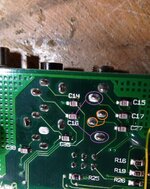 And when the headphone jack is inserted the continuity on the jack changes to this: 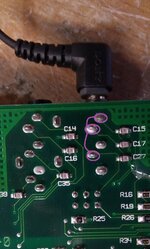 | |
| 1 > |