68kMLA Classic Interface
This is a version of the 68kMLA forums for viewing on your favorite old mac. Visitors on modern platforms may prefer the main site.
| Click here to select a new forum. | |
| Dual monitor with IIci? | |
| Posted by: Jockelill on 2022-04-23 06:52:26 Hi! I recently acquired a Macintosh II Video Card that I want to use in my IIci with dual monitor. Do I need any special driver or extension to make this card work? I’m running S7.6.1 and have tested with two monitors (known to work and at 640x480 which this card should support). From internal Video both monitors work great! I cannot say for sure that the card is ok, but before that I just wanted to know if if it could be just some settings 😀 Joakim | |
| Posted by: demik on 2022-04-23 07:15:29 Should work out of the box, no drivers needed. Does TattleTech see your board ? | |
| Posted by: register on 2022-04-23 07:31:03 Hi, Yes, usually, your setup should work fine out of the box. Depending to the type of connector used to attach the monitor to the video card, probably with an adaptor, issues might occur with regard to adaptor setting and/or sense pin configuration. If you run into a problem, double check if the settings are the same as confirmed working well with the internal graphics. Along with TattleTech, as suggested by demik, consider to have the control panel »Activate all Resolutions« at hand. Its purpose is to show and allow to set any resolution a graphics card is capable of, independent of the actual sense pin configuration. However, this might also be used to set a combination of resolution and refresh rate that the attached monitor can't support. In such case you will be left with a blank screen. If someone knows if this could do harm to the electronics on either side, please share your wisdom. With best regards | |
Posted by: Jockelill on 2022-04-23 11:17:23Should work out of the box, no drivers needed. Does TattleTech see your board ?Good tip with TattleTech! Unfortunately no, it only sees the internal video card under Nubus. I’ve tried all three slots. I also noticed it does not see my daystar Ethernet card, but not sure about that card (or drivers) either. so I’m guessing it’s some hardware issue after all 🙁. Problem is that this is my only Nubusmachine, otherwise it would have been nice to test the cards in another machine to rule out the logic board, but the computer otherwise works perfect, so I’d lean more towards the card. Joakim | |
| Posted by: ArmorAlley on 2022-04-23 11:25:35 I have just been testing a whole of Supermac & Rasterops NuBus cards on my WGS 9150 in Mac OS 7.6.1 & Mac OS 8.1. One card didn't register at all and written on the card was "Up to 7.5.3". Although I would expect to see Toby cards in 7.6.1, I wonder if you would get a different result if you boot up your IIci in System 6 or 7.0? | |
| Posted by: Jockelill on 2022-04-23 11:27:32 Not a bad suggestion at all, I’d give it a go with S7.1 | |
| Posted by: Jockelill on 2022-04-24 09:14:46 So, I’ve made some more testing, I tested with a system 6 disk and it made no difference, the TattleTech still does not see the Toby-card. out of curiosity I also tried a DaynaPort Ethernet E/II-T, but also this card is not visible 🙁. The DaynaPort installer does not see that card either. Can there be something wrong with the Nubus? Any way of testing it? In TattleTech it says that the internal video is on the minus as slot 0, but don’t know if that is actually they way it works. The logic card for the IIci is supposed to be tested and recapped, but of course there can be something wrong with it. any suggestions would be appreciated. Unfortunately I don’t have any other mac with Nubus🙁. | |
Posted by: Jockelill on 2022-04-24 09:16:48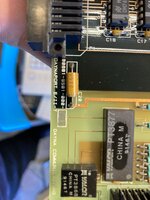 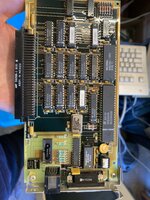 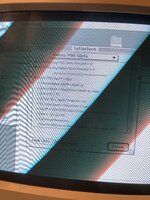 | |
| Posted by: mdeverhart on 2022-04-24 12:28:24 The IIci’s internal video isn’t on the NuBus. It may show up that way for SW, but electrically it’s connected to different logic. Since none of your NuBus card are recognized, I’d guess there’s a problem either with the NuChip30 IC, or the NuBus transceivers (or capacitor goo/goo damage) in those areas. 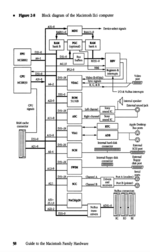 I’m afraid I don’t have a IIci at hand, so I can’t provide the locations/reference designators of those components. Maybe someone else can point you in the right direction. | |
| Posted by: volvo242gt on 2022-04-24 12:55:09 Check the 74ALS240 chip just below capacitor C16. There likely is a glob of capacitor goo underneath it, preventing the Nubus slots from working. I have the same problem with my IIci. None of the Nubus slots work. Noticed some corrosion on the pins of the aforementioned chip. | |
| Posted by: Jockelill on 2022-04-25 06:02:17 THANKS!! I'll check it out tonight! But seems plausible! | |
Posted by: Jockelill on 2022-04-26 01:05:40Check the 74ALS240 chip just below capacitor C16. There likely is a glob of capacitor goo underneath it, preventing the Nubus slots from working. I have the same problem with my IIci. None of the Nubus slots work. Noticed some corrosion on the pins of the aforementioned chip.I did check that chip, and you where right, there was capicitor goo underneath... I was able to get out a lot of it after soaking the chip in IPA and using compressed air to get it out, however it did not help solve the problem🙁. I suspect the chip might be gone 🙁. One other thing made me a little worried, there is a little patch on one of the pins, so I'm guessing there has been issues with the Nubus before...: 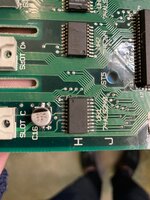 | |
| Posted by: volvo242gt on 2022-04-26 13:39:57 Yeah, you'll probably have to replace it. Luckily, it's not an expensive chip on eBay. I haven't seen much computer-related items on tradera, though (yes, I do search on that site, but mainly for Volvo parts that are hard to find here in the states). | |
Posted by: Jockelill on 2022-04-27 00:32:10Yeah, you'll probably have to replace it. Luckily, it's not an expensive chip on eBay. I haven't seen much computer-related items on tradera, though (yes, I do search on that site, but mainly for Volvo parts that are hard to find here in the states).Found it on german eBay, I'll try to change it. 🙂. Thanks for your help so far! Yeah, Tradera is great for that, it's actually owned by eBay these days. They tried to established an Swedish eBay, but Tradera has been here since before eBay so in the end they simply bought the company and kept everything. In Sweden Volvoparts are readily availble most places, Biltema is favourite here, not sure if they deliver to the US. | |
| Posted by: demik on 2022-04-27 00:58:09 Is that really a patch ? That look like a nearby line that was destroyed by cap goo | |
Posted by: Jockelill on 2022-04-27 01:00:35Is that really a patch ? That look like a nearby line that was destroyed by cap gooIt goes under the chip, but this could of course be the case, I'll know when I've desoldered the chip, but thanks for the heads up 🙂. | |
| Posted by: Jockelill on 2022-05-04 13:51:47 And it works🙂. Turns out the patch was actually a patch from a loose pad. Problem was that the chip was gone, but a new chip and a new wire solved the problem so now both screens work and TattleTech even sees my network card! Thanks for all the help!! Highly appreciated!! | |
| Posted by: mdeverhart on 2022-05-04 14:45:41 Glad you got it working! | |
| Posted by: Jockelill on 2022-05-06 12:23:15 Now that’s up and running, what is a reasonable amount of RAM for such a machine? I know that with 128MB it takes several minutes to boot, but it came with 8MB which is a bit low 😀, I wanna run 7.5 on it and just some old games and software. Does it really make sense to have the full 128MB other than the need to max out 🥹? | |
| Posted by: Cory5412 on 2022-05-06 12:35:53 Great to see you got this working! 7.5 and games should run fine in ~24-32 megs of ram, likely with room to spare. I have a Quadra running 8.0 or 8.1 on 24 megs and it's basically fine for the system 7 era stuff I run on it. I don't typically max out my own machines, mostly because I'm cheap and lazy, but I know lots of people like to have things tiptopped, even if it's not necessary for how they use the thing, so some of this will just come down to what your aesthetic preferences are. | |
| 1 > |