68kMLA Classic Interface
This is a version of the 68kMLA forums for viewing on your favorite old mac. Visitors on modern platforms may prefer the main site.
| Click here to select a new forum. | |
| LC475 memory issue(?) | |
| Posted by: Ajediday on 2022-03-20 10:33:54 I am trying to bring a LC475 back to life, soaked it in iso for a few hours, cleaned it up, and recapped it. When it powers up I get the start up chime, then the chimes of death (long version). Based on what I have read, that should point me to a memory issue. I get the same results with nothing plugged into the board other than power and speaker. It does have a fresh battery. With the video memory installed, same results. Since I only have the on-board memory, I started to look there, checked voltages on the ram, there were two that were not showing 5 volts, both were around .5 to .7. Any ideas on where I should look next? One strange thing I noticed on this machine, on the modem port, the port instead of being 8 pin (3/3/2) is 9 pin (3/4/2) never seen that before. Is that common and why? Thank you. | |
Posted by: Nixontheknight on 2022-03-20 10:37:12I am trying to bring a LC475 back to life, soaked it in iso for a few hours, cleaned it up, and recapped it. When it powers up I get the start up chime, then the chimes of death (long version). Based on what I have read, that should point me to a memory issue. I get the same results with nothing plugged into the board other than power and speaker. It does have a fresh battery. With the video memory installed, same results. Since I only have the on-board memory, I started to look there, checked voltages on the ram, there were two that were not showing 5 volts, both were around .5 to .7. Any ideas on where I should look next?The modem port is probably geoport. And as for the memory, I’d tone out the connections for the RAM using a multimeter in continuity mode/diode check | |
| Posted by: max1zzz on 2022-03-20 11:12:14 Edit: nevermind was thinking of the LC III there, RAM placement on the 475 is totally different. | |
| Posted by: Ajediday on 2022-03-20 11:47:26 If it was the one on the right side, I would understand it, but it is the two marked in red. 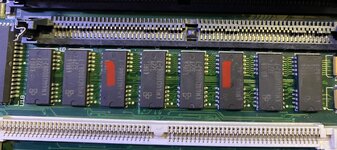 | |
Posted by: Nixontheknight on 2022-03-20 12:45:55If it was the one on the right side, I would understand it, but it is the two marked in red.View attachment 39626as I said, try seeing if the traces that go to those chips are interrupted somewhere, like they're cut, corroded, etc. | |
| Posted by: jajan547 on 2022-03-20 18:40:51 Here's an LC III schematic I have while it's obviously a different machine I think the RAM and RAM lines are mostly the same. | |
| Posted by: Ajediday on 2022-03-21 01:11:17 That's something that should help me in tracking this down, thank you. | |
Posted by: jajan547 on 2022-03-21 04:23:00That's something that should help me in tracking this down, thank you.No problem hope it helps out. | |
| Posted by: Ajediday on 2022-03-21 14:44:43 After tracing most of the data and address lines, I spotted something a little strange on the memory chip next to the two caps I replaced, I might have found an issue or it just might be another red herring 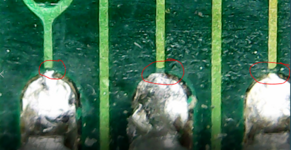 | |
| Posted by: mdeverhart on 2022-03-21 17:01:20 Cap goo can definitely eat away traces, and those look broken to me. I’d measure continuity between the solder pads and the other end of the suspect traces to be sure. If they are broken, you’ll need to add some bodge wires to bridge the broken traces. | |
| Posted by: Johnnya101 on 2022-03-21 17:18:53 What above said. Or hold the board up with a bright light behind it, and if light shows up there, then they are broken. | |
Posted by: jajan547 on 2022-03-21 17:47:16After tracing most of the data and address lines, I spotted something a little strange on the memory chip next to the two caps I replaced, I might have found an issue or it just might be another red herringView attachment 39727Hey there when those traces attach to pads there is a small dip and it’s likely corrosion has found it’s way into there. I suspect scraping the traces and bridging them to the pads should do the trick. | |
| Posted by: Ajediday on 2022-03-22 02:01:38 I did try that last night, looked like good connections at that point, still getting death chimes. Went back to the original photos I took of the board before clean up, I'm thinking there's something nasty under that chip at this point. Thinking about removing it, cleaning up under it (the board did get a good soak before this point), and seeing what's going on. 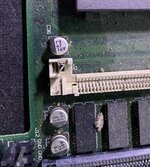 | |
| Posted by: joshc on 2022-03-22 02:36:26 This is common on these. Cap goo causes havock with the RAM chips closest to those two caps. It is worth removing the first couple of RAM chips and cleaning under them and cleaning the pins of the chips. | |
Posted by: jajan547 on 2022-03-22 02:37:03I did try that last night, looked like good connections at that point, still getting death chimes. Went back to the original photos I took of the board before clean up, I'm thinking there's something nasty under that chip at this point. Thinking about removing it, cleaning up under it (the board did get a good soak before this point), and seeing what's going on.View attachment 39738I agree gunk likes to hide under chips even on a cleaned board. I’d say remove it and clean it up. | |
Posted by: jajan547 on 2022-03-22 02:37:38This is common on these. Cap goo causes havock with the RAM chips closest to those two caps. It is worth removing the first couple of RAM chips and cleaning under them and cleaning the pins of the chips.Definitely agree with this! | |
| Posted by: Ajediday on 2022-03-22 05:41:29 It was a mess under there, more of the same thing with the pads, I think I have that taken care of now. Will find out when I put the chip back. In the end this might be a learning experience (I hope not), but fingers are crossed. | |
Posted by: jajan547 on 2022-03-22 05:58:55It was a mess under there, more of the same thing with the pads, I think I have that taken care of now. Will find out when I put the chip back. In the end this might be a learning experience (I hope not), but fingers are crossed.Have any pictures? Interested to see what all was below. | |
| Posted by: Ajediday on 2022-03-22 07:17:50 I forgot to 🙁 It was the same type of gaps between traces and pads, there wasn't anything really growing under it, the soak I think took care of that, the board was in fairly good condition (with the exception of the gaps). | |
Posted by: jajan547 on 2022-03-22 08:59:07I forgot to 🙁 It was the same type of gaps between traces and pads, there wasn't anything really growing under it, the soak I think took care of that, the board was in fairly good condition (with the exception of the gaps).Working after that? | |
| 1 > |