68kMLA Classic Interface
This is a version of the 68kMLA forums for viewing on your favorite old mac. Visitors on modern platforms may prefer the main site.
| Click here to select a new forum. | |
| Troubleshooting Quadro 4500 FX in G5 Quad | |
| Posted by: SmokelessJoe on 2022-02-15 14:38:46 Power Mac G5 Quad (2.5 Ghz) 4 GB RAM Mac OS 10.4.11 It runs fine with the GeForce 6600 installed. I just got a Quadro 4500 FX off eBay (uh oh, the seller said it was for the G5) and I get no picture at all, although the system seems to be running: the startup chime sounds, and after a minute I can press volume up/down keys and hear the volume change. I tried both ports using a DVI to HDMI cable (same cable works with the GeForce 6600). Attached is a picture of the back of the card. I can do closeups of that’ll help. I’m wondering if this is a PC version that needs to be flashed. Is there any way to tell? Any other ideas on what might be wrong? 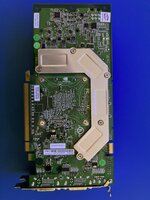 | |
| Posted by: Unknown_K on 2022-02-15 15:18:33 Did you buy a 6 pin power cable for the card? | |
| Posted by: SmokelessJoe on 2022-02-15 15:35:39 I did, although I had to buy it separately. I even plugged it in to the motherboard and the card! I haven’t tested the cable with anything else, so I dunno if it’s any good. | |
Posted by: Michael_b on 2022-02-15 16:31:23I did, although I had to buy it separately. I even plugged it in to the motherboard and the card! I haven’t tested the cable with anything else, so I dunno if it’s any good. looks like a PC Card to me. I think the Mac version would have a longer bracket that slides into the PCIe slot carrier behind the cards in the G5. I also recall that the faceplate on the Mac version had the typical Apple aluminum finish, rather than the shiny metal on the PC cards. My bet is that it still needs to be flashed. | |
| Posted by: Unknown_K on 2022-02-15 17:25:51 I think the extender for the Mac card can be unscrewed (no idea why you would do that). 
Flashing A Quadro FX 4500 For Power Mac G5 CompatibilityPrerequisites: - Nvidia Quadro FX 4500 - PC or Mac Pro with a PCI Express slot - USB flash drive - Access to a Windows installation for Step 1 Download: https://goo.gl/Ow66FG Note: Only the Quadro FX 4500 revision with a metal L-shaped piece on the back of the card can be flashed for...
 forums.macrumors.com
Looks like you have the correct card for flashing (if it is the PC version). | |
| Posted by: Byrd on 2022-02-15 18:41:07 PNY branding = generic x86 card, did the seller confirm it was flashed over to Mac firmware? I'd also pop off the heatsink to double check it's an FX4500 as advertised, and not a 7900 card. | |
| Posted by: SmokelessJoe on 2022-02-16 06:54:15 Thanks for all the replies! The listing was for: Nvidia VCQFX4500-PCIE Quadro FX 4500 PCIe for Power Mac G5 512mb DDR3 Video Card but no other details were provided except the pictures (gotta have that piece of metal on the back) and that a separate power cable was not provided. I guess my next steps are to find a PC with a compatible PCIe slot, a compatible power cable (or a plug that matches the one for my G5), and see what this card has to say for itself. The seller also says they accept returns, so I’ll look into that. | |
| Posted by: Franklinstein on 2022-02-16 08:01:06 As Byrd said, PNY never built OE or even aftermarket cards for Apple so at the very least this example, based on the picture, would have been a reflash. It does appear to be the correct model for flashing though (only the cards with the metal bracket on the rear will work). Reflashing isn't too difficult, assuming the card is otherwise working normally. | |
| Posted by: SmokelessJoe on 2022-02-17 11:03:41 So far, attempting to reflash the card is proving tedious. I’m following the directions here:
Flashing A Quadro FX 4500 For Power Mac G5 CompatibilityPrerequisites: - Nvidia Quadro FX 4500 - PC or Mac Pro with a PCI Express slot - USB flash drive - Access to a Windows installation for Step 1 Download: https://goo.gl/Ow66FG Note: Only the Quadro FX 4500 revision with a metal L-shaped piece on the back of the card can be flashed for...
forums.macrumors.com
The HP USB Storage Format Tool included in the download won’t recognize any USB devices I have. I found a newer version that will recognize a USB stick, but then complains that it’s write-protected. I tried to partition a USB stick using Command Prompt (http://wiki.freedos.org/wiki/index.php), and I can format the stick just fine, but the HP tool still says the stick is write-protected. I tried creating USB stick that would boot FreeDOS using this tool (https://www.poweriso.com/tutorials/create-freedos-bootable-usb-drive.htm), but the first two systems I tried it on wouldn’t boot with it. For some reason, a third system would boot from the USB stick. Some progress at last! This is why I’m using a 17 year old Mac instead of Windows. | |
| Posted by: Unknown_K on 2022-02-17 14:17:16 So its Windows fault you didn't buy one of the few very rare G5 PCIE cards or have an easy way to flash a card in a Mac? | |
Posted by: SmokelessJoe on 2022-02-17 16:13:55So its Windows fault you didn't buy one of the few very rare G5 PCIE cards or have an easy way to flash a card in a Mac?Exactly! | |
| Posted by: Franklinstein on 2022-02-17 23:32:50 Try using Rufus. Microsoft decided to drop the bootable device option in the format utility with Win7 which didn't do anything for anybody except cause inconvenience. I think there's a way to get it back natively with some hacking (at least, in 7; 8 and later may be lost causes) but otherwise just use Rufus. | |
| Posted by: SmokelessJoe on 2022-02-18 14:17:49 Success! 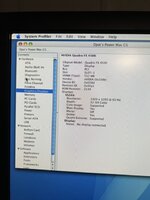 Thanks to everyone for your replies! Special shout outs to Franklinstein for suggesting Rufus and Unknown_K for keeping me honest. Rufus quickly and easily created a bootable USB stick. Then I followed steps 2 - 4 in the procedure here:
Flashing A Quadro FX 4500 For Power Mac G5 CompatibilityPrerequisites: - Nvidia Quadro FX 4500 - PC or Mac Pro with a PCI Express slot - USB flash drive - Access to a Windows installation for Step 1 Download: https://goo.gl/Ow66FG Note: Only the Quadro FX 4500 revision with a metal L-shaped piece on the back of the card can be flashed for...
forums.macrumors.com
I was lucky that I found a PC at work that recognized the card AND would boot from the USB stick. I found a few that would do one or the other, but not both. I am not ruling out user error in my process. Flashing worked without error, once my hands stopped shaking long enough to correctly type in the command. Hooray! | |
Posted by: Daniël on 2022-02-18 15:03:09It does appear to be the correct model for flashing though (only the cards with the metal bracket on the rear will work). There does exist a ROM that will work for the single sided VRAM models (the heatsinks indicate that the GPU has double sided VRAM). I can confirm it because I'm running an "unsupported" FX4500 in my Quad with said ROM. I'll attach it here if anyone needs it. Do not use it if you have the double sided FX4500! | |
| Posted by: Franklinstein on 2022-02-19 08:35:01 Thanks for posting that. I may have to give it a go. I have at least one single-sided FX4500 hanging out somewhere to try it on. | |
| Posted by: andy_c on 2022-07-27 06:01:22 Hello! Did you try it on your single-sided FX4500? I just got one for my Quad G5 and it it single sided. | |
| Posted by: MaG on 2022-10-23 10:07:15 I am also very interested if anyone used this rom successfully for single sided version of Quadro FX 4500 to work with Power Mac G5? | |
Posted by: Daniël on 2022-10-23 10:29:50Hello! Did you try it on your single-sided FX4500? I just got one for my Quad G5 and it it single sided. Late reply, but I am using that ROM successfully on my G5 Quad with a single sided VRAM FX 4500. I have provided this ROM to others through DMs on various platforms before, every single time they too had success with it. EDIT: I should also mention, I did not create this ROM. I was given it by a friend, who got it from someone else, either that person created it, or again got it through someone else. Because of this, I initially handed the ROM out in private to others when they mentioned having the single sided VRAM version, as to help them out. I have since decided just to post it publicly, so others can benefit from it, but I do not wish to take credit for the creation of the ROM. | |
| Posted by: MaG on 2022-10-28 14:06:34 It worked flawlessly for one sided Quadro FX 4500. Thank you @Daniël for this ROM and support. Two screens - before on PC and after on my Power Mac G5!!! 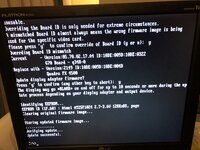 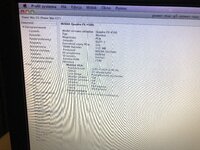 | |
| Posted by: andy_c on 2022-10-29 01:56:00 Does it display the Apple logo while booting? | |
| 1 > |