68kMLA Classic Interface
This is a version of the 68kMLA forums for viewing on your favorite old mac. Visitors on modern platforms may prefer the main site.
| Click here to select a new forum. | |
| Bootable 50pin SCSI CDRW Drive | |
| Posted by: macuserman on 2021-11-08 06:53:39 I'm wondering if anyone knows which if any SCSI CDRW drives were bootable? I know there weren't a lot of options in general but if possible I'd like to find one. | |
Posted by: MrFahrenheit on 2021-11-08 06:59:16I'm wondering if anyone knows which if any SCSI CDRW drives were bootable? I know there weren't a lot of options in general but if possible I'd like to find one. I think you can burn a bootable CD on an old Mac CDRW drive (like a Yamaha) using the Toast CD extension for that drive. I haven’t done it in 25 years but I seem to recall doing this. YMMV | |
Posted by: macuserman on 2021-11-08 07:05:53I think you can burn a bootable CD on an old Mac CDRW drive (like a Yamaha) using the Toast CD extension for that drive. I haven’t done it in 25 years but I seem to recall doing this. YMMVThe systems I want to put it in only have room for one optical drive, so I'm more concerned about it being both bootable as in I can put a system CD in it and boot off it as well as being a CD burner. | |
| Posted by: lisa2 on 2021-11-08 07:44:05 I had a Plexor 12X SCSI CDRW drive in my PowerMacintosh 7200 and it was bootable. I still have this drive, now in a UMAX S900 clone and bootable there also. | |
Posted by: macuserman on 2021-11-08 07:49:26I had a Plexor 12X SCSI CDRW drive in my PowerMacintosh 7200 and it was bootable. I still have this drive, now in a UMAX S900 clone and bootable there also.Oooh! You got a model number from it? | |
| Posted by: lisa2 on 2021-11-08 20:10:50 On the face of the drive it is labeled: "PleXWriter 12/4/32" SCSI probe shows it as a "PLEXTOR CD-R PX-W124TS Ver. 1.04" 12X CD-R 4X CD-RW 32X CD-ROM I definitely boots, I tried it tonight on the UMAX S900 and booted the recovery CD. Rick | |
| Posted by: Byrd on 2021-11-08 20:52:46 Plextor is probably the choice, I've had limited success with Sony and NEC branded CD-RW drives (a combination of odd behaviour like not booting but mounting CDs OK when the OS loads, or vice versa) | |
| Posted by: macuserman on 2021-11-09 04:13:00 I guess I’m on the lookout for a plextor unit then. The ones I have are both Yamaha and if I recall did not boot for sure. 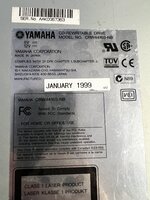 | |
| Posted by: lisa2 on 2021-11-09 07:25:14 When searching for a PlexWriter, note that the "S" ( PX-W124TS ) in the model number is important, I think "S" denotes SCSI. | |
Posted by: macuserman on 2021-11-09 08:53:07When searching for a PlexWriter, note that the "S" ( PX-W124TS ) in the model number is important, I think "S" denotes SCSI.Good to know, what about PX-W124TSi I found one that has an i at the end but I'm not sure what that would indicate. | |
Posted by: Daniël on 2021-11-09 10:29:27Good to know, what about PX-W124TSi I found one that has an i at the end but I'm not sure what that would indicate. Internal. The W124TSE is the external SCSI model. | |
| Posted by: macuserman on 2021-11-09 11:23:22 Welp I threw an offer of $40 bucks and it was accepted on this very very dirty and questionable unit all the others online are selling for insane money. We'll see if it works and if it's bootable. https://www.ebay.com/itm/224434005740 Hopefully it's not a lemon. | |
Posted by: macuserman on 2021-11-09 11:47:52Welp I threw an offer of $40 bucks and it was accepted on this very very dirty and questionable unit all the others online are selling for insane money. We'll see if it works and if it's bootable. https://www.ebay.com/itm/224434005740 Hopefully it's not a lemon.Ooof that's ugly the more I look at it lol, well I didn't really think he would accept my offer it was so far under what he was asking. Guess we'll see might have to scrub it and try my hand at retrobrite for the first time on that faceplate yuck yuck. | |
| Posted by: Unknown_K on 2021-11-09 15:10:55 Dish soap and hot water will clean most of that up. Not snagging a bunch of NOS Plextor SCSI CD drives when they were being dumped was something I still regret. | |
Posted by: macuserman on 2021-11-09 15:27:23Dish soap and hot water will clean most of that up.Yeah we'll see I plan to put this in one of my very special machines so looks are important as well as functionality. | |
| Posted by: macuserman on 2021-11-15 14:17:35 We’ll it came today! It did scrub up somewhat but it’s still pretty yellow and dirty looking. Although it is very quiet and did boot off my install disc without any issues. Haven’t tried to burn anything yet but so far I’m pleased I think a lot of that will be covered up by my powermac bezel and it won’t look to awful. I'm actually wondering if the eject button is going to line up now, guess I'll have to get it all buttoned back up and try it. 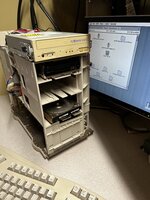 | |
Posted by: MrFahrenheit on 2021-11-15 19:05:57We’ll it came today! It did scrub up somewhat but it’s still pretty yellow and dirty looking. Although it is very quiet and did boot off my install disc without any issues. Haven’t tried to burn anything yet but so far I’m pleased I think a lot of that will be covered up by my powermac bezel and it won’t look to awful. I'm actually wondering if the eject button is going to line up now, guess I'll have to get it all buttoned back up and try it.Nice thing now is that you can burn a CDRW disc that’s bootable and you can rewrite it if you want to. | |
| Posted by: superjer2000 on 2021-11-15 19:30:31 I have never had an issue with a non apple Optical drive failing to boot as long as I was booting a proper boot cd. I didn’t realize some would not boot. On some Macs pressing c would boot from a cd or else holding down command option shift delete to not boot from the internal hd would always work, although sometimes it took a few attempts. | |
Posted by: macuserman on 2021-11-15 19:39:01I have never had an issue with a non appleI’m not sure which do and which don’t but I do know for sure that not all optical drives will allow you to boot a Mac disc I’ve had some that don’t. | |
| Posted by: Nynex on 2021-11-16 09:47:47 If you are still having issues with this, the following may help: At issue is the fact that the Yamaha drive isn't Apple ROM'ed, so it's easy to say it isn't bootable (as Yamaha support used to do without much thought), BUT ... it is bootable with the longer SCSI ID startup prompt (command/option/shift/delete/SCSI ID#), and if you install Apple CD-ROM 5.3.1 (from System 7.6) in place of your OS's standard CD/DVD driver/extension, it will work just fine as your primary/only CD drive. Just keep the Toast extension in another set for when you want to burn. | |
| 1 > |