68kMLA Classic Interface
This is a version of the 68kMLA forums for viewing on your favorite old mac. Visitors on modern platforms may prefer the main site.
| Click here to select a new forum. | |
| Cheap and simple ADB to USB converter | |
| Posted by: ronan on 2021-11-05 02:44:32 Hi everyone, I love my Alps M0116 keyboard and I have been using it daily for more than one year now. When I was trying to find a decent ADB to USB converter I was shocked by the price. So after searching the internet I found out that the QMK firmware (that you'll know if you already built some mechanicals keyboards on you own) had support for adb keyboard ! So I bought an Arduino Pro Micro and a flashed it with this custom firmware and I was good to go. But for more than one year I was struggling because there was three wires between the pro micro and the adb connector flying and always disconnecting. So I finally got to create a small and simple PCB to clean this up and here it is 🙂 Here are the KiCad files : https://github.com/ronangaillard/adb2usb You can order it on JLCPCB for instance (around 4.50$ including shipping for 5 pcbs). The Pro Micro is worth around 10$, and you'll just need a resistor of between 1k and 10k to solder on the PCB (through hole to make things simpler for everyone). 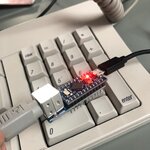 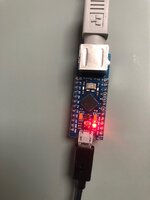 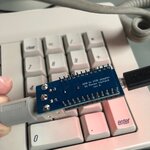 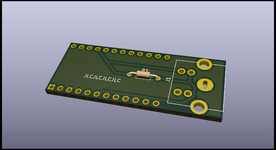 For the first time you will have to flash the DFU bootloader to your Pro Micro with this doc : https://beta.docs.qmk.fm/using-qmk/guides/keyboard-building/isp_flashing_guide You then need to install QMK : For Mac OS : brew install qmk/qmk/qmk And then build firmware with : qmk compile -kb converter/adb_usb -km default And then flash Pro Micro with : qmk flash -kb converter/adb_usb -km default And you're good to go ! A really cool thing with QMK is that you can personalize your keyboard mapping very easily, for instance I remapped the "Power key" at the top of the keyboard to a Play/Pause key. This was a really quick post about my little project, don't hesitate to ask for anything that wasn't clear ! Ronan | |
| Posted by: chue on 2021-11-07 11:22:12 This is fantastic thanks for releasing it! Now I just need to get around to building a few. | |
| Posted by: kitsunesoba on 2021-11-08 09:53:09 Do you see anything that would prevent this from working with a Pro Micro compatible board such as the Elite-C? | |
Posted by: mogs on 2021-11-08 14:58:48Do you see anything that would prevent this from working with a Pro Micro compatible board such as the Elite-C? Should be fine, both use Atmega32U4 which is the magic sauce required for emulating USB devices. | |
Posted by: ronan on 2021-11-09 12:30:29Should be fine, both use Atmega32U4 which is the magic sauce required for emulating USB devices.Agree with that (AtMega32U4 is also one chip that supports the QMK firmware) 🙂 | |
| Posted by: Tom2112 on 2021-11-30 11:30:10 This might be a really dumb question, so bear with me: how hard would it be to reverse this? In other words go modern USB keyboard/mouse to ADB port on Mac? I'm not so concerned about the keyboard side of things, as there are good reasons to use a genuine ADB keyboard. But the old ball mice are horrible, and a modern optical USB mouse is so much better. Having a cheap device to make that connection would be awesome. (Wombats are pricey, especially if you have multiple Macs like we all do.) | |
| Posted by: chue on 2021-12-04 14:00:57 Anyone know of a part number for the adb connector? I want to make sure I buy a connector that will fit the pcb. | |
Posted by: Daniël on 2021-12-05 04:42:12Anyone know of a part number for the adb connector? I want to make sure I buy a connector that will fit the pcb. You are looking for a Circular Mini Din, 4 contact, PCB Mount connector. Looking at various brands, it seems this is fully standardized and any brand should fit. Examples would be the TE Connectivity 5749230-1 and 5749263-1, and CUI Devices MD-40SGK, but again, any PCB mount connector should work. These were widely used for S-Video in A/V devices. | |
| Posted by: chue on 2021-12-05 07:39:24 Thank you! | |
| Posted by: ronan on 2021-12-05 07:44:20 For information here is the connector I bought and the one this board is designed for : https://www.digikey.fr/fr/products/...TCBcDa4AwE4wFoDSBZAIgcQBrIBYBlZAIRIDlMQBdAXyA | |
| Posted by: Trash80toHP_Mini on 2021-12-05 10:35:45 Nice work! Very elegant. 😉 | |
| Posted by: Skate323k137 on 2022-04-07 07:13:46 Thanks for your work and docs on this! I grabbed the git repo and generated gerbers with kicad, and ordered a small handful to try myself. The link for the DFU bootloader is gone but I'm sure I can manage, there seems to be a little documentation elsewhere at least. | |
| Posted by: shadedream on 2022-04-08 18:17:30 Nice, I have one of these bare wired up on a teensy already... it was a massive pain. A little PCB like this would have made it significantly easier. If you can find them and spend the extra for one, I recommend getting a pro micro compatible board with anything but USB micro though. Those little micro ports like to rip right off the board. | |
Posted by: Skate323k137 on 2022-04-08 19:07:27Nice, I have one of these bare wired up on a teensy already... it was a massive pain. A little PCB like this would have made it significantly easier. I'll have some extras, happy to pass along a couple if you wanted some (or if someone else in the US does). Re the USB ports, are they cold jointed, or do they take the pads right off the PCB? | |
Posted by: shadedream on 2022-04-08 19:18:05I'll have some extras, happy to pass along a couple if you wanted some (or if someone else in the US does). Appreciate the offer, but don't need one at the moment (I mostly use my wombat currently). I believe they tend to rip the pads right off the PCB. The USB Micro ports don't have good through-PCB support legs to hold them on. It was such an issue that the custom keyboard community designed multiple of their own USB-C pro micro clones to use instead. | |
| Posted by: Skate323k137 on 2022-04-08 20:18:54 Ah nice, great info. Do you use a mouse with the Wombat? My ADB keyboards are fine but it's picky with mouses and seems a bit laggy with fast movements. I haven't updated the firmware or customized any settings but it didn't like my IIgs mouse at all. | |
Posted by: davewongillies on 2022-04-09 12:36:57Nice, I have one of these bare wired up on a teensy already... it was a massive pain. A little PCB like this would have made it significantly easier.For anyone looking for non-micro USB versions of the pro micro, the BIT-C fits the bill: Amazon.com: BIT-C Pro Micro MCU with USB-C & DFU bootloader (ATmega32U4, 5V/16MHz) (Black) : ElectronicsAmazon.com: BIT-C Pro Micro MCU with USB-C & DFU bootloader (ATmega32U4, 5V/16MHz) (Black) : Electronics
www.amazon.com
| |
Posted by: Skate323k137 on 2022-04-09 13:30:46For anyone looking for non-micro USB versions of the pro micro, the BIT-C fits the bill:Nice, also looks like these should do for a few bucks less (b stock just means the PBC is a little thicker I guess?) 
Elite-C V4 - USB-C Pro Micro Replacement ATmega32u4Liked the original Elite-C but think it’s a bit too tall for you? We heard you loud and clear, so we replaced the original USB-C port with a mid-mount version of it to produce a lower-profile board. It's even thinner than a Pro Micro!
 keeb.io
| |
| Posted by: shadedream on 2022-04-09 16:49:29 Elite-C are the ones I've used in the past for keyboard projects. Wasn't aware of the BIT-C ones. They don't look as nice as the Elite-C for that price, but if it works it works. Looks like the BIT-C has a vendor in Europe also which may be a plus for some: 
Bit-CPlease note machine pin sockets are not included, available at the link below.https://mechboards.co.uk/products/machine-headers-12-pin-pack-of-2 Pro Micro Compatible MCU with USB-C The Bit-C is a microcontroller daughterboard featuring the Atmel ATmega32U4, designed for DIY keyboard enthusiasts...
 mechboards.co.uk
| |
| Posted by: kitsunesoba on 2022-04-09 19:21:23 Also in the vein of Pro Micro clones (as the Elite-C is) there's also the nice!nano 2.0, which works the same way as the Pro Micro/Elite-C/etc do with the same pinout and everything (drop in replacement), but also offers connection via BLE (Bluetooth Low Energy) in addition to USB. Only difference is that you need to hook up a battery, and it would be pretty easy to find room for one of those in the case of any just about any ALPS Apple board. | |
| 1 > |