68kMLA Classic Interface
This is a version of the 68kMLA forums for viewing on your favorite old mac. Visitors on modern platforms may prefer the main site.
| Click here to select a new forum. | |
| Mac Classic: Swap analog board with Classic II | |
| Posted by: ClassicMacintosh on 2021-10-26 00:54:35 'Evening all, On the right, I have an analog board from a carefully restored Classic in excellent condition. All of the capacitors were leaking. It has been fully recapped but doesn't work, and has been a bit of work to troubleshoot for a beginner. On the right, an analog board from a booting classic 2 with some logic board issues (battery bombed). I can't tell the difference. Is it okay to exchange them for testing? Thanks 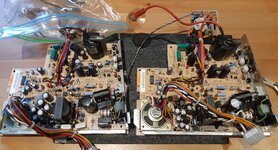 | |
| Posted by: joshc on 2021-10-26 01:08:25 Those are interchangable, as the yoke connector is the same. It's when you've got one with a different yoke connector that you can't just swap them as easily. If you can't get a Classic AB working, the place to look is the replacing the optocoupler (assuming no voltages or very weird voltages). | |
| Posted by: ClassicMacintosh on 2021-10-26 01:41:46 Thanks. That makes sense. Which part is the optocoupler? Are replacements easily available? How do I check the voltage? Strangely, after swapping them out, the new-old AB doesn't produce anything. Both give no indication of booting, sound, anything. Is there perhaps a logic board reason for this? Finding it extremely hard to believe neither have any power at all. -edit- after leaving it to boot for about 15 seconds, it began to make a quiet popping sound, almost like a "click" "ka-click-ka-click-ka-click". Sounded like it was coming from near where the AC goes in. The fan definitely spun. | |
| Posted by: dochilli on 2021-10-26 01:49:42 First look at the power connector if there are broken solder joints. I had this on one of my classic AB. Are the fuses ok? A lot of things can be wrong with Classic analog boards (the two Diodes DP3 and DP4 (1N4148) are almost bad everytime, TDA4605, CNY17G, IRFBC40). TDA4605: Have you measured the voltage at pin 6 of TDA4605? Should be 12V. Voltage is AC! 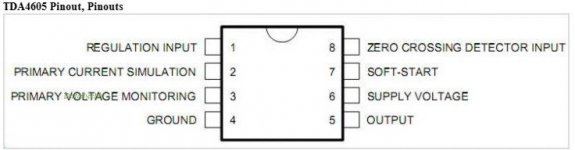 The voltages +5, +12 and -12 can be measured at the floppy port. 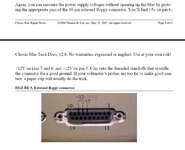 | |
| Posted by: ClassicMacintosh on 2021-10-26 02:00:08 This is perfect. The power connector's solder joints look okay. -edit again- is there more than 1 fuse? I only found a single 3.15A 250V, and it looks fine. I have found a source of 1N4148 diodes. Will a 4605-3, CNY17G-3, and IRFBC40S do for replacements? Can also easily source these. For testing TDA4605, can I have the board out of the machine, plugged into AC, and switched on? Or can it be done with AC off? Same question for the external floppy connector testing - multimeter black to standoffs for ground, and probe into 12v or +5... does the mac have to be reassembled & on? Or can it be done with the board loose and unplugged? Thanks | |
| Posted by: dochilli on 2021-10-26 05:28:54 There is one fuse. For testing the classic must be switched on. I used the CNY17G-3 and it worked. The others I don´t know. I would start with measuring the voltages at the floppy port. Black to ground and red to 12 or 5V. Be carefull when working at the AB! There are high voltages! Discharge the CRT when you disassemble the classic. | |
| Posted by: dochilli on 2021-10-26 05:49:44 Service manual | |
| Posted by: Cinan on 2021-10-26 14:26:57 I always think it is safer to have the AB installed in the machine particularly with the anode cap (big red wire) safely connected to the CRT with the earth cable connected. Too risky for amateurs to be playing around some of these deadly voltages. Safety first folks, safety first. ClassicMacintosh look on Mouser or Digikey and you should be able to find replacements for most parts. Double check your polarity on the Capacitors you have replaced and check the traces on the reverse side to see if there is any obvious corrosion, next check polarity between trace end points with a multimeter. | |
Posted by: ClassicMacintosh on 2021-10-26 17:39:30I always think it is safer to have the AB installed in the machine particularly with the anode cap (big red wire) safely connected to the CRT with the earth cable connected. Too risky for amateurs to be playing around some of these deadly voltages. Thank you! I have done this, safety first is a good mantra. I ended up ordering all the parts on eBay, don't mind waiting a little longer. But will keep mouser in mind, their shipping is lightning fast. Have double-checked the polarity of all caps on the recapped board. There was a fair bit of corrosion on the reverse of the recapped one, and a little on the other - scraped it off and applied mask on top. There is one fuse. OK, have some testing results here: On AC volt setting: AB #1 (Classic 1, Fully recapped) +12v: 1.45-1.95v +5v: 1.51-1.94v AB #2 (Classic 2, not recapped) +12v: 11.99 +5v: 4.37 In addendum, there was a little caked-on liquid on the Classic 2 motherboard. I cleaned it up, and then swapped the 22k3W resistor from the Classic 1 board to the Classic 2 board (it was obviously burnt-out in board #2). Results: After a little popping, it came alive. The pattern on the screen waves a little and alternates with a quiet "pop" to straight horizontal lines, and back again.: 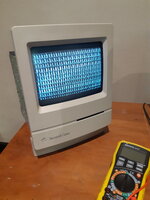 Does this help with any diagnosis? Feels like some progress. Thanks again | |
| Posted by: dochilli on 2021-10-26 22:59:13 Your 5V is too low with 4.37V (must have 4.85 to 5 V), 12V is ok. The Mac can´t boot with that. I would recap AB#2, perhaps the voltages are ok then. On #1 I would change all parts that I described before ((DP3 and DP4 (1N4148), TDA4605, CNY17G, IRFBC40). Did you check the solder joint of the connection between LB and AB? Sometimes they must be reflowed. | |
| Posted by: chiptripper on 2021-10-27 00:43:25 I recapped a Classic and Classic II AB recently, and I had low 5V issues on one of them, wavy display issues similar to what's described. It turned out to be PP1, located right in the centre of the board. I removed it, gave it a contact cleaner bath, and reinstalled, totally resolved the problem. | |
| Posted by: dochilli on 2021-10-27 01:09:36 If you turn pp1 to change the voltages, check both voltages (12 and 5 V). If 5V is low and you turn pp1, the 12V can raise to high and damage the board. Cleaning pp1 can be a good idea. | |
| Posted by: ClassicMacintosh on 2021-10-27 14:45:03 Great advice, thanks all. Plans: AB #1: Replace components @dochilli described. Check solder joints over AB #2: Recap. Remove PP1, clean. Would 99% IPA do for cleaning? Have also been reading this thread: https://68kmla.org/bb/index.php?threads/dont-use-16v-solid-tantalum-on-se-30-motherboards.37823/ Planning to replace solid tantalums with derated polymers on the LB. | |
| Posted by: dochilli on 2021-10-27 22:45:58 IPA is ok. | |
Posted by: ClassicMacintosh on 2022-01-07 17:32:06IPA is ok. So, after a couple of months wait for components, everything has arrived and been replaced. Hoping for some more insight: AB #1: Still awaiting TDA4605, everything else replaced. AB #2: Complete recap performed (20+ capacitors) checked & rechecked. PP1 removed, 99% IPA bath, brushed gently with toothbrush, resoldered. Results: 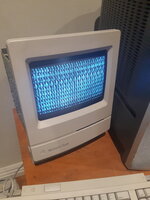 Boot attempt #1: Popping followed by wavy patterns above. 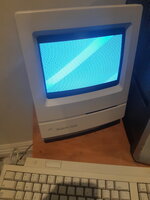 Subsequent boots show the lined pattern above - it waves and oscillates within a few millimetres, like ripples in a small pool. So frustrating! The only last thing that hasn't been done is to replace the Logic Board's tantalums with derated Polymers, which are yet to arrive. Hoping for some insight. Thanks again | |
| Posted by: ClassicMacintosh on 2022-01-07 17:54:59 In addendum. I noticed from another topic here that the security capacitors don't look great. Could these be the culprit? (all replaced caps are labelled with black dots or "22" to signify year). 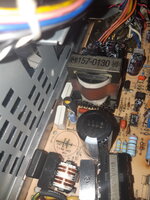 | |
| Posted by: Johnnya101 on 2022-01-07 17:57:25 Did the voltages change? | |
Posted by: ClassicMacintosh on 2022-01-07 18:55:59Did the voltages change?Only slightly. Have 11.91 & 4.49 no matter whether cold boot (pic 1) or second boot (pic 2). | |
Posted by: macintosh2002 on 2022-01-08 00:33:58Only slightly.In my opinion 4.49V is not a good result, you should have 4.85V to 5.15V. That could be enough to get a flicker screen | |
Posted by: ClassicMacintosh on 2022-01-08 01:46:00In my opinion 4.49V is not a good result, you should have 4.85V to 5.15V. That could be enough to get a flicker screen Thank you. What else can be replaced to influence this? Could the white Security Caps (pictured above) cause this, if broken, and should they be replaced? | |
| 1 > |