68kMLA Classic Interface
This is a version of the 68kMLA forums for viewing on your favorite old mac. Visitors on modern platforms may prefer the main site.
| Click here to select a new forum. | |
| Apple-branded "Fast Ethernet 10/100BaseT card" (PCI) "SA0025" | |
| Posted by: aperezbios on 2021-10-01 20:55:33 Does anyone know which Apple driver/extension this card uses? The SA0025 is apparently just a re-badged ZNYX NETBLASTER ZX345. Both boards are silk-screned with "SA0025" on the PCB, and appear identical, besides the sticker on the 21140 chip itself. For the record, the Apple 10/100 PCI card is actually just a DEC 21140-based Ethernet card: The following is taken verbatim from a 1998 Apple document, labeled "033-1014-A", Update: About the Optional 10/100Base-T Ethernet Card Some Macintosh computers come with an optional 10/100 Base-T Ethernet card installed. This update provides details about the card that are not covered in the computer’s manual. 10/100Base-T Ethernet Card Specifications
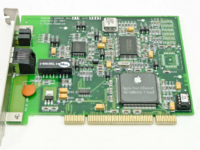 ...and here's the original, ZNYX-branded card: 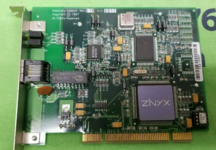 | |
| Posted by: olePigeon on 2021-10-01 21:09:51 I AltaVistaed the card, and it apparently uses the "Apple Enet" extension ... but it has to be the correct Apple Enet extension from the Beige G3 or later. I suspect so long as it is installed while you install the OS, anything OS 8 or later will likely install the correct driver for the card. | |
| Posted by: NJRoadfan on 2021-10-06 04:05:48 This was a BTO option on the beige G3. The B&W G3 came with it built in. | |
| Posted by: aperezbios on 2021-10-06 18:40:39 I can confirm that the "Apple Enet" extension, version 2.4.2, works properly with this Apple-branded card, which is actually a re-badged ZNYX NetBlaster ZX345. I've attached a self-extracting, macbinary-encoded archive, containing just the necessary Extension, to this post. According to a nearly 21-year-old MacInTouch post, version 2.4.1 of this extension had a memory leak. The Apple ENET Extension version 2.3 may also work with this card, but I haven't yet validated it. Apple Enet extension version 2.4.2 originally was distributed as part of an image, published on Apple's FTP site, Apple_Ethernet_Update_2.0.smi.bin | |
| Posted by: gijsmans on 2022-01-15 16:40:43 I have this card in a Macintosh Server G3 333MHz. Works using standard Mac OS 9 installation. | |
| Posted by: LCARS on 2022-03-26 10:34:36 I recently received the same Apple-branded card and when installed in my beige G3 running 9.2.1 with the 2.4.2 Enet extension, the machine will not boot past the happy mac screen. I reset the PRAM but still no boot. I have yet to move the card around to different PCI slots but before I do, does a no-boot situation like that lend itself to a problem with the card itself? | |
| Posted by: Swabbie on 2022-04-06 04:16:11 if I could be permitted to hijack this thread a bit - has anyone on here gotten this card working on a 6400/6500/Tam? I still haven’t been able to get Ethernet on my 6500 (see previous post here). The card discussed here is for sale on eBay for $30. one main problem unrelated to the card, Ethernet is missing from my system under tcpip. Ppp and AppleTalk are my only options & I don’t know why. I loaded the os with the Ethernet card installed But maybe because the card isn’t liked by my system it didn’t trigger the needed code to be installed when I installed the OS? Any help here would be much appreciated. | |
Posted by: Powerbase on 2022-04-07 14:06:47if I could be permitted to hijack this thread a bit - has anyone on here gotten this card working on a 6400/6500/Tam? I still haven’t been able to get Ethernet on my 6500 (see previous post here). The card discussed here is for sale on eBay for $30.It most likely didnt install the extensions because it wasnt present when you installed the OS. I think a program called TomeViewer is used to extract them from the installer. | |
| Posted by: ried on 2022-04-07 20:43:43 Yep. Same with the DVD Player app, etc. Only installs support for what's physically present when the installer is run, unless you choose a custom install at that time. | |
Posted by: Swabbie on 2022-04-08 03:42:51It most likely didnt install the extensions because it wasnt present when you installed the OS.You're correct about the Tome extractor. I used it to get usb extensions installed when I installed an OS without the card installed. Problem is it looks like all the Ethernet extensions are still there but I’d need a definitive list of what to look for from Someone to confirm. | |
| Posted by: croissantking on 2025-04-05 06:14:37 Would anyone who has the Apple branded 10/100 ethernet card discussed above be kind enough to help me? I would like to see a screenshot of the information shown about it in Apple System Profiler under Devices and Volumes. For example here’s a 3rd-party ethernet card of mine. 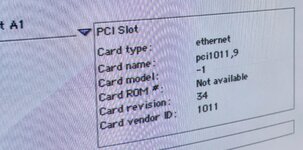 I am keen to know the name, vendor ID and model. | |
| Posted by: Mk.558 on 2025-04-06 08:33:53 Turns out I can actually get one more use out of this thing. You know that principle where the thing you like the least is the thing that lasts the longest? 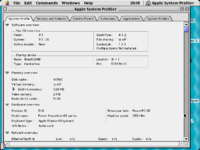 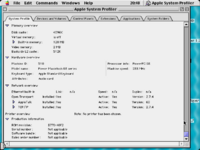 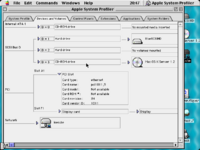 Not really satisfied with the ASP report, I checked with TattleTech. Also tried checking with Rhapsody 5.6, but that doesn't have an equivalent for ASP. Considered installing OS X on it, but too much time for something that probably won't give any other info than what we have here. 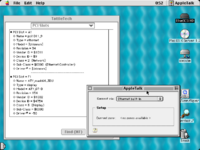 TattleTech report is below. In AppleTalk and TCP/IP control panel, it's reported as "Ethernet slot A1", when I got it, it was in "Ethernet slot B1". If you scrap off the label, it shows this: 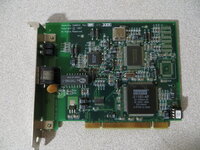 | |
| Posted by: joevt on 2025-04-06 15:39:17 For Mac OS X, ioreg and lspci from my pciutils fork. Also, my pcitree.sh script.For classic Mac OS, Display Name Registry and my DumpNameRegistry.For Open Firmware, the dump-device-tree command and my lspci for Open Firmware script. | |
Posted by: croissantking on 2025-04-06 17:21:08Turns out I can actually get one more use out of this thing. You know that principle where the thing you like the least is the thing that lasts the longest?Oh thank you, much appreciated! You don’t like this card? I’m surprised to see your SA0025’s card name and vendor are the same as my D-Link card (1011 is DEC corp). I assumed that it would be different as the Apple Enet extension ignores my card. So it must be checking another way. | |
| Posted by: NJRoadfan on 2025-04-06 18:10:59 Its likely MAC locked, looking for the Apple OUI (MAC starts with 00:05:02 in the example above). Looking at OUI registration dates, it could also be 00:10:FA too. | |
Posted by: Mk.558 on 2025-04-06 21:39:09You don’t like this card? The card is probably fine, the host machine is ready for the dumpster... | |
| Posted by: joevt on 2025-04-06 21:47:57 Might be interesting to compare vendor/product IDs with subsystem vendor and subsystem product IDs. | |
Posted by: croissantking on 2025-04-06 23:50:31Its likely MAC locked, looking for the Apple OUI (MAC starts with 00:05:02 in the example above). Looking at OUI registration dates, it could also be 00:10:FA too.Ooh, I’m totally going to pop off the little 1kbit EEPROM and reprogram it. The card is probably fine, the host machine is ready for the dumpster...G3/233 DT? Do tell. What’s the story? | |
| Posted by: Mk.558 on 2025-04-07 06:24:07 Oh it's just a Server G3 MT that is about ready to keel over: * Capacitors in the PSU are dying * All the HDDs were dead when I got it * The RAM failed one by one * The CD-ROM drive was unplugged on arrival * Battery bomb damage It did its job though, but also made me earn it. Heard the power button likes to break on these, this one is just fine. | |
| Posted by: finkmac on 2025-04-08 11:05:42 damn, yeah. CD-ROM being unplugged is a dealbreaker. once it's unplugged it's impossible to fix. | |
| 1 > |