68kMLA Classic Interface
This is a version of the 68kMLA forums for viewing on your favorite old mac. Visitors on modern platforms may prefer the main site.
| Click here to select a new forum. | |
| Bug in Apple's Find File app (System 7.5 – Mac OS 8.1) | |
| Posted by: PB170 on 2020-10-09 00:53:27 While searching for some files with Apple's Find File app using the date options (something I often do), I noticed I wasn't getting the results I expected. After some testing, there appears to be a bug which manifests itself in the following, somewhat peculiar way:
I suppose this isn't a known bug and that there's no fix for it. Just thought I'd let you know, in case anyone is using it regularly like I do. But if anyone has more insight into this, let me know! | |
| Posted by: BadGoldEagle on 2020-10-09 19:22:19 I just tried with Basilisk II (Quadra 900, D1-8.1, Find File "Dateien finden" version D1-1.1.3) and I can confirm that no results are found if you set the search before January 1st 2000. #1: Date October 10th 2020, search: Name contains .SIM, Modified before October 10th 2013. Results: All files were found. (see bottom: all of them were created in 1970 and modified sometime in 1991) 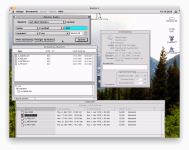 #2: Date October 10th 2020, search: Name contains .SIM, Created before October 10th 2013. Results: All files were found. (see bottom: all of them were created in 1970 and modified sometime in 1991)  #3: Date October 10th 2020, search: Name contains .SIM, Created before October 10th 1999. Results: No Objects were found. 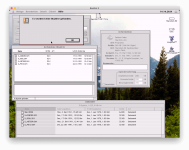 | |
| Posted by: Crutch on 2020-10-10 00:57:04 I was able to replicate this on my SE/30 with 7.5.5. I think I came up with a fix for it. I’ll post it later today and share a link. | |
| Posted by: Crutch on 2020-10-10 02:04:30 My fix works... 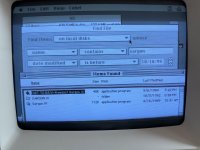 | |
| Posted by: Crutch on 2020-10-10 02:25:01 I created a tiny extension, FixFindFile, that repairs this by patching _DateToSeconds. It's here: https://macintoshgarden.org/apps/fixfindfile Just drag it into your System Folder and restart. What's happening here is, Find File is interpreting "99" as 2099 (see Macsbug screenshot, which I grabbed with "ATB _DateToSeconds"), which is an illegal date in classic MacOS (> 2040) and is probably wrapping around to some much earlier date (I haven't checked, but would guess circa 1904+(2099-2040) = 1963). You're therefore asking Find File to find files created before 1963, so you only get the "1904" results. My fix patches the Toolbox routine _DateToSeconds. It first checks to see if the current application is called "Find File". If not, it does nothing. Otherwise, it checks for a year input greater than 2040, and if it finds one, it subtracts 100 before handing off control to the real _DateToSeconds routine. Let me know if it works for you! I included the source code (THINK C 6).  | |
Posted by: cheesestraws on 2020-10-10 02:26:08I created a tiny extension, FixFindFile, that repairs this by patching _DateToSecondsGood grief, you're quick... :-D Impressive work! | |
| Posted by: LaPorta on 2020-10-10 03:33:38 Amazing you caught that. You may have to update it in 2041, however 😛. | |
| Posted by: Crutch on 2020-10-10 03:53:51 For sure. But we’ll have bigger problems with our old Macs in 2041! | |
| Posted by: BadGoldEagle on 2020-10-10 05:38:53 @Crutch It doesn't seem to work on any of my Basilisk systems (8.1 German Find File 1.1.3, 7.5.1 French Find File 1.1.2 nor 7.5.5 English International Find File 1.1.2)... 🙁 | |
| Posted by: Crutch on 2020-10-10 05:45:02 Hm disappointing. I wonder if my check for a specific app name is breaking. Is your application named, precisely, “Find File” or something else? I don’t have any of those system versions to test unfortunately. | |
| Posted by: Crutch on 2020-10-10 06:05:15 By the way, if the application name isn’t exactly “Find File”, would you mind either (1) change the application name to “Find File” and try again, or (2) open FixFindFile with ResEdit and changing STR 128 to match your exact file name? To prevent overpatching, FixFindFile does nothing unless the application name matches STR 128 in the extension’s resource file. If that’s the issue here, I will need to loosen that restriction probably. Thanks for testing it out. | |
Posted by: Crutch on 2020-10-10 12:03:23@Crutch It doesn't seem to work on any of my Basilisk systems (8.1 German Find File 1.1.3, 7.5.1 French Find File 1.1.2 nor 7.5.5 English International Find File 1.1.2)... 🙁I just installed the English International version of 7.5.5 with Mini vMac, running Find File 1.1.2 and it works fine? I would be interested in any more details you have on your setup. | |
| Posted by: BadGoldEagle on 2020-10-10 16:28:07 Something went wrong while I was unpacking the .sit (I know I should never unpack to Unix but I always do it). The ressource fork was stripped which caused the English international issue. As far as the other systems are concerned, I was able to get it to work by renaming STR128. I posted a comment on the macintosh garden page and uploaded French and German versions there as well. https://macintoshgarden.org/apps/fixfindfile | |
| Posted by: Crutch on 2020-10-10 17:08:56 Woohoo that’s awesome. Thanks for uploading the localized versions! | |
| Posted by: PB170 on 2020-10-11 14:00:31 Wow! I haven’t had time to check the thread during the weekend but came back just now to see if anyone had replied and was amazed to see all the activity. This is fantastic! Amazing to see a fix for it this quickly. Works great! And thanks for including the source. Ps. According to my test, the bug only manifests itself when the system clock is set to 2011 or later, so it doesn't effect the whole century. | |
| Posted by: PB170 on 2020-10-11 14:06:34 I've made a Swedish version. I might be a good idea to append the language directly to the file name for clarity (and also to the version info, but I'm not sure about how to properly do that). Also, it might be more convenient to include the localized versions in the original sit file. Crutch and BadGoldEagle, if you are both fine with it, I can remove the current uploads and screenshot and replace them with this updated version: 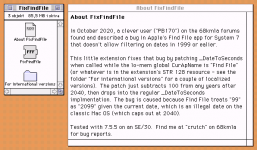 | |
| Posted by: PB170 on 2020-10-11 14:09:10 Thanks for the kind credit by the way 🙂 | |
| Posted by: Crutch on 2020-10-11 20:03:58 Yes of course, that's a great idea to combine the downloads. And thanks for making a Swedish version! I'd love to know how the System knows the name of the "Find File" app to launch it on Cmd-F keystroke. It must be stored in a resource somewhere, but a quick FEdit Plus search didn't turn anything up. If I can find that, I can make a global version that magically knows the name of the app to patch. Or maybe I can find some other way to just detect that Find File is running .... hmm. | |
| Posted by: PB170 on 2020-10-12 00:09:42 All right, the combined version is up now! My first guess would be that it's looking for the creator code. Out of curiosity, I tried changing it to something else and rebuild the desktop file, but the system still finds it. Just changing the file name also doesn't fool it. However, if both the creator code and file name are changed, it fails and opens the built in search function instead. With that done, adding the creator code to another APPL, say the CD player, opens that instead, so I think I'm on to something 🙂 If the original name is restored, it goes back to opening the find file app despite the creator code being applied to another app. So it probably looks for at least a combination of file name and creator code. | |
| 1 > |