68kMLA Classic Interface
This is a version of the 68kMLA forums for viewing on your favorite old mac. Visitors on modern platforms may prefer the main site.
| Click here to select a new forum. | |
| Mac LC and DB15 to VGA adapter problem... | |
| Posted by: dragon_x on 2020-08-27 15:05:08 Hello all. this is my first forum post. My friend and I are trying to bring the Macintosh LC back to life. the capacitors in the power supply and those responsible for the power supply on the motherboard have been replaced. The Macintosh wakes up, a distinctive sound is heard after it is turned on. however, we have a problem. no stable image on the external monitor. we are building our own adapter from db15 to VGA because currently in Poland or the other near placed countries we can not buy a sensible adapter anywhere. we tried a few patterns but to no avail. we get either unstable image without synchronization or uniformly white or black. we checked it on several monitors and a projector. I did not find a solution on the forum, so I am asking for help. thank You and greetings | |
| Posted by: cheesestraws on 2020-08-27 18:28:38 What arrangement of wires has been the most successful to date? How much VRAM does the LC have? | |
Posted by: dragon_x on 2020-08-27 18:56:01What arrangement of wires has been the most successful to date? How much VRAM does the LC have?Hi, thank you for your answer, We dont know how much VRAM does the LC have but I think that 256KB. How to check it? We have VRAM as on the picture. We used this wires arrangement as showed on the picture. Projector shows only right resolution information as 640x480 pixels at 60Hz. 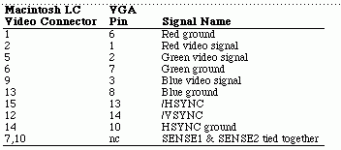 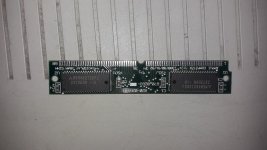 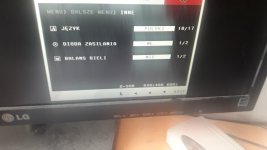 | |
| Posted by: bibilit on 2020-08-27 19:20:40 an original adapter will be your best solution. Those can be found on Ebay pretty easily and probably not for much money. I will try another LCD first, much are not able to play fine with resolutions supplied. | |
Posted by: dragon_x on 2020-08-27 19:29:32an original adapter will be your best solution.I know that original will be best solution, but waiting time for delivery is very long, aprox. october-january.... We wanna tray to make adapter by ourselves. We checked this on other monitor and results was similar. | |
| Posted by: bibilit on 2020-08-27 23:25:12 strange, can you post a picture of the issue ? | |
Posted by: dragon_x on 2020-08-28 02:49:17strange, can you post a picture of the issue ?It looks as You can see on the attached video. On second monitor is similar or worse. We also try this pinout, https://old.pinouts.ru/Audio-Video-Hardware/MacVideoToVGA_pinout.shtml result is similar. View attachment IMG_3466.mov | |
| Posted by: bibilit on 2020-08-28 05:33:32 Are you sure the Logic board is ok ? you mentioned some capacitors have been replaced, not all of them ? | |
Posted by: dragon_x on 2020-08-28 13:17:18Are you sure the Logic board is ok ?of course we're not sure but some time ago a colleague ran it in connection with the crt multiscan monitor, which he had access to and the Mac was working. capacitors in the power supply and three on the motherboard responsible for the power supply have been replaced. after turning on, you can hear the characteristic sound of the Mac booting up. | |
| Posted by: bibilit on 2020-08-28 15:02:25 The LC has a lot of capacitors in the Logic board, only replacing some and leaving the others can be your issue. Again, is not really the capacitor, but more the fluid leaking all around. Was the board washed or cleaned ? | |
Posted by: dragon_x on 2020-08-28 16:05:58The LC has a lot of capacitors in the Logic board, only replacing some and leaving the others can be your issue.the computer is at my friend's. we know that we need to replace all of them, but my friend is afraid to solder smd. the motherboard was cleaned somehow for sure. there is a chance that the computer will come to me soon and then I plan to replace all the capacitors and clean it properly. however, as I wrote earlier, LC worked with a multisync monitor. | |
| Posted by: bibilit on 2020-08-28 17:24:32 Well, in the Logic board area, all capacitors are smd. So don’t see really what capacitors have been changed or not. You are lucky enough the board chimed or displayed anything, many doesn’t work anymore, even with new caps around. | |
Posted by: dragon_x on 2020-08-29 00:22:04Are you sure the Logic board is ok ?The right way may be find apple monitor for this Mac and check. But It is hard to find someone near with that monitor. i wonder how to check motherboard ... three caps was replaced for sure by my friend. | |
| Posted by: dragon_x on 2020-08-31 05:05:47 The good news is that mac react for instert floppy disk. Mac try to read disk and put it out. For now we dont have any bootable system disk. We are searching for a solution how to make it on windows 10. | |
Posted by: cheesestraws on 2020-08-31 05:08:27The good news is that mac react for instert floppy disk. Mac try to read disk and put it out. For now we dont have any bootable system disk. We are searching for a solution how to make it on windows 10. The LC has a high density floppy drive, so you can make a boot disc on a PC using a raw disk image. Not sure off the top of my head how you'd do it on Windows, but it should definitely work. | |
| Posted by: Oberlehrer on 2020-08-31 05:10:31 The Macs of that particular vintage are rather finicky as far as monitors go. I have a 19" monitor that works well with an adapter on my LC475 but not on my IIsi. Other monitors (even 19" ones) play nicely with the IIsi. The original LC and the IIsi came out at about the same time. Just a thought. | |
Posted by: dragon_x on 2020-08-31 05:11:34The LC has a high density floppy drive, so you can make a boot disc on a PC using a raw disk image. Not sure off the top of my head how you'd do it on Windows, but it should definitely work.is it possible on usb floppy drive? | |
Posted by: cheesestraws on 2020-08-31 05:12:59is it possible on usb floppy drive?It certainly works on the USB floppy drive I have here. | |
Posted by: dragon_x on 2020-08-31 05:14:21The Macs of that particular vintage are rather finicky as far as monitors go.So I need to be a little lucky to adjust the monitor? Currently, Mac is with a friend. I hope he will be with me soon. I have a few monitors, including the old LG 17 "LCD, maybe it can handle it | |
| 1 > |