68kMLA Classic Interface
This is a version of the 68kMLA forums for viewing on your favorite old mac. Visitors on modern platforms may prefer the main site.
| Click here to select a new forum. | |
| Mac se/30 SCSI2SD version | |
| Posted by: MegaImg on 2020-07-18 07:18:31 Hello guys, I like to get some opinion of what version of SCSI2SD I must get for my SE/30. At https://store.inertialcomputing.com/Default.asp their is two, v5.1 and the new v6.1 RevF. The new version 6.1 is faster but will the Mac Se/30 will take advantage of it...Any recommendation! 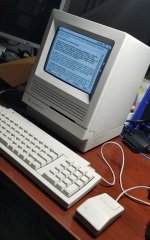 | |
| Posted by: Crutch on 2020-07-18 07:36:58 1. Nice looking SE/30! 2. Particularly if you have multiple Macs, consider the 5.5. It’s tiny and can be used externally. WIth a 90 degree adapter you can plug it into the back of your SE/30 like a little backpack, bent up snugly against the case back. And you don’t have to worry about opening that beautiful case if you ever want to change the SD card. 3. To answer your specific question, my understanding is the SE/30 can’t take advantage of the additional speed of the SCSI2SD 6. | |
| Posted by: MegaImg on 2020-07-18 07:42:45 Thanks! I thinking printing a 3D part to use the expansion bay on the back of the case to access the sd card (https://www.thingiverse.com/thing:4216602) ... I took some time, and work on it to make it look as new...Recap everything (Logic board, CRT Control board, PSU and Analog board), fix floppy and lubricated, clean everything, replace fan, upgrade ROM for 32bit fix, 128mb of RAM and some retrobright! 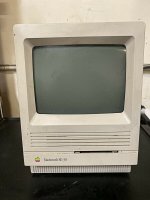 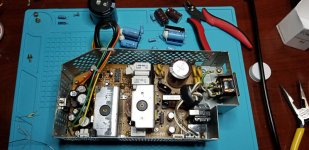 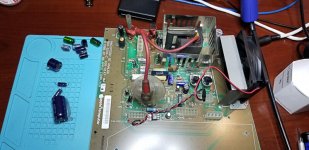 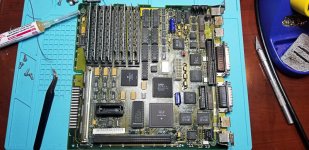 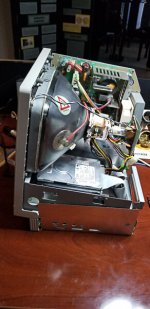 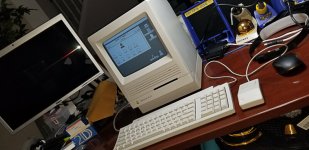 | |
| Posted by: joshc on 2020-07-21 02:37:14 That looks lovely, very well done. I use a SCSI2SD V5.1 in my SE/30: https://store.inertialcomputing.com/SCSI2SD-V5-1-p/scsi2sd-v5.1.htm | |
| Posted by: Hollie on 2020-07-21 19:54:35 Hopefully you haven't bought one yet, but the SE/30 and the SCSI2SD V6 are not friends; I found this out to my disadvantage. The V5.1 works perfectly, however. | |
| Posted by: PotatoFi on 2020-07-22 00:35:08 +1 for a SCSI2SD v5.1. That's what I am using in my Classic II and SE/30. I buy the one from Inertial Computing that includes an SD card. You don't need a power cable - it will be bus-powered. | |
Posted by: Stephen_Usher on 2020-07-22 04:17:00Hopefully you haven't bought one yet, but the SE/30 and the SCSI2SD V6 are not friends; I found this out to my disadvantage. The V5.1 works perfectly, however.I've a v6 in an SE/30 and it's fine. Just don't turn on the SCSI2 stuff. As for the original poster's question about speed, no, the SE/30 won't take advantage of it. The NCR 53C80 maxes out at a theoretical 1.5MB/s but in reality is about 1.2MB/s. | |
| Posted by: aeberbach on 2020-07-22 17:25:13 I had a sinking feeling reading what @Paulie wrote about the V6 and the SE/30 since I have a SE/30 and a new V6 sitting here. Tried it out today; sure enough the 6.08 and 7.5 installers can not write to the v6 SCSI drive though it completes init OK. But I noticed when booting from a 6.08 floppy the drive appeared to be writable; I copied in the System Folder and the drive boots and works normally. Will have to try disabling anything SCSI2? | |
Posted by: cheesestraws on 2020-07-22 19:17:28ve a v6 in an SE/30 and it's fineIt seems to be incredibly hit-and-miss. Some people here have the v6 working apparently absolutely fine, some people it doesn't work at all, and some people get weird half-broken edge cases. There have been threads here where two people have had exactly the same settings and for one person it worked and for one person it didn't. Personally, I suspect some kind of subtle timing issue somewhere, but I'm not competent to investigate the issue any further than having vague suspicions. So if it's specifically for an SE/30, it's probably best to avoid the v6. | |
| Posted by: ttb on 2020-07-23 05:00:59 I just got a new V6 2020 and put it a newly-recapped SE/30 and it's been pretty erratic. I confirmed SCSI2 mode isn't on, but I'm wondering if leaving the speed setting on auto is an issue. I'll try swapping my 5.1 that works in another SE/30 in and report back. | |
Posted by: rplacd on 2020-07-23 06:57:06Hopefully you haven't bought one yet, but the SE/30 and the SCSI2SD V6 are not friends; I found this out to my disadvantage. The V5.1 works perfectly, however.Doubling this – I've had random data corruption, random write errors. Would love to try to see if turning SCSI2 off would help, but I broke off the micro-USB connector so... | |
| Posted by: karrots on 2020-07-23 08:12:57 Do these problems persist with the latest firmware? Mainly past the fixes from early this year for data corruption and booting issues? | |
Posted by: cheesestraws on 2020-07-23 20:34:57Do these problems persist with the latest firmware? Mainly past the fixes from early this year for data corruption and booting issues?I know @Paulie's at least was a very recent one, though I don't know the exact firmware version. It might also be worth noting that, if I remember correctly, the SCSI controller in the SE/30 isn't listed as a supported controller for the v6, but is for the v5 | |
| Posted by: karrots on 2020-07-23 21:41:10 But that list is just a list of devices people have reported success. Not necessarily a definitive no it won't work it wasn't designed for it type list | |
| Posted by: cheesestraws on 2020-07-23 21:48:42 Yes. And in some ways the absence of a Mac that people really want to install scsi2sds in from that list is reasonably telling. I mean, if you want to go and install a v6 in an SE/30, go for it. But I wouldn't. | |
| Posted by: LaPorta on 2020-07-23 23:05:55 It’s not just the SE/30. I had endless corruption issues with a v6 and my PowerTower Pro. In fact, it was so persistent that I just ditched it and installed a compact flash adapter to hook up to its ATA card. There have been a few known firmware issues to cause this. I hope it’s rectified, because I’m thinking of installing it in my Quadra 660av next. | |
Posted by: cheesestraws on 2020-07-23 23:11:18I hope it’s rectified, because I’m thinking of installing it in my Quadra 660av next. parenthetically, I have a v6 in my Q950 and it has behaved perfectly for probably a year and a half now. | |
Posted by: Hollie on 2020-07-24 01:31:12I know @Paulie's at least was a very recent one, though I don't know the exact firmware version. It might also be worth noting that, if I remember correctly, the SCSI controller in the SE/30 isn't listed as a supported controller for the v6, but is for the v5Mine's a RevF, not the latest, but does use the same 6.3.1 firmware (22nd April 2020) as the '2020' version. Never turned on SCSI2. I had a sinking feeling reading what @Paulie wrote about the V6 and the SE/30 since I have a SE/30 and a new V6 sitting here. Tried it out today; sure enough the 6.08 and 7.5 installers can not write to the v6 SCSI drive though it completes init OK. But I noticed when booting from a 6.08 floppy the drive appeared to be writable; I copied in the System Folder and the drive boots and works normally. Will have to try disabling anything SCSI2?Mine would crash out when doing installs (always at the 'writing' stage), and sometimes doing file copies. I could also get a working system through copying the System Folder, but it's not an ideal solution. | |
| Posted by: aeberbach on 2020-07-24 17:14:58 Mine is still failing. My best is disk 3 of 7.5.3 installer so far :-( And then when it reboots after that I get the four chimes of death and 0000000F 00000066... Have to start again from floppy. I wish I had a 6.0.8 boot .dsk with Lido on it, I would like to rule out the 7.5.3 patched HD tool as source of problems. I have one Floppy Emu, no functioning FD drive, no two-way SCSI cables. | |
| 1 > |