68kMLA Classic Interface
This is a version of the 68kMLA forums for viewing on your favorite old mac. Visitors on modern platforms may prefer the main site.
| Click here to select a new forum. | |
| Resurrecting a few 128k/512k boards | |
| Posted by: LaPorta on 2020-07-12 18:31:11 I've finally got around to sorting through a box of broken logic boards that I inherited. Four or five of them are 128k and 512k boards, so I figured that it would definitely be worthwhile to try and get them going again. I have a 128k that was chip-for-chip upgraded to 512ke, and I want to backdate it to 128k with 400k drive for historical curiosity. The other boards will be available to others once I am done! This is what I built my test rig for: being able to quickly diagnose boards like this: 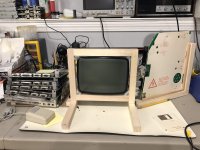 The majority of the boards are throwing what appear to be RAM-related errors, which, to my research, appears to be quite common with these machines, especially those with original, Apple-screened RAM. All visible errors are one-liners, starting with 04 and one with 03. So, to start, does anyone have a good, reliable source of the 64 and 256 kbit RAM chips these thing take at a reasonable cost? 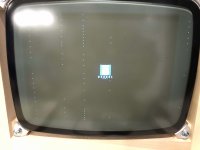 | |
| Posted by: LaPorta on 2020-07-13 01:08:26 I thought this might do the job, it’s just a bit pricy I thought (with no frame of reference): https://www.jameco.com/z/4164-150-Major-Brands-64KX1-DIP-16-DRAM-150NS_41662.html | |
Posted by: blusnowkitty on 2020-07-13 01:22:33I thought this might do the job, it’s just a bit pricy I thought (with no frame of reference):I ended up paying about that much per 4164 off eBay to get my 128k going. | |
| Posted by: PB145B on 2020-07-13 03:26:03 This is cool! Will be following this thread. 🙂 That test rig rig is awesome. I think I remember seeing that in an older thread of yours. | |
| Posted by: LaPorta on 2020-07-14 23:12:00 Thank you! For the first round, I ordered 20 of the 64 bit chips for the three 128k boards I have. Hopefully there aren’t more busted chips than that! If this works well, I’ll get to the 512ks after. | |
| Posted by: LaPorta on 2020-07-18 14:00:58 Crap. So I order these things, spend three hours desoldering the one bad chip, and solder in the new one. Nothing. I look up schematics. Turns out these things are NOT pin compatible with the original RAM! What in the heck gives. How frustrating. Does anyone have any insight into a source of pin-compatible stuff for these? I mean, I can make a breakout board and wire it correctly, but come on. Here is the pinout from the spec sheet on the order site: 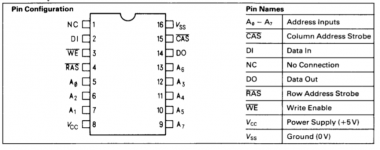 And from the Mac 512k schematics: 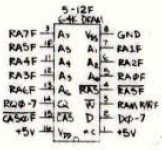 | |
| Posted by: LaPorta on 2020-07-19 10:28:44 Ok so I sorted all this out on paper: 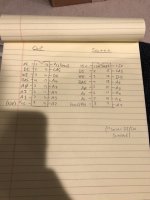 Basically, the ground and 5V pins are reverse...why, I have no idea. So, I went ahead and raised the 8 and 16 pins up, inserted wires into their corresponding holes, and rearranged them. I used a new RAM chip in case I fried the other. 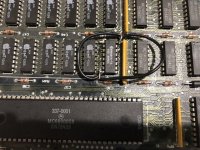 This arrangement produces the same result: nothing on startup. No chime, no video, nothing. It may be that these chips just don’t work at all...what do I know about it? I wish I knew of a known-good source. Otherwise I’m kind of stuck here. Open to all suggestions. | |
| Posted by: PB145B on 2020-07-19 10:45:05 That’s crazy that the pin-out is different on them. I figured that was the same on all 64k RAM chips. Hopefully someone can tell you why it isn’t working, or where there’s a good source for the proper RAM chips. I don’t know, unfortunately. | |
| Posted by: LaPorta on 2020-07-20 01:47:15 Yes I was quite dismayed that that was the case. I need to find direct replacements. If I’m successful ill post here but I’d love to just have someone who already knows chime in! | |
| Posted by: trag on 2020-07-20 03:08:36 IIRC, Uniserver claimed to have laid in a supply of those chips several years ago. You might search the forums and see if he mentioned where he sourced them from. | |
| Posted by: archer174 on 2020-07-20 03:20:53 I think I got my stash from a s-100 RAM board. If you are patient you can probably find one cheap. | |
| Posted by: LaPorta on 2020-07-20 22:28:17 Now that I’m thinking about it, I hope I didn’t fry something entirely. I don’t get a boot chime or anything at all anymore (no CRT image). Why would it not just give me a bad RAM error as before? Wish @techknight were here to save the day as always! | |
| Posted by: techknight on 2020-07-20 22:32:55 Did you change the RAM chip after you powered it on improperly and then rewired? If not, that chip is dead. You cant reverse polarity on a chip and hope it doesnt die it will die. usually instantly. As far as the exact RAM, I dont remember off the top of my head. I havent needed to replace RAM in these machines before as most of the stuff I ever worked on was SE and newer. | |
| Posted by: LaPorta on 2020-07-20 22:39:09 Yes, I used a different chip in the assumption that I fried the other one. By my hand drawing at least, does the logic look correct? Also, the pin that the chip lists as N.C., I just kept the pin out of the hole and soldered it up to keep the +5V continuity path. Was that a mistake? | |
| Posted by: bibilit on 2020-07-21 00:25:09 The Logic board will only chime with good ram all around. Bad ram is F5 according to the sad Mac error displayed. No display at all can be an issue with the Analog board | |
| Posted by: bibilit on 2020-07-21 02:01:48 Also I have been using 41256 chips instead, easily available and cheaper. Works on both the 128 and the 512 Logic boards. Never had any issue. | |
| Posted by: LaPorta on 2020-07-21 02:22:12 Those are 64kbit to make 128k total? | |
Posted by: PB145B on 2020-07-21 05:33:04Those are 64kbit to make 128k total?Those are 256kbit so technically 512k total, but the Mac will still see 128k unless the board has been modified. | |
| Posted by: bibilit on 2020-07-21 14:57:04 Yes true, the board will only see 128 k on the Macintosh 128 and 512 k otherwise. | |
| 1 > |