68kMLA Classic Interface
This is a version of the 68kMLA forums for viewing on your favorite old mac. Visitors on modern platforms may prefer the main site.
| Click here to select a new forum. | |
| Netatalk/Virtual Box setup and config | |
| Posted by: LaPorta on 2020-03-16 17:45:10 Hi everyone, I’ve been getting some good help from pcamen and others setting up an AppleShare server on Virtual Box. This runs on my MacMini server. I’ve been using the pre-made Netatalk 2 setup for the Apple II sharing. It works right out of the box: the server is visible and connectable to macOS 10.14 and System 7 - exactly what I wanted. Now, I need to get this thing fine tuned. My goals thus far are: 1. Using my RAID drive as a shared drive and using it as the root for the A2Server. All of my legacy software is on there, and it will be the biggest boon to me to be able to copy software right from there to a System 7 Mac. I am not sure just how to accomplish this, however, via Linux. I have no experience whatsoever with Linux. I got some instructions from a link pcamen sent me that instruct you to install stuff to make shared drives available, but my system tells me that the command is not available. I assume this is because I have a stripped down OS running this thing...but in reality I have no idea. Currently, that is the biggest thing. Small things like renaming the server I can get to later. | |
| Posted by: LaPorta on 2020-03-16 19:09:13 To be more specific, I am following the instructions below, but my client states that the command "apt" is not found. Not sure what to do about that... Enable a shared folder in VirtualBox for Debian guest Installing guest addition in Debian is a little different from in Arch Linux. For Debian, I will show you a more universal way that you can apply to any other distro including Arch Linux. However, the way I showed before is preferable for Arch Linux. Prepare the system and add a shared folder In Debian guest, open a terminal and install the build-essential, dkms, and linux-headers packages. sudo apt install build-essential dkms linux-headers-$(uname -r) | |
| Posted by: Byte Knight on 2020-03-16 21:36:23 Maybe you already found this, but the manual for Netatalk 2.2 is here. | |
| Posted by: davidg5678 on 2020-03-17 06:12:39 Do you know which distribution of Linux you are currently running? Debian and Arch Linux systems use different package managers. This means that if you are running a distribution based upon Debian, you will use the command with apt to install something, and if you are using a distribution based on Arch, you would instead use the pacman command. | |
| Posted by: LaPorta on 2020-03-17 07:12:52 It is Debian for sure. I’ll get screen shots here to show what’s what...thank you. | |
Posted by: LaPorta on 2020-03-17 08:36:13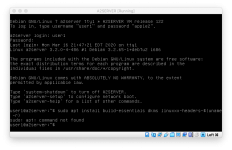 | |
| Posted by: cheesestraws on 2020-03-17 08:38:29 Ah. Do 'sudo apt-get install ...' instead of 'sudo apt install ...'? | |
| Posted by: cheesestraws on 2020-03-17 08:40:28 (also, it should be 'build-essential', not 'build-essentials') | |
| Posted by: LaPorta on 2020-03-17 09:47:10 Thanks cheesestraws, that at least ran, but got numerous 404 errors when it could not fetch the software to install. Perhaps the components are no longer available, or named something else? | |
| Posted by: LaPorta on 2020-03-17 09:49:36 I tried getting build essential itself, and here is what happened: 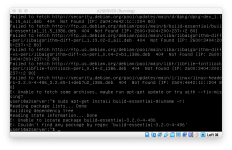 | |
| Posted by: cheesestraws on 2020-03-17 09:54:30 Try doing 'sudo apt-get update' first? To clarify: you are having issues because this VM is based on an old version of Debian so you may need to do some massaging to get it to connect to things | |
| Posted by: LaPorta on 2020-03-17 10:00:21 Thanks, my friend. This is one area where I am the one really in need of help. | |
| Posted by: cheesestraws on 2020-03-17 10:05:28 You are very welcome, I am glad to be of help 🙂 . This stuff is an acquired taste, especially when you're trying to muck about with older versions of things. Sorting out an AppleTalk/AFP fileserver is on my own list to do too, so seeing how A2Server works is very useful 🙂 | |
| Posted by: cheesestraws on 2020-03-17 10:07:49 The 404s are because when a release is over a certain age, Debian move the packages/updates onto an archive server, because fewer people are using it. So it's probably looking for where the packages used to be, rather than where they are now. Update might not fix it, we might need to change the URL manually. But that's not particularly tricky, I'll talk you through it if you need to 🙂 | |
| Posted by: LaPorta on 2020-03-17 10:39:32 Still a lot of 404s. Is there a way to simply update Debian to the newest version without messing this up? Strictly speaking, all I am needing to do is get the shared folder to work. | |
| Posted by: cheesestraws on 2020-03-17 10:41:29 I'll get back to you in about an hour—incoming meeting here. | |
| Posted by: LaPorta on 2020-03-17 10:45:41 Good luck! | |
| Posted by: cheesestraws on 2020-03-17 11:17:34 It finished early! Can you send me what is in your /etc/apt/sources.list file? Just 'cat /etc/apt/sources.list' should work. This is the file that contains what locations it's trying to download packages from. | |
Posted by: LaPorta on 2020-03-17 12:25:54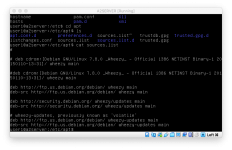 | |
| 1 > |