68kMLA Classic Interface
This is a version of the 68kMLA forums for viewing on your favorite old mac. Visitors on modern platforms may prefer the main site.
| Click here to select a new forum. | |
| SCSI2SD Issues | |
| Posted by: maceffects on 2019-11-09 19:18:07 So I bought 5 SCSI2SD boards and have had major issues getting them to work. I am trying on 3 different SE/30 machines. I followed the instructions on how to flash it to work with Macs, but when installed in an SE/30 it doesn't show up (using Apple Drive software and Lido). They do sometimes produce a steady but slow flash of the activity LED light. Am I missing something? | |
| Posted by: LaPorta on 2019-11-10 12:02:14 I'll tell you: I have had more consternation with these than anything else. I've had to do innumerable things: supply external power while connected to SCSI bus, initialize on another machine first, connect to the external port while a standard HD was connected internally (don't ask me how that worked). The real trick I have found is in partitioning the SD card on a modern machine using Disk Utility so that it has a 2 GB partition (or however many you want if you are using a system that limits it), and then set the SCSI2SD to have that many SCSI drives. What I'll usually do if, say, I don't need more than the 2 GB is I'll make a 2 GB partition under OS X and leave the rest of the drive unallocated. This seems to confuse the hardware less and make it simpler. Just a few suggestions; I haven't found the real magic in these things. | |
| Posted by: haemogoblin on 2019-11-10 12:12:07 Not pleased to read this, I recently bought one. I really hope I didn’t just waste the better part of £70 If mine doesn’t work right it’ll be returned, setting up a hard drive on a Mac shouldn’t require so much messing around. | |
| Posted by: LaPorta on 2019-11-10 13:54:38 Oh they work alright, I've gotten a bunch to work. I've yet to get a good, standardized approach, however. | |
Posted by: Realitystorm on 2019-11-10 17:02:58Not pleased to read this, I recently bought one. I really hope I didn’t just waste the better part of £70Have you tried the guide on my site? http://www.savagetaylor.com/2018/01/05/setting-up-your-vintage-classic-68k-macintosh-using-a-scsi2sd-adapter/ I created it to help myself mainly.... I have a habit of playing with these machines then shelving the hobby for a few years, so wanted a place where I could keep instructions for my future self. Others have found it useful. Providing power through the USB connection seems to be a common fix. The other issue is the settings stored in the SCSI2SD settings program aren't sorted to the SD card, so if you change cards you often have to update your settings again unless the cards are configured identically. | |
| Posted by: haemogoblin on 2019-11-10 17:16:59 Thanks, I literally ordered mine a few days ago. As my hd is showing its age. I'll check that link out for hints and tips. | |
| Posted by: LaPorta on 2019-11-10 17:58:24 I actually just had some much easier success. Configure the SCSI2SD to use whatever size HD you want. I have never, ever gotten it to work well with seeing it as multiple SCSI drive IDs, so I simply only use one SCSI ID and then partition that into multiple drives. What I found was the easiest method is just make sure the SD card has NO file system whatsoever. I erased it as all free space on my OS X 10.4 machine. Then, the patched version of HDSC Setup just sees a totally bare HD and will write the driver on it and help create partitions. It was the easiest time I have had yet. | |
Posted by: sfiera on 2019-11-10 18:16:43Have you tried the guide on my site? http://www.savagetaylor.com/2018/01/05/setting-up-your-vintage-classic-68k-macintosh-using-a-scsi2sd-adapter/Using one of the SD images from Realitystorm’s blog and providing USB power would have been my suggestions. Even if you would prefer to build your own image or rely on termination power, I’d start with that to help narrow down what the problem might be. I also elected to run off an older 2GB SD card instead of thinking about partitions. Of course, 2GB SD cards aren’t common these days, so my Plus currently boots off a pink Hello Kitty-branded card. | |
| Posted by: pcamen on 2019-11-11 16:01:23 I'm very frustrated with mine lately. I've set up a BUNCH of these and never had an issue, and in the last week I've had nothing but issues. I have a 5.0 version that I tried to set up for my SE/30. I can copy all the files off the boot drive to one of the partitions, but the system folder won't become blessed. I set the new drive to be the startup disk and it still boots from the internal HD. So I tried to set up a 5.1 version and I can't even get the darn thing initialized. Harumph. I set it up with the SCSI2SD util as a single SCSI ID with all 32 GB of the card allocated to that device. I am using the Vendor, Product ID, and Version specified here: Then I put it in a Mac and attempt to use either the patched (which should work given the Vendor, Product ID and Version I've given it) or the patched version of HD SC Setup). But now I am getting failures on that. "The disk could not be initialized. Unable to mount volume". I am just trying to initialize the drive before partitioning it. The partition option is greyed out so I assume I need to partition it first. Furthermore, recently I put two SCSI2SD devices on the same Mac, tried it on a Lombard and a 540c, and tried to copy drive images from one to the other. I keep getting "disk error occurred" messages. WTF? Ug. | |
Posted by: pcamen on 2019-11-11 16:08:22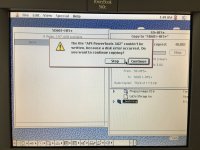 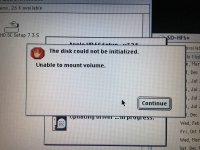 | |
Posted by: pcamen on 2019-11-11 16:13:33Then I put it in a Mac and attempt to use either the patched (which should work given the Vendor, Product ID and Version I've given it) or the patched version of HD SC Setup). But now I am getting failures on that. "The disk could not be initialized. Unable to mount volume". I am just trying to initialize the drive before partitioning it. The partition option is greyed out so I assume I need to partition it first.Okay, well I figured out that one. The 5.1 has SCSI termination controllable by the SCSI2SD utility. I had it turned on and was using it in an external SCSI case. The Lombard didn't like this. So at least that problem is solved. Can anyone point to a SCSI termination guide - when you need it and when you don't? For example, does an internal drive on a system need it? | |
| Posted by: techknight on 2019-11-12 05:30:57 Termination is REQUIRED on a SCSI bus. Period. At the end of the chain. So if there is a SCSI HDD in a Mac, you must terminate this drive. If you plug a drive externally, you MUST terminate that drive too! But if you insert a drive in the middle of the chain, you do NOT need to terminate those drives. only the END OF THE CHAIN needs terminated. If there is only one drive in the chain, That is your termination point. Terminators are there to impedance match the "transmission lines" to prevent reflections, or bus errors. | |
| Posted by: just.in.time on 2019-11-12 09:41:44 @techknight if I’m not mistaken (though I may be), the SCSI2SD v5.x boards have on board termination and I want to say it is enabled out of the box (physically on older red boards, via firmware on newer green boards) I’ve had great luck setting up ~5 of these (SE/30, SE FDHD, CC, LC520/50, and a PM6100), all bus powered with only one of which I tried to play with the config settings on. Usually I just pop in a new SD card, plug into the Mac, and use Lido to partition the SD into ~2gb partitions (except the pm6100, let it have all the space on OS 9.1). I give 4 partitions and leave the rest blank. I imagine the starting format of the SD card is fat/exfat or whatever would be PC compatible. Lido reformats it to Mac HFS. On the pm6100 after Lido I think I reformatted from finder to HFS+ prior to OS install iirc. But it’s been about a year since I set one up, maybe newer firmware has a bug or something. | |
| Posted by: pcamen on 2019-11-12 09:48:14 Holy crap why haven't I been using LIDO? 🙂 | |
| Posted by: techknight on 2019-11-12 10:05:18 Yea, Lido is awesome. I use it for everything. I have 2, maybe 3 of these things and I have not had an issue yet setting any of them up. | |
| Posted by: pcamen on 2019-11-12 10:08:49 Hmm. 4 gigabytes is 4194304 kilobytes according to this converter: https://convertlive.com/u/convert/gigabytes/to/kilobytes#4 I must be a few k high, as my SE/30 running 7.5.5 rejected the partitions of that size. | |
| Posted by: LaPorta on 2019-11-12 10:18:05 Only thing I don’t like about Lido is those awful HD icons it makes you choose from. | |
| Posted by: pcamen on 2019-11-12 10:23:32 ha ha ha ha. I actually thought they were kinda novel when I saw them. Is there a better alternative for setting the HD icons? | |
| Posted by: dcr on 2019-11-12 10:35:17 Was it System 7.5 or earlier that allowed you to change icons with cut and paste? I seem to recall you could download files that contained blank folders with custom icons. You clicked a folder with an icon you liked, did a "Get Info" on it, selected the icon in the info window, copied, then clicked your hard drive icon, did a "Get Info" on that, selected its icon in the info window and pasted. | |
| 1 > |