68kMLA Classic Interface
This is a version of the 68kMLA forums for viewing on your favorite old mac. Visitors on modern platforms may prefer the main site.
| Click here to select a new forum. | |
| Pismo drive replacement - what type of SSD do I need? | |
| Posted by: J English Smith on 2019-04-08 12:06:17 Hey, gang, it's been a while since I spec'd a new hard drive to work with a G3 Pismo. Remind me - does it have to be a PATA drive rather than SATA? I want to cheap out and get an inexpensive drive - there seem to be abundant 120gb SATA III drives out there for around $20, but not sure those will work. I know the OWC ones work but not going to pay THOSE prices. Thanks for any advice... There is this SATA drive for instance... SATA drive example | |
| Posted by: beachycove on 2019-04-08 14:27:59 PATA | |
| Posted by: Cory5412 on 2019-04-08 15:34:53 The itnerface in the Pismo is PATA. There are PATA SSDs, but most of them are old/older technology. I don't know what they cost these days. There are also mSATA and m.2 (both SATA and PCIe/NVMe) to PATA adapters, which may or may not work well, depending on your particular situation. A regular 2.5" SATA drive and an adapter likely won't fit inside a PowerBook/iBook. However, those SSDs are reasonable choices for desktop Macs (except for the Mac mini) where the adapters fit within the space occupied by an existing 3.5-inch hard disk. | |
| Posted by: Gorgonops on 2019-04-08 17:45:22 An mSATA/m.2 adapter plus an inexpensive "drive-stick" is probably your best bet if you want it done cheap; the adapter plus a 128gb drive (it's probably unwise to go bigger) will cost you about $40 on Amazon, which is a fraction of what the OWC Legacy PATA drives go for. Word on the street about these adapters is they usually do not work in systems older than the Pismo (aka, any IDE controller that doesn't at least do UDMA/33) but they *should* work for you, knock on wood. Drive compatibility may also be hit and miss. The cheap ADATA stick in my PowerBook G4 works fine. | |
| Posted by: Elfen on 2019-04-08 22:18:48 I use a CF Card (16GB or bigger) with a CF Adapter on my Wallstreet and other PPC/G3/G4 powerbooks and iBooks. You will need a Single CF to IDE Adapter, the Double CF one will not work, and of course the CF. You will need to do some surgery to the adapter by removing one of the pins, (I think Pin 22, check with the back of the hard drove and see what pin is missing and remove it from the adapter). You can also use CF to PCMCIA adapter and set up and boot it from the PCMCIA Slot. The How to link her is dead, don't know why.... | |
| Posted by: Cory5412 on 2019-04-09 16:36:21 I recommend against using a CF card in a machine you use with OS X. Newer SSDs will be both faster and more reliable. OS 9, especially with enough RAM that VM is disabled or that you do not hit VM often, should be "fine" but I would still back up your data frequently just to be sure. | |
| Posted by: Gorgonops on 2019-04-09 17:04:54 Compactflash would also cost an arm and a leg compared to m.2/mSATA drives once you start getting into the 64-128GB ballpark. I'm seeing prices north of a hundred bucks for 128GB CF card, the m.2 drive I used was $26, which isn't an atypical price. CompactFlash may well have a valid niche for older pre-OS X Powerbooks because of the aforementioned issue with SATA-PATA adapter compatibility; CompactFlash is technically native PATA, although if I were looking for a drive for a 1990's laptop I might try an SD adapter instead simply because it'd also be cheaper if I didn't already have the parts lying around. | |
| Posted by: Elfen on 2019-04-13 00:45:25 Using a CF (or any SSD) on a G3/G4, I find best to edit the system preferences to shut off event & crash logging as they tend to fill up a hard drive quick. It has been a very long time since I did this so I forgot which preferences to shut off but it is somewhere on the internet. Personally, I have not had issues with my CF Powered G3/G4s. They are quick to boot and load up apps. I did have an issue with a Crucial M4 SSD with total Data Loss after 3 weeks and they refused to honor their warantee citing User Abuse as the cause for the Data loss, so I am not happy with them, not one bit! I have had good luck with a Cheapo Chinese KingSpec SSD. The PATA II they have is wickedly fast, and the 2.5in drive they have is cheaper than the 3.5in - go figure! They both use the same size connector! Their PATA (or PATA I) tends to be slow, about equal to a spinning platter, but reliable. Since I did this so long ago, their (KingSpec's) 10 year warentee should be ending soon. So I wonder, when the warentee dies, will they go thermal nuclear or do I have nothing to fear? I'm just joking, I'm sure they will be just fine for many more years to come. Same with the CFs I used - SanDisk and Trascend (sic.) Media mostly. But I should start looking into making backups for these systems soon. | |
| Posted by: AlpineRaven on 2019-04-13 05:01:50 I have confirmed and tested; 44pin to m.2 SSD (Green one) 44pin to mSATA (Black one) 44pin to SD (was slower than above two) I strongly recommend and is widely available is m.2 and mSATA SSD. Don't bother with 44-CF, - its much slower than 44-SD in Pismo, Pismo has 66mhz bandwidth and you might as well put fastest SSD as possible for what It can use. So, get that black full size 2.5" mSATA or m.2 adapter, bear in mind - Pismo will only read upto 128gb. If the media is bigger than 128gb you'll have to partition it, but you'll have to do that external drive. I have confirmed that 540gb works (it was m.2 SSD) in Pismo (partition it in PowerBook G4 into 3 - 2x 128gb and 3rd partition was whatever left over it was). Now that m.2 SSD is in TiBook 1ghz, and the Pismo has 256gb mSATA partitioned into 2x 128gb - one of 9 and X. Cheers AP | |
| Posted by: AlpineRaven on 2019-04-13 05:04:44 Heres a link for m.2 adapter; https://www.ebay.com.au/itm/M-2-NGFF-SATA-SSD-to-2-5-IDE-44pin-Converter-Adapter-with-Case-Converter/233081662155?hash=item3644bfeacb:g:uZEAAOSwMQ1cMFc2&frcectupt=true Heres a link for mSATA adapter; https://www.ebay.com.au/itm/44PIN-mSATA-to-2-5-IDE-HDD-SSD-mSATA-to-PATA-Adapter-Converter-Card-with-Case/292973693249?hash=item443697c941:g:T5kAAOSwGoRcbhLS&frcectupt=true That small angled adapter does not work. Cheers AP | |
| Posted by: Innes on 2019-04-18 03:45:11 Do these bring any noticeable performance improvements? | |
Posted by: AlpineRaven on 2019-04-18 03:48:30Do these bring any noticeable performance improvements?Oh big time! Cheers AP | |
| Posted by: Innes on 2019-04-18 03:52:54 Neat. I'm definitely snagging one myself then. Cheers! | |
Posted by: AlpineRaven on 2019-04-18 04:01:54Neat. I'm definitely snagging one myself then. Cheers!No questions asked mate... you'll be blown away - heres the benchmarks See PoweBook G3 500mhz with spinner HDD (835) and Kingspec is mSATA adapter (2084). Cheers AP 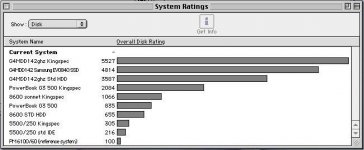 | |
Posted by: Elfen on 2019-04-29 23:14:47Do these bring any noticeable performance improvements?Even if you go cheap by using a CF as an SSD on a G3/G4 iBook/PowerBook, you're talking about Boot times of under 30-45 seconds compared to a hard drive that can take up to 5 minutes, depending on extensions and OS size. | |
Posted by: AlpineRaven on 2019-04-29 23:37:38Even if you go cheap by using a CF as an SSD on a G3/G4 iBook/PowerBook, you're talking about Boot times of under 30-45 seconds compared to a hard drive that can take up to 5 minutes, depending on extensions and OS size.Pismo with mSATA yeah about that - about 35-40 seconds. All comes down to what extensions you have installed, 400 or 500mhz G3 etc Cheers AP | |
| Posted by: Fizzbinn on 2019-05-20 19:44:34 This combo works great in my Pismo (also put the same in my iBook G4): Ableconn IIDE-MSAT mSATA SSD to 2.5-Inch IDE Adapter Converter with Aluminum Frame Bracket - Latch and Retain mSATA SSD as 9.5mm 2.5" IDE SSD Drive https://www.amazon.com/gp/product/B017VQT5YW/ $29.99 Transcend 64GB MLC mSATA SSD TS64MXT1CC https://www.ebay.com/itm/352520351672 $22.95 | |
Posted by: jimjimx on 2019-07-22 10:10:43Hey, gang, it's been a while since I spec'd a new hard drive to work with a G3 Pismo. Remind me - does it have to be a PATA drive rather than SATA? I want to cheap out and get an inexpensive drive - there seem to be abundant 120gb SATA III drives out there for around $20, but not sure those will work. I know the OWC ones work but not going to pay THOSE prices. Thanks for any advice...I went bare bones and used a uncased adapter, and just plugged it into the socket. https://www.ebay.com/itm/mSATA-SSD-to-44-Pin-IDE-Converter-Adapter-as-2-5-Inch-IDE-HDD-5-Volt-For-Laptop/263766651638?epid=1331356730&hash=item3d69b7b2f6:g:GhoAAOSw5MdbKKhM At $3, I might get another 5 or so, just to have on hand, or when they’re no longer made and the price skyrockets.. if you get one of these, make sure that it has the 5v to 3.3v regulator. Some don’t have the regulator, and will destroy the SSD. | |
| Posted by: hageir on 2019-07-22 14:24:27 I’d go for the IDE to CF route, I have one in a Performa, works like a pig. I have the “Chinese Connection” in my G4 PowerBook (white m.2 PATA/IDE box + cheap 32GB Chinese m.2 SSD) and that thing is VERY unstable, the system’s Node Tree gets corrupted every once in a while, requiring a fresh install....... The most solid I’ve come across; the Lindy IDE to SATA bridge, albeit a bit expensive it’s 100% solid, works like a champ and is backwards compatible all the way down to the late 80s = Ultra-ATA 33/66/133 to name a few. | |
| 1 > |