68kMLA Classic Interface
This is a version of the 68kMLA forums for viewing on your favorite old mac. Visitors on modern platforms may prefer the main site.
| Click here to select a new forum. | |
| Desktop backgrounds on compact macs | |
| Posted by: SE30_Neal on 2019-02-12 06:33:17 Hi guys, is there a way to add background pictures to a compact mac: a utility or add on? i’m running 7.5.5 on my se/30. Basically its a bit cheesy but i’d like to the same backgrounds on all 3 of my vintage macs, i mocked up my idea in the below picture. Trimmed picture in photoshop for the se/30 and saved as .bmp to the right size. any advise? 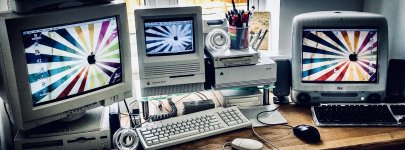 | |
| Posted by: LaPorta on 2019-02-12 06:59:33 There are several DA/control panels I’ve seen, but I don’t use any personally..I can’t recall the names, but they are out there. | |
| Posted by: SE30_Neal on 2019-02-12 07:02:16 Cheers Laporta, i’ll have a look on macintosh-garden see if i can find something neal | |
Posted by: Dog Cow on 2019-02-12 07:07:05Cheers Laporta, i’ll have a look on macintosh-garden see if i can find somethingTry Desk Picture at Mac GUI Vault. | |
| Posted by: SE30_Neal on 2019-02-12 08:31:40 Cheers buddy will try it out when I’m home 🙂 | |
| Posted by: werdna on 2019-02-20 20:05:49 Yes, it is possible. I'd like to point out that Decor is another good option and shouldn't bother you about it being unregistered like DeskPicture always does. Also, when dealing with images on old macs, GraphicConverter is a good option. You can find several versions on Macintosh Repository. (This is also doable on System 6, but you will need to need to convert the file to a 1-bit 512x342 PICT file using GraphicConverter, and then use SuperPaint 2.0 to re-save that PICT as a "StartupScreen" file. With Backdrop installed, make a folder in the System folder called "Screens" and throw as many StartupScreen files in there as you want, and Backdrop randomly picks one on startup.) | |
| Posted by: SE30_Neal on 2019-02-21 14:17:09 I do have desk pictures on and found a registration code that works but still can’t seem to get it to stick picture on :/ thanks werdna, if I cannot get this desk picture working ill give the others a try so thank you | |
| Posted by: bibilit on 2019-02-23 10:56:28 Decor is pretty easy to use. | |
| Posted by: Scott Baret on 2019-02-23 11:23:00 I've used a public domain utility called Backdrop. | |
| Posted by: SE30_Neal on 2019-02-23 11:40:20 Cheers Guys 🙂 | |
| Posted by: Nathanplus on 2019-02-26 13:49:26 Im sorry all im getting is a garbled image can some one direct towards how to make a 1bit image | |
| Posted by: SE30_Neal on 2019-02-26 14:30:52 On a 1-bit macintosh pictures and backgrounds can be intriguing so you need to be clever with yor pictures, simple b&w pics work best. What you trying to fo Nathanplus? | |
| Posted by: Nathanplus on 2019-02-26 14:50:52 So I'm putting pictures on mac os 7 thew a emulator and floppies using imageconverter for mac os 10.4.11 tiger. I figured out how to get all the detentions and the 1 bit finally but every format I use either GIF, .MAC , or PICT does not show up in macpaint, superpaint, or Photoshop unless its a RAW. The (RAW) picture looks like some one threw up on the screen no matter what I use, so I don't know what I'm doing wrong. I've been doing this for hours and I'm not familiarize with picture sizes because that's not what I do, I don't do graphics for a living. This is the first time I have ever had to deal with this, and the first time learning about the measurements of resolution and bits which is the reason I put off the project in the first place. As you can see I'm not good at art, nor graphical formats. That's why I like working on hardware rather than software | |
| Posted by: SE30_Neal on 2019-02-26 14:56:10 Ah i used photoshop 4 on my se/30 and converted the image size as close to 512 x 384 dpi (dots per square inch) to match my screen size and saved in pict format as that suits system 7 best. | |
| Posted by: Nathanplus on 2019-02-26 15:18:44 let me see if I can use my powerbook g3 pismo because it's not mac osx 10 | |
| Posted by: Nathanplus on 2019-02-26 15:25:07 SE30_Neal: what format did you save your image as so you could trance-fer it to your se/30. I'm using and ordinary original SE no super drive. | |
| Posted by: Nathanplus on 2019-02-26 17:48:20 This is really making me mad. because my machine wont except 1.44 floppies, I'm having trouble with software downloading software. At the same time wasting 6hrs trying every combination of photo and trying to open it with photo shop 0.63b and its not working. I would need more help with this. I would be so grateful if some one helps me out by making a tutorial on how to do it. Note: it was easier to put music on my SE than this. | |
| Posted by: Nathanplus on 2019-02-26 18:38:26 Thank the lord above I figured it out. So as a raw image you need specific rows and columns and I kept screwing that up. | |
| Posted by: SE30_Neal on 2019-02-27 01:44:24 Glad you sorted it out. I use a zip drive to transfer files to my mac its alot easier than floppys🙂 | |
| 1 > |