68kMLA Classic Interface
This is a version of the 68kMLA forums for viewing on your favorite old mac. Visitors on modern platforms may prefer the main site.
| Click here to select a new forum. | |
| Non Backlit Recapped Portable Questions and Help (Yes... another) | |
| Posted by: Johnnya101 on 2018-11-07 18:21:33 Hi all, Got my portable board back, and put it all together and am having some error messages and funky stuff happening (After being recapped). I am now starting to think that it is the "new" battery having of failed already and maybe be contributing. With the portable plugged in and battery in, death chimes most of the time and error 01000A82 00001D02 comes up. If I press interrupt, then 03021300 00001FFA comes up. Then, if I press reset (After pressing interupt), 01000200 00001FBA comes up. On the seldom chance it makes a healthy chime, it goes to a blank screen with either a frozen or movable cursor in the top left corner, no floppy image. ??? Not really sure how to read error codes. Havent seen these ones posted either. Am I dealing with a dead battery symptom? Wouldnt it still boot with it being plugged in, or does having a run into the ground dead battery put too much strain and cause it not to boot? Is it something else?? Floppy drive unplugged, no hard drive installed, no cards installed. Non backlit. Recapped board by a pro, tested and confirmed working after recapped. Cleaned. No smoke smell or smoke visible, or excess heat anywhere. Battery came with it when I bought it two years ago. Its a black 3D printed case. Have had it plugged in for a few hours now... Started out at 2.18 volts (Tested on digital multimeter at 20VDC) and after a few hours its at 2.71 and wont go any higher, which makes me think this battery is completely dead. Using stock power adapter that puts out correct voltage. Quite a difference between the needed 6V and 2.71. Any ideas folks? First portable and first time ive ever had an issue like this with one of my macs. 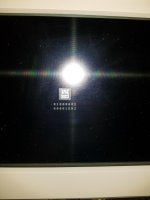 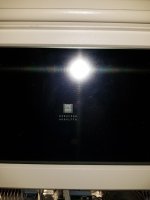 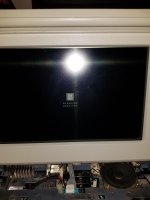 | |
| Posted by: Juror22 on 2018-11-07 21:06:21 They need a live battery. I had a rebuilt SLA battery for one of mine that was working fine, then I didn't use it for about 9 months and when I tried to boot up, I had similar issues from the low power output of the battery. You need a new battery. | |
| Posted by: Johnnya101 on 2018-11-08 03:16:52 That's what I thought. Just wanted a confirmation. Checked that battery I have now 10 minutes after posting my first post (last night) and it already sunk to 2.6 volts... So yeah that one is junk . Buying a new one now. Hope this is all it is. | |
| Posted by: LaPorta on 2018-11-09 06:34:40 As an aside, these things are the same as car batteries. If you are not using them for a long time, get a $20 battery maintainer and hook it up to that. It will keep them good until needed again. | |
| Posted by: Johnnya101 on 2018-11-17 12:55:17 Hello folks, ' Got a new battery reading in at 6.5 volts. Threw it in. Nothing. Plugged it in. Tried again. Couple thick black bars popped up on the screen, then whole thing turned black. Pressed reset, and a distorted dead mac chime and error 01000B82 004C06E8 popped up. Quickly pulled the plug and removed the battery to avoid damage. Do I just need to let it sit and charge?? Is it something else? Wouldnt think that this thing would be THAT fussy power wise... | |
| Posted by: techknight on 2018-11-19 16:03:27 Why is it that just about every portable board I have been sending back out of here, has issues in one way or another. but when I bench it, I have 0 issues... Hmmmm.... Press Reset and NMI at the same time, it should shut off. Then tap a key, try again. | |
Posted by: LaPorta on 2018-11-19 16:07:30but when I bench it, I have 0 issues... Hmmmm....Check my thread and see what you think about my video weirdness...you seem to have a lot more experience here. | |
| Posted by: Johnnya101 on 2018-11-20 12:16:56 So, made a mistake for that one error.... Sorry.... Forgot the fact that the cover needed to be on. So now when I have the cover on, just battery, no charger (And this is a NEW battery) Good chime! But its very quiet and there is a black screen. no error codes. Nothing. Held down both buttons. Same thing. Quiet chime, black screen. Plugged in charger. Again, same thing. So it seems to be booting sort of now? Missing video and low sound. Ill leave it plugged in for a little while and maybe that will help. Verified tested and working display. Ill update in a half hour after its had some charging time. | |
| Posted by: Johnnya101 on 2018-11-20 12:50:44 UPDATE Tried it again. Went to a black screen. I left it on for a few seconds, and then played around with the track ball. A cursor now appeared and I could move it around! Then a question mark floppy appeared! Finally! Didnt know that there is a waiting period to see that I guess. Turned it off, plugged the floppy drive back in. Same thing, question floppy. Popped in the install disk I had, and it spit it out. Had a spare and said Welcome to Macintosh. It loaded up 6.0.5! Sorry for the absolutley horrific lighting, but man these displays need a bunch of light. Old house with only lamps for light pretty much combined with a dark snowy day... It was just a dead battery for all the issues all along.... Now, to order the hard drive adapter and an SCSI2SD.     | |
| Posted by: LaPorta on 2018-11-20 13:07:41 If you build the HD adapter, let me know! I’m looking to make one as well. | |
| Posted by: Johnnya101 on 2018-11-20 13:12:13 Actually, theres some on Ebay right now. Think made by Alaska as well? Here ya go, have at it! Buying one now. https://www.ebay.com/itm/Macintosh-Portable-34-to-50-pin-SCSI-Hard-drive-Adapter/312047710466?hash=item48a77e3102:g😀p8AAOSwMsVXjEow:rk:1😛f:0 | |
| Posted by: LaPorta on 2018-11-24 16:37:50 I ordered one, as well as a v 5.1 SCSI2SD to use with it. We will see how it goes! I'll be modifying the original HD tray to use it. | |
| Posted by: Johnnya101 on 2018-11-24 17:54:26 Just got my SCSi2SD... Just waiting for my adapter now and SD card adapter. Seems like computers are phasing those out now 🙁 | |
| Posted by: LaPorta on 2018-11-24 18:16:04 SD adaptor for your current Mac? Plenty of those to be had. | |
| Posted by: Johnnya101 on 2018-11-24 18:28:48 Current PC. Yeah insane I havent had the need for one before... but now I need it. Thats okay, still need the adapter for the SCSI2SD anyways. | |
| Posted by: LaPorta on 2018-11-24 18:47:27 Alternatively, you can get SCSI2SD set up, get the SD card in it, and then if you have another disk with Lido, etc on it, you could format it right there. | |
| Posted by: Johnnya101 on 2018-11-26 19:41:22 Everything finally arrived. Set up the scsi2sd without issue. Alaska's adapter is also working great. Tried to install an OS with the original install disks, but something was acting up on utilities 2, so grabbed my newly made set of install disks and was able to install 6.0.5 without issues, along with a copy of Microsoft works (had disks on hand). 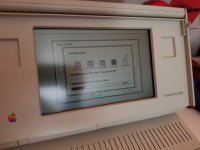 | |
| Posted by: LaPorta on 2018-11-26 20:02:48 Glad to hear it all worked out! Still waiting on mine. Question for you: do you have a similar contrast issue to me? That is, if it is set to anything but full or minimal contrast, there are rolling lines going up the screen at different rates depending on where you have the contrast adjusted? Or is that unique to me? | |
| Posted by: Johnnya101 on 2018-11-27 07:53:13 Unique to you. No issues with contrast so far. Had it all the way up, no issues. Right now its about mid way, again, no issues. | |
| 1 > |