68kMLA Classic Interface
This is a version of the 68kMLA forums for viewing on your favorite old mac. Visitors on modern platforms may prefer the main site.
| Click here to select a new forum. | |
| Se/30 networking | |
| Posted by: SE30_Neal on 2018-08-12 09:46:46 Hi guys, ok I’ve got my se/30 running with the 128mb upgrade on mode 32, as yet i haven’t worked out getting the rominator II working with 7.5.5. But thats another day so networking and getting online. I have shiver network card installed, drivers installed and open transport 1.1.2, a twisted pare adaptor with lights on yet no internet or networking appearing to work. Ive copied the ethernet/DHCP settings to auto the same as my working performa 6200 and nothing. Is there any test program to ping the responses or something, any suggestions? I have no idea if the card works but as lights come on I’m hoping its just a config problem | |
| Posted by: ants on 2018-08-12 17:14:43 A common issue is that vintage Mac network cards only supports a fixed speed and duplex (usually 10mbs Half Duplex), and they don't support the "auto negotiate" standard that modern Routers use to determine the speed & duplex. Check your Router settings to see if you can disable auto negotiate on the LAN port connected to your Mac, and set the connection to 10mbs half duplex. Note that most modern routers probably won't have settings to change this. Usually if the green light (link light) on your Mac network card is blinking, then you don't have a connection to your router. If it's solid, then you do. | |
| Posted by: Unknown_K on 2018-08-12 19:19:16 Those old network cards were built to work with the normal office type switches and hubs so using a 10Mb or 10/100Mb 3com (for example) switch should not be a problem. Connecting the SE/30 directly to a new 1Gb router will probably not work. I have a large network and keep a 24 port 3com 10/100Mb switch running and never had an issue with anything connected to it. Newer machines are on Gb switches and I have a couple old coax hubs for REALLY old machines that I bring out as needed. | |
| Posted by: SE30_Neal on 2018-08-12 22:44:34 Ok cheers guys, humm. I do have a solid green light on the back of the se/30 and running my other mac performa 6200 off the same port (via a range extender with 2 ports) the performa is working fine online and thats also an old 10base Ethernet card. i have a slightly older but half decent router an Asus nighthawk N900 which is quite flexible and do have a small 4 way switch a could use so and have a go at reconfiguring. I had noticed where as the performa has the IP and subnet mask auto configured the se/30 is still blank so something isn’t right, i could manually configure that? | |
| Posted by: Unknown_K on 2018-08-13 00:31:39 Open transport should do DHCP (the whole reason people use it). | |
| Posted by: SE30_Neal on 2018-08-13 02:44:37 Yes thats what I thought, i’ll have a play with my router and add a switch in. It maybe the card itself, its never been tested so i have no idea, the guy I brought the se/30 including the nic card was selling It on behalf of his father who’d recently passed away and it was in the loft so knew nothing about it, will keep trying different configurations | |
| Posted by: ants on 2018-08-13 03:34:24 I find MacTCP Ping handy for checking basic network connectivity (also works with Open Transport) | |
Posted by: SE30_Neal on 2018-08-13 04:02:38I find MacTCP Ping handy for checking basic network connectivity (also works with Open Transport)Great thank you ants I’ll try it out! Neal | |
| Posted by: SE30_Neal on 2018-08-20 14:13:38 Still cant get it to work 🙁 i know the network line works as i can plug it into my 6200 and that works, my twisted pair adaptor has all the correct lights on, attempted DCHP and nothing, tried static ip as well and nothing. Looked at the router and can’t change it to 10base. Not sure what next to try | |
| Posted by: ants on 2018-08-20 16:11:01 Well you could always try a Wi-Fi module 🙂 The above article uses a Vonets card - however I now recommend an OpenWRT device such as the GL-AR300M (which is also in an external box in case you don't want to pull your Mac apart) There's also a system extension for displaying a Wifi icon in your Mac menubar... | |
| Posted by: dochilli on 2018-08-21 08:30:03 Can you show your network settings? My SE/30 with 128MB and an asante network card works. But I had to use manual settings. Automatic IPs did not work. I connect my SE with an old hub (10Mbit) to my router. | |
| Posted by: SE30_Neal on 2018-08-21 12:03:21 Hi dochilli, sure i’ll power zippy up, here’s the tcp/ip settings and my twisted pair adaptor 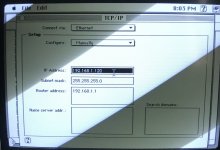 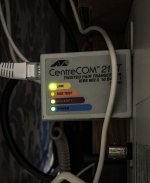 | |
Posted by: SE30_Neal on 2018-08-21 12:15:12Well you could always try a Wi-Fi module 🙂Looks awesome although different base card to mine. I want one 🙂 | |
| Posted by: dochilli on 2018-08-23 11:22:23 Here are my settings. 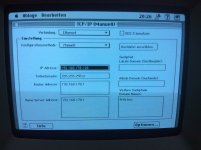 | |
| Posted by: SE30_Neal on 2018-08-23 12:04:47 Thanks Dochilli, i will have another try cheers neal | |
Posted by: SE30_Neal on 2018-08-23 12:15:30Here are my settings.What version of open transport and os do you have on yours as I noticed you have more boxes in your TCP/IP page? | |
| Posted by: olePigeon on 2018-08-23 12:32:02 @SE30_Neal Your Name Server Address and Domain aren't filled in. It can make a difference. He has Advanced options enabled. I don't remember where you turn it on, though. | |
| Posted by: SE30_Neal on 2018-08-23 12:36:00 Thanks Pigeon. I can look into how to add advanced with a play around. What I don’t know is where to find my domain its not on my router setting that i can see | |
| Posted by: dochilli on 2018-08-23 13:04:58 Fritz.box is the adress that I use to administrate my fritzbox in a browser. I use OS 7.5.3 and Open transport 1.1.2. Advanced Options (in german), look at the pictures. 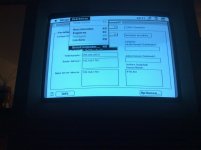 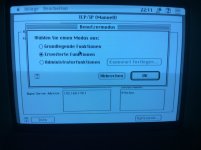 | |
| 1 > |