68kMLA Classic Interface
This is a version of the 68kMLA forums for viewing on your favorite old mac. Visitors on modern platforms may prefer the main site.
| Click here to select a new forum. | |
| Powerbook G3 Lombard replacing LCD panel not whole screen | |
| Posted by: Jon183 on 2017-12-01 16:19:24 Hi, I got my replacement LCD today and I am wondering how to replace just the LCD panel and not the whole screen assembly, I cant seem to find any documentation about it online, maybe im not digging hard enough. | |
| Posted by: Byrd on 2017-12-02 16:33:28 You'll probably need to remove several screws on the outside borders of the screen, some metal tabs and maybe some tape to get the panel out. | |
| Posted by: Jon183 on 2017-12-02 16:43:13 easy enough to do without any documentation, did it last night | |
| Posted by: CharlesT on 2017-12-09 13:40:21 You've motivated me to do the same for one of my Pismos. There's a new screen on it's way to me from the UK now, s/b here around the new year. Did you run across any tricks or gotcha's while doing yours that might be useful to know? | |
| Posted by: Jon183 on 2017-12-10 01:17:09 I believe the case uses regular philips screws but you will need a set of hex drivers too, cant remember what sizes. Remove all those rubber bits in the picture, remove the screws under them, I used a very small flat head screwdriver to pry out the rubber protectors but im not sure it was the best idea. Make sure the rubber bits are all stored in a container right after removing, I lost 2 of the top rubber bits. I used a plastic prying tool to go all the way around the lid except for the large hinge at the bottom and then I removed the plastic cover. I remember there were screws holding the screen in and other screws for the screen bracket. Some dont need to be removed, cant remember which. The connector for the backlight unfortunately doesn't unplug by removing just the LCD enclosure in the lombard, it appears that the connector runs through the screen into the logic board chassis in mine. I snipped both the new LCD backlight wires and old ones, there were two connectors, a thicker one and thinner one in both old and new wires, i connected thickest to thickest and both thinner ones and it worked, absolutely made sure both wires were insulated properly with electrical tape but should of used shrink wrap too. Be careful if you follow what I said, I dont know if its the best idea, proper replacement documentation may exist somewhere, you may be able to connect the new backlight wire to the correct socket without cutting both ends and soldering old and new together, im sure I voided my LCD warranty with what I did. 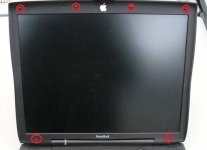 | |
| Posted by: AlpineRaven on 2017-12-10 03:08:07 PowerBook Pismo is same - but it has extra item which is airport antenna in it and the frame inside is kinda different to lombard ones. But Lombard and Pismo shares the same LCD panel. Cheers AP | |
| Posted by: CharlesT on 2017-12-11 11:01:32 Thanks for the info guys. I take it from your description that you did not disconnect the display assembly from the main unit? So you just used the existing data cable and snipped and spliced the backlight cable? I don't use the airport antenna anyway (just use a USB powered TP Link via ethernet), so that won't be an issue. | |
| Posted by: AlpineRaven on 2017-12-12 00:50:25 Its easier to disassemble whole thing - it can be done (i've done it before) from working from behind of the cover, but in these days I find it easier to remove whole display assembly from PowerBook Cheers AP | |
| Posted by: CharlesT on 2017-12-14 18:27:03 Have another question for Jon183. I just received my replacement screen today from the UK. Not bad, ordered on the 7th. Upon opening the package I noticed the unit is actually an Hitachi TX36D something or other, which is a 14.1 inch XGA, but not the LG Phillips I ordered. Is that what you also received, or did you get the LG screen? I haven't taken the Pismo apart yet so can't compare directly tnx in advance | |
Posted by: AlpineRaven on 2017-12-14 18:49:57Have another question for Jon183. I just received my replacement screen today from the UK. Not bad, ordered on the 7th. Upon opening the package I noticed the unit is actually an Hitachi TX36D something or other, which is a 14.1 inch XGA, but not the LG Phillips I ordered. Is that what you also received, or did you get the LG screen? I haven't taken the Pismo apart yet so can't compare directlyThat mob from UK - you need to ask specifically what you want otherwise they'll send out random display but it appears the connector is the same.. Cheers AP | |
| Posted by: CharlesT on 2017-12-14 19:26:58 I thought I did, their website lists the LG Phillips LP141XA. The paperwork I received with the order shows that number in the description field but the part number is the Hitachi part number. Perhaps it's a direct replacement, I haven't been able to find any data one way or the other. Will just have to try it I suppose. | |
| Posted by: AlpineRaven on 2017-12-15 12:00:23 Maybe I don't know - did you contact them? Cheers AP | |
| Posted by: CharlesT on 2017-12-15 14:19:05 I have, waiting for a response | |
| Posted by: Jon183 on 2017-12-15 15:07:29 I got the LG Philips panel, does this hitachi panel have the same specs and connector as the one I have? Should be able to check online. | |
| Posted by: Jon183 on 2017-12-15 15:18:51 Also, I wouldnt snip any wires until you are 100% sure it will fit, just in case you have to send it back. | |
| Posted by: CharlesT on 2017-12-15 15:27:02 Specs are similar, but it's a glossy screen as opposed to the matte of the Pismo. I'll be taking the Pismo apart tomorrow so I can do a side by side comparison. You received the LG so they had them recently. Their website description of the LG says it's matte. Seems they could simply have asked me if I wanted a glossy substitute. | |
| Posted by: CharlesT on 2017-12-16 16:13:29 So, I've completed my Pismo tear down and compared the Hitachi and LG screens side by side. The data cable connector does fit. However, it's located 10mm nearer the top of the screen than the LG. Which means the data cable is 10MM too short. So unless I could somehow stretch the flex etch, that alone is a no go. Combined with the glossy vs. matte issue this thing is a comprehensive fail. I've requested a refund. We'll see how it goes. For now RequireIT in Ipswich, UK is on my (lengthening) list of dodgy vendors. | |
Posted by: AlpineRaven on 2017-12-16 16:43:34So, I've completed my Pismo tear down and compared the Hitachi and LG screens side by side. The data cable connector does fit. However, it's located 10mm nearer the top of the screen than the LG. Which means the data cable is 10MM too short. So unless I could somehow stretch the flex etch, that alone is a no go. Combined with the glossy vs. matte issue this thing is a comprehensive fail. I've requested a refund. We'll see how it goes. For now RequireIT in Ipswich, UK is on my (lengthening) list of dodgy vendors.Bugger hey.... I know the Samsung and LG are the same.... Cheers AP | |
| Posted by: CharlesT on 2017-12-20 09:00:43 Just to close this out, the RequireIT folks refunded my money and told me to keep the panel. They also have no more of the LG Phillips panels, so Jon183, it looks like you may have gotten the last one, from that source, anyway. So I'm left with one panel I can't use and back in the hunt for an LG Phillips. It was a good learning experience in any event. In the meantime I managed to score a fully working 12" Powerbook 1.5 and a 1GHz Titanium (sans working batteries) for a total of $50, so the fun goes on... | |
| 1 > |