68kMLA Classic Interface
This is a version of the 68kMLA forums for viewing on your favorite old mac. Visitors on modern platforms may prefer the main site.
| Click here to select a new forum. | |
| HP 7475a Multi-Pen Color Plotter! | |
| Posted by: olePigeon on 2013-12-20 18:05:07 Woohoo! Not as cool as the Roland, but still damn cool! And at $20, I couldn't pass it up. Has pens, too. Although, I ran into a slight problem, then pens are too tall! 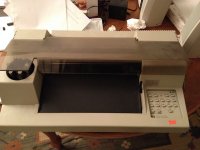 Problem solved! 😛 (only 3 screws, that was easy.) 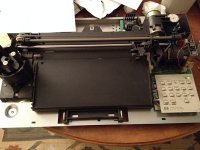 And the test print! 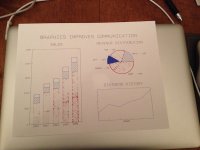 I'm really surprised the pens still worked. I tried all the red pens, and none of them seemed to work. The black and blue pens are working fairly well, though, as you can see. Considering the package says to use before 1986, I consider it a win. These are roller ball pens. The felt pens were 100% dried up with pen dust coming out. Fortunately, quite a few companies still make pens for these old plotters, including refillables. I'll need to order a set. Holy cow this thing is AWESOME to watch print. It's just whirring and whizzing, jumping all over the place. :lol: I'm gonna have so much run with it. I'm thinking of taking it into to work and have the kids print on it because it's so much fun to watch. Apparently there are hacks left and right for them, including lasers, turning it into a paper cutter. Ooooo. What's cool is that this plotter will work on pretty much darn everything, from Macs to PCs, Apple IIs and Commodores. It's a really cool piece of technology. Does 11x17, so I can make some pretty big prints. | |
| Posted by: unity on 2013-12-20 18:54:24 Wow! Thats wicked cool. Nice find! | |
| Posted by: Trash80toHP_Mini on 2013-12-20 19:36:54 Way cool, I've always wanted a flat bed, but mine have all been drums. Great nab @ $20!! :approve: | |
| Posted by: Anonymous Freak on 2013-12-21 01:23:54 I miss my 7475a... I got one (from Goodwill,) in high school for $50. I then hacked together one of the "automatic advance" mechanical pencils to fit in place of a pen, and "plotted" a handwriting font onto standard lined notebook paper. My teacher thought I had the best handwriting in the world! (After all, in the days when tractor-fed dot-matrix were what almost everyone had, seeing pencil on notebook paper, with what appeared to be handwriting - it HAD to be hand-written, right?) As a drafting/engineering student, I got to use bigger ones at school regularly, and just had to have one for myself. Sold it off years ago. Kind of wish I still had it. The small desk-size of it was nice. (Okay, relatively speaking... It is definitely smaller than a tall drum one, that's for sure!) | |
| Posted by: volvo242gt on 2013-12-22 00:18:38 My father had one when he was working at Boeing back in the '80s. Was hooked to a IBM XT with two monitors (monochrome with Herc card and a CGA monitor with its card) and an Epson FX-100 printer. Eventually got replaced when he started using a PS/2 machine with a LaserWriter IINTX connected to it. -J | |
| Posted by: bigmessowires on 2013-12-22 08:53:35 Very nice! "Graphics improves communication", I love it. Too bad plotters went the way of the Vectrex. | |
| Posted by: Trash80toHP_Mini on 2013-12-22 09:16:41 Suggestions for flat bed plotter playtime: Try one of those conductive marker pens on some acetate. It would be a lot easier to remap a membrane KBD at the flex circuit level to than using an expensive hardware controller . . . . . . try it on blank FRP for prototyping PCBs my favorite: Test a paint marker for plotting etch resist on copper clad FRP. _____ if the Y axis travel and pressure are sufficient, the marker might be self-priming throughout a plot _____ if the paint marker is fine enough (they're trimmable) and resolution is good enough, drill positioning holes in the pads might be etched. _____ with pin-hole registration, you ought to be able to do double sided board prototyping HEH!!!!! [😀] ]'> | |
| Posted by: techknight on 2013-12-22 16:28:26 Question: What were the marker plotters used for? I remember hearing about them back in the day, but never knew their purpose. | |
Posted by: CelGen on 2013-12-22 17:28:05Question: What were the marker plotters used for? I remember hearing about them back in the day, but never knew their purpose.Provide hard line graphics in multiple colors. The CAD folks use them heavily still because thermal printers were generally too small, laser was too expensive and dot matrix was too low quality. I got one of those setup directly above my desk. It's connected to an HP-85 with the plotter option ROM. It has a problem grabbing the pens so it will rather annoyingly error out from time to time. The pens are also drying out on mine. Wish I knew how to get a bit more use out of them. | |
| Posted by: NJRoadfan on 2013-12-22 19:57:05 Modern plotters are just large format inkjet printers. I can't say I have encountered anyone still using pen plotters as architecture firms have long moved on to units like the HP Designjet series. We had a HP pen plotter at the computer store that a customer wanted to convert to cut vinyl, so there are alternate uses for these. | |
Posted by: techknight on 2013-12-22 20:42:26Modern plotters are just large format inkjet printers. I can't say I have encountered anyone still using pen plotters as architecture firms have long moved on to units like the HP Designjet series. We had a HP pen plotter at the computer store that a customer wanted to convert to cut vinyl, so there are alternate uses for these.Yea I had a feeling especially with large format printers, that these things really arnt used anymore. But modifying for vinyl cutting, Never thought about that but that sounds awesome. Pair that with a copy of flexisign and your good to go 🙂 | |
| Posted by: NJRoadfan on 2013-12-22 22:10:06 https://web.archive.org/web/20050616073829/http://www.luberth.com/help/pen_plotter_vinyl_cutter_swivel_knive_drag.html If you are interested. | |
| Posted by: uniserver on 2013-12-22 22:14:32 humm and adjustable flatbed ( up/down ) a weed wacker sting melting head… and you got your self a 3d printer… (when your ink pens dry up) lol | |
| Posted by: Huxley on 2020-11-07 17:21:44 Hey @olePigeon! Hope it's okay that I'm resurrecting this old thread, but I'm curious: did you ever get this plotter 'talking' to a vintage Mac? I don't want to jinx it, but if all goes well I'll be picking up the same model plotter tomorrow and I'm already thinking about which era-appropriate computer(s) I might try to connect it to... EDIT: I missed this previously, but MacintoshGarden has a set of mid-90's drivers for plotters in this series - has anyone here tried these? 🙂 Huxley | |
| Posted by: olePigeon on 2020-11-08 16:18:32 @Huxley I used MacPlot. But there's also PlotterGeist and a few others out there. You have to use a true vector application. Adobe Illustrator rasterizes before printing, so it's no good. MacDraw works, but a safe bet is to use CAD software. | |
Posted by: Huxley on 2020-11-09 07:29:13@Huxley I used MacPlot. But there's also PlotterGeist and a few others out there. You have to use a true vector application. Adobe Illustrator rasterizes before printing, so it's no good. MacDraw works, but a safe bet is to use CAD software. Got it, thanks for the info! I actually spent about 90 minutes last night putzing with MacPlot Professional (the version available on MacintoshGarden), but nothing I did seemed to get it to show up in the Chooser. There's no documentation I've been able to find, so I'm pretty confident that I'm just not dropping the right files in the right places. Are you able to share any info about what you actually did with the contents of the MacPlot disk image that got this working for you? H. | |
| Posted by: Zippy Zapp on 2020-11-09 08:40:21 What cable are you using? Mini-Din to 25-pin serial and a Null modem adapter? I have not interfaced mine to a Mac only a DOS computer and an Amiga. They have modern libraries and drivers for interfacing with modern systems. IIRC InkScape has support for HPGL too. | |
Posted by: Huxley on 2020-11-09 08:42:29What cable are you using? Mini-Din to 25-pin serial and a Null modem adapter? I have not interfaced mine to a Mac only a DOS computer and an Amiga. They have modern libraries and drivers for interfacing with modern systems. IIRC InkScape has support for HPGL too. I only picked up the plotter yesterday and other than cleaning it up and having it run through the built-in demo, I haven't connected it to anything yet. I was hoping to figure out what software I'll be using on the Mac before I hook it up, since I need to dig into my Giant Bin o' Cables to find a 25-pin-to-Mac-serial cable 😀 | |
| Posted by: Zippy Zapp on 2020-11-09 10:29:51 Gotcha. I have a 25 pin to mac serial and a 25 pin null modem adapter so I could hook it up but like you I haven't really looked into the software aspect yet. It would be cool if there was some sort of spirograph like generator that supported this. | |
| 1 > |