68kMLA Classic Interface
This is a version of the 68kMLA forums for viewing on your favorite old mac. Visitors on modern platforms may prefer the main site.
| Click here to select a new forum. | |
| 128MB Magneto-Optical Rewritable | |
| Posted by: Cloaked Alien on 2014-09-22 23:59:47 Was just gifted this by my boss (the very guy who fixed my dad up with his SE/30 that I recently had techknight and uniserver repair the mobo for) Anyways. I did a quick search and I couldn't find out much more than that this kind of media is recently common and standardised. The drive itself however... Does anyone know if it requires drivers for the mac (or pc for that matter)? 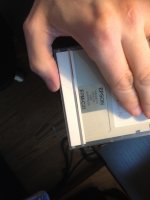 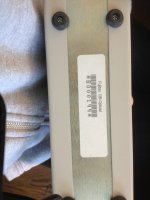 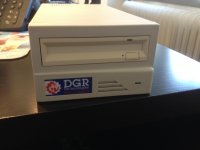 | |
| Posted by: bibilit on 2014-09-23 04:08:11 Probably the same technology NeXT used for a while (in the Cube) you probably need a driver. | |
| Posted by: olePigeon on 2014-09-23 09:38:58 Well, if you boot up a Mac with it connected and media inserted, it'll mount like any SCSI drive. However, what you can do is open the case up and see what the make is of the drive. Hopefully it's Fujitsu. In any event, these drives are well supported even today. Even if it's Cannon, Maxtor, or Pinnacle, you should be able to get drivers for it. I think you'll like it. You can still buy packs of newly manufactured media for it, and the higher capacity drives are backwards compatible with the smaller media. So if you were to get a 2.3GB drive, you can still use the 128MB discs with it. They're sort of like a hard platter version of a floppy disk. They're very reliable. I have two 2.3GB Fujitsu drives myself. I use them for archiving my vintage software. | |
Posted by: olePigeon on 2014-09-23 09:45:55Probably the same technology NeXT used for a while (in the Cube) you probably need a driver.It's exactly the same. NeXT was the first company to use it in a commercial product, then the standard was made available to everyone. Fujitsu and Pinnacle Micro were the big guys. | |
| Posted by: CelGen on 2014-09-23 20:12:32 My money is on it's a fujitsu drive. I forget what I did to make MO work under my quadra 950. I think I just used Pinnacle Micro's 3.5" MO driver and it was happy with hot mounting/unmounting. | |
| Posted by: Cloaked Alien on 2014-09-23 23:54:10 Indeed, it's a Fujitsu. I only did a quick check yesterday as I was busy with some other tinkering. Drive probably needs some lubrication since it doesn't seem to close the door properly after ejecting media. I hope it's in working order. Otherwise I'll try to use the cabinet for a harddrive or something =) Just hope I can find any drivers, at all =S If anyone has a link I'd greatly appreciate it, even DOS/Win drivers since I have retro PC's with oldschool scsi controllers =) | |
| Posted by: waynestewart on 2014-09-24 08:03:14 I've had mine for over a decade and never knew there were drivers available. I just plugged them in and they worked. | |
| Posted by: olePigeon on 2014-09-24 09:05:17 http://192.240.0.102/global/support/computing/storage/mo/macssap/ 🙂 Straight from Fujitsu's website. Supports System 7.1 through 9.2.2. Hard to beat that support. | |
| Posted by: Cloaked Alien on 2014-09-24 12:27:08 Cheers, thanks! I just tried it a bit with really weird results. Using the Fujitsu exension or not does not make a difference. With Mac OS 7.5.3 properly booted it ejects the MO media as soon as I insert it, all three disks I have. No errors, no nothing. The actual drive is a Fujitsu M2511A#N | |
| Posted by: olePigeon on 2014-09-24 12:42:12 Are they 128MB MO media? | |
| Posted by: waynestewart on 2014-09-24 13:37:24 Try powering up the MO and inserting the media before starting the Mac | |
| Posted by: Cloaked Alien on 2014-09-24 13:43:41 Yes, they are 128MB. I tried it with my retro pc and it just plain worked. That means the disks are PC formatted. But I should at least be able to Mac format them before they get ejected =P Well, first try I had the disc in when booting. As soon as I got to the desktop it ejected the disk... | |
| Posted by: CelGen on 2014-09-24 15:25:09 The only other thing that comes to mind is that Fujitsu's drives had a tiny bank of dip switches for setting assorted things, including what it will identify to the host as and "Mac Mode" Which I never understood because Fijutsu's documentation is terrible. With the driver loaded you should be able to insert a cartridge and if it's not mac formatted or you don't have FAT support installed, it will ask you to initialize it. | |
| Posted by: olePigeon on 2014-09-24 19:56:10 What if you load the formatter first? | |
| Posted by: Cloaked Alien on 2014-09-24 23:58:31 I tried loading the formatter first, same deal. I did however start up my harddrive partitioning tool (can't remember what software it is right now) and while it was running it didn't eject any media. It did however show me that the drive was connected with ID 1 and was working. I can confirm it has boatloads of dip switches, so that might just be something. I've got FAT support installed, I haven't verified it though. At least I've verified that the drive and media themselves are fine and working since it works under Win98 on my other PC =) | |
| Posted by: CelGen on 2014-09-25 06:01:06 You really don't need to worry about defects. Magneto optical technology is possibly the most stable optical storage technology in existance. I've never seen a bad MO disk and I've seen a lot of really beat up cartridges. | |
| Posted by: olePigeon on 2014-09-25 09:17:52 They're essentially floppy disks but with platters instead of, well, floppy disks. 🙂 Here's a manual for the 1300/2300 model, dunno if it'll apply to yours. It does have 4 dip switches for various options. http://www.fujitsu.com/downloads/COMP/fcpa/mo/discontinued/dynamo-x300-scsi_user-manual.pdf I didn't know that you can toggle it between MO mode and HDD mode. The difference is that in HDD mode it'll show up as a SCSI HDD instead of removable media. Pretty cool. | |
| Posted by: CC_333 on 2014-09-25 09:28:11 I should get one of these! c | |
| Posted by: olePigeon on 2014-09-25 09:35:32 Switch SW1 Key 1 OFF(*) Reserved Select SCSI ID Keys 2 3 4 SCSI ID OFF* OFF* OFF* 0 OFF OFF ON 1 OFF ON OFF 2 OFF ON ON 3 ON OFF OFF 4 ON OFF ON 5 ON ON OFF 6 ON ON ON 7 Switch SW2 SCSI bus parity Key 1 ON(*) Enabled OFF Disabled Synchronous Data Transfer Request Mode (SDTR) Key 2 OFF(*) Disabled from TARG ON Enabled from TARG Device mode Key 3 OFF(*) Direct access device (INQ = 00) ON Optical memory device (INQ = 07) Automatic spindle stop mode Key 4 OFF Disabled ON(*) Enabled Command compatibility Key 5 OFF(*) Sony MO compatible ON ANSI compatible Key 6 OFF(*) RESERVED Macintosh Mode Key 7 OFF(*) Mac mode off ON Mac mode on Send/Receive Diagnostic Command Key 8 OFF(*) Rejected ON Accepted Terminal CNH 1 (For drives with serial above 30,000) SCSI Terminating Power 1-2 3-4 Function SHORT(*) SHORT(*) Power is supplied from the drive to both the terminating resistor pack and the TERMPWR pin on the SCSI bus. (Pin 26) OPEN SHORT The TERMPWR pin is not used. Power is supplied to the drive terminating resistor only from the drive. SHORT OPEN Power is not supplied to the terminating resistor from the drive, only from the TERMPWR pin. Terminal CNH1 (For drives with serial below 30,000) SCSI Terminating Power 1 - 2 SHORT(*) The TERMPWR pin is not used. Power is supplied to the drive terminating resistor only from the drive. 2 - 3 SHORT Power is not supplied to the terminating resistor from the drive, only from the TERMPWR pin. (Pin 26) Terminal CNH1 (For drives with serial above 30,000) Pin Signal 1 CTRGIN (Cartridge in) 2 -ID2 (bit value 4) 3 +5VS 4 -ID1 (bit value 2) 5 ELED (LED control) 6 -ID0 (bit value 1) 7 EJSW (Eject switch) 8 Ground 9 DEVMD (Device mode) 10 No connection 11 MACMD (MAC Mode) 12 No connection Terminal CNH2 (For drives with serial below 30,000) Pin Signal 1 -ID2 (bit value 4) 2 -ID1 (bit value 2) 3 -ID0 (bit value 1) 4 Ground | |
| 1 > |