68kMLA Classic Interface
This is a version of the 68kMLA forums for viewing on your favorite old mac. Visitors on modern platforms may prefer the main site.
| Click here to select a new forum. | |
| Christmas Conquest- Quicktake 200 | |
| Posted by: Concorde1993 on 2010-12-24 08:07:30 My package was delivered early this morning (about a quarter to nine EST) containing the Quicktake 200 camera I had purchased on eBay a couple of weeks back. The unit is in mint condition, and includes all original accessories + box except the software installation disc, and the external viewfinder. Naturally, it works. All in all, not bad for $70 (cost includes shipping). 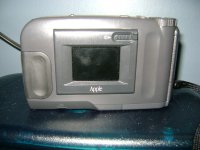 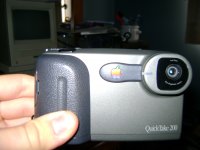 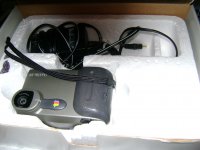 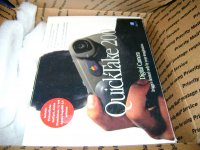 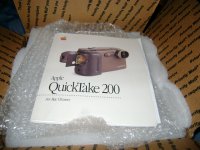 | |
| Posted by: Arths on 2010-12-24 08:52:51 Great conquest. 😀 Mint condition 😎 | |
| Posted by: Bunsen on 2010-12-24 15:04:38 Huh. I didn't realise they were that small. For some reason I always pictured them being hugemungous. | |
Posted by: Concorde1993 on 2010-12-24 22:20:58Huh. I didn't realise they were that small.The Quicktake is fairly compact, and light. It was definitely a major improvement over the 100/150, which I wouldn't dare touch (although I hear that the "100 Plus", which was an upgrade to the 150, are very rare, so I may look into that one in the future). I took about 30 pictures on the 200 today (being Christmas Eve, I figured I would take some very amateur photos of the family to confirm that my $70 was being put to good use), however this thing guzzles battery juice like no tomorrow. Honestly, after filling up the 2MB card, I already had the "Low Battery" warning light go off (and we're talking four Energizer e2 batteries here, not some cheap generic nonsense). The batteries were purchased yesterday, too. I'm going to try again later today with another batch of Energizer batteries to see if this occurs again. I doubt that anyone owns a Quicktake camera on the 68k forum, but if you do, please provide whatever information you can on the 200. | |
Posted by: MacJunky on 2010-12-24 22:31:13please provide whatever information you can on the 200.Use batts that you can recharge. 😛 hehe (no, I do not have one) | |
Posted by: Concorde1993 on 2010-12-24 22:42:34Use batts that you can recharge.Yep, I've got a set of four Energizer "AA" rechargeables, which I use for my Nikon Speedlight flash. I'll definitely give those a try, and see what happens. | |
| Posted by: highlandcattle on 2010-12-25 02:46:06 I love the look of it even if it just a repackaged fuji camera. must be handy if you can upload directly to 68k macs | |
Posted by: Concorde1993 on 2010-12-26 01:16:38must be handy if you can upload directly to 68k macsI currently do not have the software disc to transfer pictures over to the Mac. All I can do at the moment is view my pictures on my TV set (a great feature, btw). Hopefully someone on the forum can help out (and yes, I already did a Google search; the packages there do not work with my 5215CD- see thread in "Software"). | |
| Posted by: ssgconway on 2010-12-31 19:17:32 I have one of these, too, and it's a nice camera. It will work w/68K & OS 7.x. I use mine with a PB 1400 in preference to my Mac II ci, but I would suggest 'Cameraid,' a shareware ute that you can use free. (Not paying the $20.00 fee means having it run slow, but it will run.) As a side note, the video out capability makes this a nice unit to hook up to an old monitor, if you want a basic, low-res video cam. I used mine with a Commodore 64 monitor this way. If I can be of add'l help, please feel free to write me at ssgconway@juno.com. Happy 68K New Year to all! | |
| Posted by: superpantoufle on 2011-01-06 14:00:09 Hey, your post made me want to own one of these pretty badly to add to my collection. Well, actually I've wanted one for a long time, but never could find one to buy. I searched eBay after seeing your post, and boom! There was a couple of them (there still is, if anyone interested). I got mine today, $74 plus $40 international shipping. It certainly isn't cheap, but it defintely is a cool addition to the collection! And it was my personal christmas gift to myself… Mine arrived in pristine condition, complete in its original box, with AC adapter, serial transfer cable, 2 MB memory card, manual, wrist strap, viewfinder and software discs (one Apple disc with QuickTake software and one Adobe disc with PhotoDeluxe and PageMill 2.0 with licence). It works great! I shot a couple of pictures (tonight, in very bad light condition), and rushed to my PowerBook 1400c to install the software and transfer the images. Here's the results:  quicktake1 par superpantoufle, sur Flickr Our usually clean living-room…  quicktake2 par superpantoufle, sur Flickr Yakua loves the smell of old Apple manuals…  quicktake3 par superpantoufle, sur Flickr And this Lady is soon going to transfer the pics to the net! So as you can see, you get approximately the quality of the pictures taken with a 5-7 years old cell phone, but it's pretty cool anyway. Concorde1993, I may help with the software if it isn't available on Apple website. PM me! | |
| Posted by: jpolster2009 on 2011-01-06 14:02:26 Was the screen on that camera a color screen? Because if it was, one has to wonder why the newton didn't have color? | |
| Posted by: superpantoufle on 2011-01-06 14:16:17 It is a color screen, but it is WAY smaller than a Newton screen. Nothing to compare! And by the way, I confirm that it does suck batteries like mad. Was it the same 14 years ago? Is it due to some aging components? Don't know. | |
Posted by: Concorde1993 on 2011-01-06 14:28:46And by the way, I confirm that it does suck batteries like mad. Was it the same 14 years ago? Is it due to some aging components? Don't know.In regards to the batteries, I left those same AA Energizer batteries in my QT 200, and the low battery indicator did not show up until about 2-3 minutes later. I really do not know what is causing this, but I will say that re-chargeables are the way to go with this camera. I read on some website that the fuse for the QT may require replacement, as they are notorious for failing with age. I'm not sure if this is the case with other QT owners on the 68k forum. Superpantoufle, I will send you a PM soon regarding the QT software. If you can duplicate it, and send me a quote on the cost of shipping, that would be most appreciated. The 200 software is not on the Apple Legacy support site...only the 100 & 150. | |
Posted by: protocol7 on 2011-01-06 14:58:56Superpantoufle, I will send you a PM soon regarding the QT software. If you can duplicate it, and send me a quote on the cost of shipping, that would be most appreciated. The 200 software is not on the Apple Legacy support site...only the 100 & 150.I posted it in your request thread. Guess you must have missed it. It's a disk image containing just the software. But the full cd might still be of benefit if you can get it. | |
Posted by: Concorde1993 on 2011-01-06 15:29:12I posted it in your request thread. Guess you must have missed it. It's a disk image containing just the software. But the full cd might still be of benefit if you can get it.Yes, Protocol7, I did see the link, and I downloaded the disk image on two floppies. It did not work with my 5215CD (system hung on several attempts while installing the software). | |
| Posted by: protocol7 on 2011-01-06 16:14:14 Ah I see. I tested it first by installing it in Sheepshaver and it went on without a hitch. Maybe there's something on your system interfering with the install? | |
Posted by: Concorde1993 on 2011-01-06 16:39:24Maybe there's something on your system interfering with the install?After my 5215 hung for the third time, I restarted it without any extensions running. Even then, I was still having problems downloading the software. I even tried installing the software onto an external SCSI HD, and I still got the same result. I don't have Sheepshaver, but I do know what you are referring to. My guess is Snow Leopard is causing a disturbance of some sort. Prior to requesting the QT 200 software on the 68k forum, I downloaded the disk image from this website: http://www.macdrivermuseum.net/scan.shtml. On Snow Leopard, the Classic Installer icon + the extension software was displayed normally, but on my 5215 (which runs 8.1, btw), all the Installer files (plus the icons) showed up as generic PC files, and when I tried opening one, the system displayed a bomb. It's quite bizarre, because when Beachycove sent me disk images of the eMate 300 Connectivity software via e-mail, I had no issues transferring the files from my MBP to the 5215 via floppy. Perhaps the drivers online for the QT 200 are corrupt? | |
| Posted by: protocol7 on 2011-01-06 16:57:16 Snow Leopard could be messing things up if you're using it to view/write the image. Can you transfer the stuffit archive to the 5215 by any method? Then unstuff it on the 5215, mount the disk image with Disk Copy and install from there. That should work. I tend to test stuff in SheepShaver out of convenience but just to be sure I downloaded my disk image and unstuffed, mounted and installed it on a 7500. All icons displayed normally and it installed fine. | |
Posted by: superpantoufle on 2011-01-06 23:53:50Snow Leopard could be messing things up if you're using it to view/write the image. Can you transfer the stuffit archive to the 5215 by any method? Then unstuff it on the 5215, mount the disk image with Disk Copy and install from there. That should work.It certainly will! Concorde, as a comfort rule you'd have to transfer anything stuffed from Snow Leopard (or any modern OS) to your vintage Mac prior to unstuff/mount/install. I could eventually send you a copy of the discs by mail, but I initially planned to upload a disc image of the CD somewhere, just as protocol7 did. Maybe I'll stuff the .img file using DropStuff on my 1400c, so you'll get a .bin.hqx file that won't be corrupted by Snow Leopard nor anything else before being expanded using StuffitExpander on your 5215. Let me know what you need, I'll try to do that over the week-end. | |
| 1 > |