68kMLA Classic Interface
This is a version of the 68kMLA forums for viewing on your favorite old mac. Visitors on modern platforms may prefer the main site.
| Click here to select a new forum. | |
| DIP switch settings for Mac to VGA adapter | |
| Posted by: bigmessowires on 2015-03-21 13:43:48 A year or two ago, I remember seeing a big list someone had to put together of all the common brands of Mac to VGA adapter, and a link to the instructions with DIP switch settings for each one. I can't remember where I saw it, though, and Google isn't leading me to it. Anyone remember this list, and know where it is? Thanks! | |
| Posted by: 360alaska on 2015-03-21 14:06:44 http://griffintechnology.com/sites/default/files/MonitorAdapter_MacPnP.pdf | |
| Posted by: bigmessowires on 2015-03-21 15:01:04 Yup, that's one of them. The list I'm thinking of might have been started by jt. It had photos of lots of different brands and styles of adapter, so you could find the one you've got, and then look up the matching instructions. | |
| Posted by: uniserver on 2015-03-21 15:11:01 that sounds pretty useful... too bad jt has like vanished with out a trace, seems like 2 months now. | |
| Posted by: 360alaska on 2015-03-21 15:31:06 How about this, take a picture of what you have and I'll see if I can find a sheet for it eh? | |
| Posted by: 360alaska on 2015-03-21 15:43:09 Here's 4 I found so far... 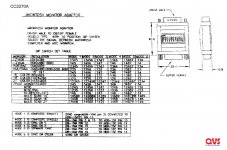 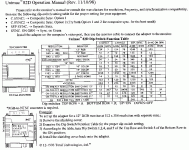 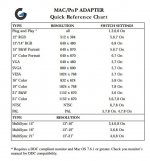 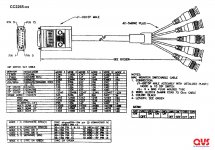 | |
| Posted by: raoulduke on 2015-03-21 15:43:12 Mine looks identical - gray - but it's generic with no labeling. It's 2,3,5 On; I would guess that's plug-and-play. *Never mind, I think it's probably the VGA/SVGA mode on the second picture you posted. | |
| Posted by: 360alaska on 2015-03-21 15:58:00 Those are all I could find... | |
| Posted by: bigmessowires on 2015-03-21 16:10:20 This is for my new IIgs system, trying to get it working with the Dell 2001FP monitor's VGA input, which might not even be possible due to the scan rate. NJRoadfan suggested it might work if I set the VGA adapter to the multisync setting. I have three different Mac to VGA adapters, and it turns out one of them is the Griffin MacPNP that you linked first. I tried the multisync settings using those instructions, but no love from the IIgs. I guess I'll stick with the composite video input for now. It works OK, even if the resolution isn't the greatest. | |
| Posted by: Bunsen on 2015-03-22 05:04:55 Are the pinouts even the same on the IIGS vs Mac video? | |
| Posted by: bigmessowires on 2015-03-22 08:32:24 I think so. But the scan rate is some weird frequency, like television frequency, not VGA frequency. I didn't look very hard for details, though. | |
| Posted by: NJRoadfan on 2015-03-23 05:05:00 I can confirm this adapter works with the IIgs and with my 15.75khz RGB capable CRTs, I don't have any LCDs here that I can test with that ability. http://www.belkin.com/support/dl/f3h1381revised.pdf I had to fiddle with switches 5, 6 and 7 if I recall. This adapter appears to have a sync splitter inside of it to split composite sync to H+V sync. the rotary knob and the rest of the switches should have no effect on the IIgs as it doesn't use the sense pins like a Mac does. I have the knob at 0 and switches 1-4 off, 8 on. Pinout for the IIgs port is here: https://support.apple.com/kb/TA36688?locale=en_US Pinout for Centris/Quadra is here: https://support.apple.com/kb/TA47448?locale=en_US&viewlocale=en_US Looking at that, your Mac to VGA adapter may not connect IIgs pin 3 to anything, you may have to wire IIgs pin 3 to VGA pin 13. Most VGA monitors will take composite sync on their H sync line. If not, wire IIgs pin 3 to VGA pin 14 as well.. If that STILL doesn't work, the last ditch effort is a sync splitter. Amiga users don't have to worry about this as that machine outputs composite along with seperate horizontal and vertical sync signals. | |
Posted by: Charlieman on 2015-03-23 06:07:47Are the pinouts even the same on the IIGS vs Mac video?At least one cable for Mac II monitors was the same as for the IIgs RGB monitor. When I made my own monitor cable (IIgs to NEC Multisync 1), it worked for the IIgs, LCIII and a few more. The monitor is one of the few which work at VGA and IIgs refresh rates. | |
| Posted by: NJRoadfan on 2015-03-23 08:21:54 Later Macs did output composite sync, so an adapter for one will work with the IIgs too, the biggest difference being the output scan rate. The Multisync 1 and II (I own the latter) were swiss army monitors, they would take H+V, composite, or sync on green without a problem! Apple was pretty loose with the DB-15 video connector in the early days, but seems to have standardized it for the most part with the 040 machines onwards. | |
Posted by: Charlieman on 2015-03-24 06:57:50The Multisync 1 and II (I own the latter) were swiss army monitors, they would take H+V, composite, or sync on green without a problem!The Sony Multiscan was an alternative for some applications. These monitors persisted for a long time but were not sold to the public. Owing to burn out, manufacturers of hospital equipment, industrial control systems etc shipped replacements for very expensive kit. My Multisync 1 (industrial spec, rectangular case) was used on a stock exchange according to text burned into its screen. | |
Posted by: cycologist on 2016-05-21 04:05:48http://griffintechnology.com/sites/default/files/MonitorAdapter_MacPnP.pdfthe link is dead, but can be reached on archive.org https://web.archive.org/web/20120511185824/http://www.griffintechnology.com/sites/default/files/MonitorAdapter_MacPnP.pdf | |
| Posted by: Bunsen on 2016-05-24 03:14:15 Thanks - attaching it here as a file just in case. MonitorAdapter_MacPnP.pdf | |
| Posted by: l008com on 2019-11-01 23:50:32 I recently upgraded my "extra" monitor from a 15" to a 19". The 15" had a resolution of 1024x768 which used mode 1,2,6,7 on my adapter, and all was well. The new display works at that resolution but of course is blocky and horrible. It's native resolution is 1280x1024, but I have not seen that resolution listed on any dip switch chart for any DB15 to VGA adapter, not just on this thread but anywhere. Does that mean it's just not an option? it would be nice to have that native res working in OS8 🙂 | |
| Posted by: jessenator on 2019-11-02 09:15:07 My ViewSonic adapter instructions dont have it listed either. It does have one higher than 1024x768  Might not give you the same result, however. | |
| 1 > |