68kMLA Classic Interface
This is a version of the 68kMLA forums for viewing on your favorite old mac. Visitors on modern platforms may prefer the main site.
| Click here to select a new forum. | |
| Slimmed 6.0.8 | |
| Posted by: 360alaska on 2015-02-17 16:42:19 Hello, I was wondering how to slim up System 6.0.8 for rom use when it occurred to me to see if I could use finder 5.5 with system 6.0.8 and sure enough it worked! The downside is that chooser is not available, but that doesn't bother me. Anyhow, using finder 5.5 with system 6.0.8 saves you 80k. Image attached... 608.zip | |
| Posted by: CC_333 on 2015-02-17 20:06:58 Interesting. That's kinda like using the Mac OS 7.6 (or 7.5.x) Finder on Mac OS 8 to lighten up its resources. c | |
| Posted by: TheWhiteFalcon on 2015-02-17 20:10:09 To think that saving 80k was once a significant achievement. 🙂 (not intending this as a putdown) | |
| Posted by: 360alaska on 2015-02-17 20:31:07 80k = 1-2 more games in rom... | |
| Posted by: uniserver on 2015-02-17 20:43:52 ok why not stick with an OS that is less then 608? System 3.2 (System 3.0 and Finder 5.1) to 7.5.5depending on what apps you are running, you might not need 608. maybe you don't even need system 6 at all. get the os down as less as possible then you will have that much more room for cool Games/Apps as long as they work. | |
| Posted by: johnklos on 2015-02-17 23:40:46 Oh! Slimmed! I kept reading that wondering whether System 6 had anything to do with Ghostbusters. I did a lot of slimming back in the day of 7.5.5 and 7.6.1, but there was a lot more to slim. If you're running only on classic m68000 machines, then you can use ResEdit to take out all icon and pict resources with more than one bit of color. | |
| Posted by: Elfen on 2015-02-18 07:45:20 I concur with JohnKlos. You can also remove Monitor Definitions (except for the one for the classic Mac) from the System File and there are a few color icons you can also delete in the Finder with ResEdit. | |
| Posted by: bigmessowires on 2015-02-18 08:30:49 I assume this is for the ROM-inator kit? If you get to a slimmed down disk image with lots of games that you're happy with, would you mind sharing it? I'll use it as the new default for future kits. The one the kit ships with at the moment is more a proof of concept, and I can't recall if it has any games at all or if it's just the system files. | |
| Posted by: 360alaska on 2015-02-18 08:35:05 I have one with apps, but I figured people would want to put there own apps... I'll get back to you on this once we've figured a way to slim it up as much as we can... | |
| Posted by: 360alaska on 2015-02-18 09:03:49 I was able to slim it down by just 2k by removing icons from the mouse control panel. I didn't see any icons in the system file that were color or any that should be removed. If somebody else wants to take a stab at trimming more be my guest. I have added some apps and games, macpaint does not work on a read-only disk so it's among what's not there. 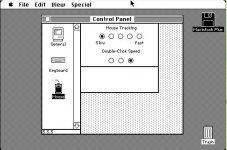 608.zip | |
| Posted by: CC_333 on 2015-02-19 17:35:32 How about a RAM disk? That would let MacPaint work, and it shouldn't need to be too large (maybe 50k?) so as not to hog too much system RAM. c | |
| Posted by: 360alaska on 2015-02-19 19:51:28 I'm out of ideas to make it smaller... Steve, I think this is the final product... | |
| Posted by: uniserver on 2015-02-19 21:57:42 How about this comment: ------------------------------------------------------------------------------ Re: Plus ROM adapter investigation | |
| Posted by: CC_333 on 2015-02-20 07:00:01 I'm not certain, but isn't the Classic a special case? Because, unlike all the other models in question here, it actually came from the factory with a built-in ROM disk. c | |
| Posted by: bigmessowires on 2015-02-20 08:18:10 Thanks 360alaska, I'll check it out. So what was the final list of things you removed from the stock 6.0.8 install? - using Finder 5.5 - remove mouse control panel icons - ?? What about the printer drivers, or the scrapbook file, and stuff like that? TeachText? And the color icon resources? System beep sounds? I also agree with what Uniserver said earlier - do the games you bundled actually need system 6? You might be able to use an earlier system version, and save more space that way. | |
| Posted by: 360alaska on 2015-02-20 08:36:42 Using finder 5.5 and striped icon from the mouse control panel, I didn't see anything else that should be striped... I didn't see any color icons in the system file, they likely were in the newer finder. As for a lower version os with these game I can't say because I haven't tried it, I think system 6 would be best personally... | |
| Posted by: bigmessowires on 2015-02-20 10:21:34 Here's a revised ROM disk image, still using system 6.0.8. I expanded the image size to 864K (the maximum possible for the ROM-inator), and shuffled the selection of included software. I managed to fit System 6.0.8, MacDraw, MacWrite, and eight games. 5K free! rominator-disk.zip | |
| Posted by: 360alaska on 2015-02-20 15:32:19 Maybe we should just remove the keyboard and general Control panels, if one needs to set the date and time they can put in a boot disk... Keeping the mouse control panel is handy for games so I would suggest keeping it... | |
| Posted by: 360alaska on 2015-02-20 15:35:55 Also, pyramid of peril doesn't work with a locked disk... | |
| 1 > |


